

Forms are among the highest-volume document types in most enterprises and one where optical character recognition most often disappoints. A loan application, an insurance claim, a patient intake sheet, and a tax declaration all share a structure that looks like the easiest extraction job: the fields are labeled, the layout is fixed, and the same form arrives thousands of times. However, that appearance is what makes form processing deceptive.
The text on a form is rarely the hard part. What’s tricky is the relationship between a label and the value beside it, the meaning carried by a tick inside a box, the handwritten entry in a ruled area, and the fact that the "fixed" layout changes the moment a business revises its own paperwork.
This article examines what OCR for forms requires in production, where conventional approaches break, and how a layout-aware parsing and extraction pipeline handles the same form when its geometry changes.
What Makes a Form Different From a Document
A typical document carries meaning in its prose. A form carries meaning in its structure. For instance, removing the layout from a contract leaves text that still largely makes sense. Removing the layout from a form leaves a list of words and numbers with no indication of which number belongs to which question. This distinction determines everything about how form processing has to be engineered.
Three properties separate forms from the documents that general OCR software handles comfortably.
Values Are Defined by Their Labels
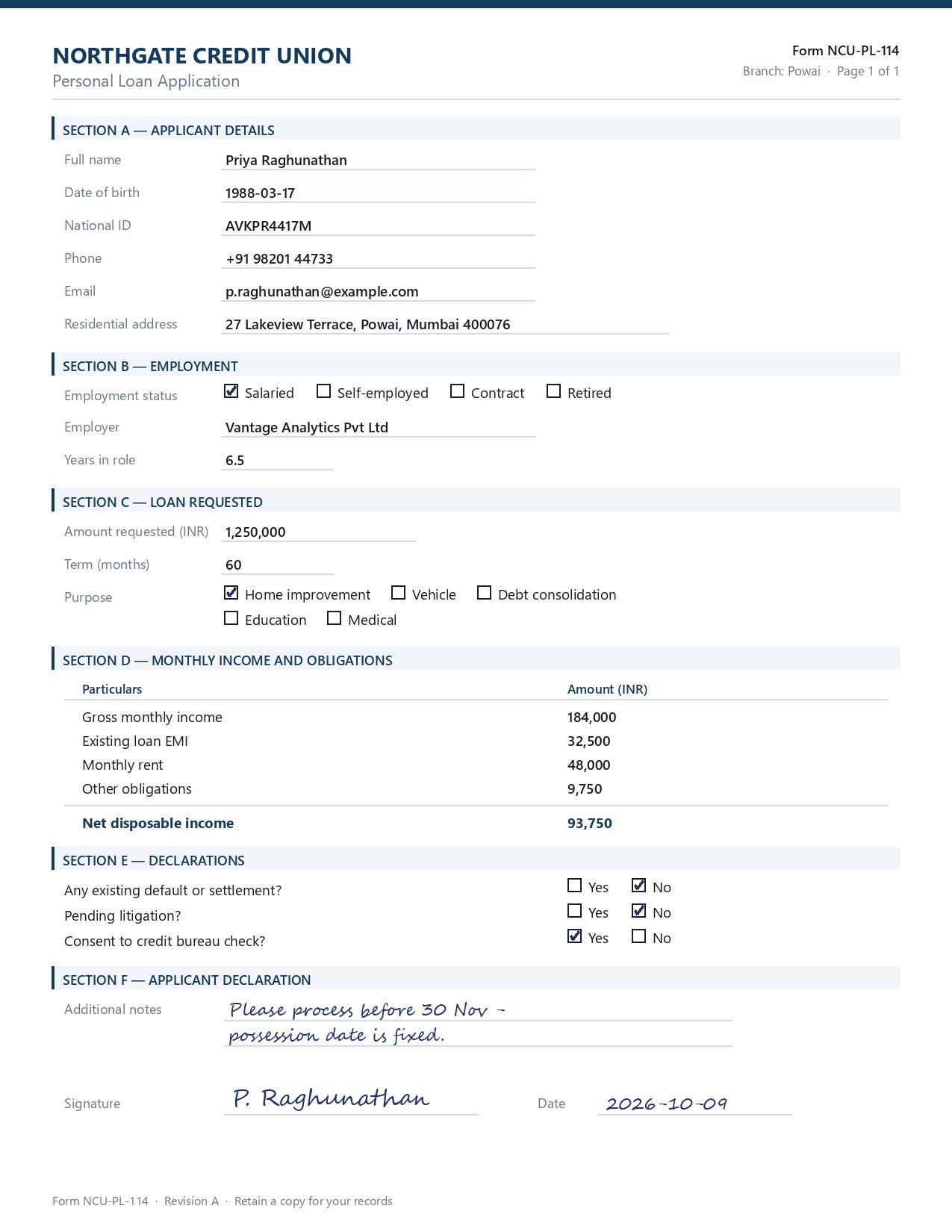
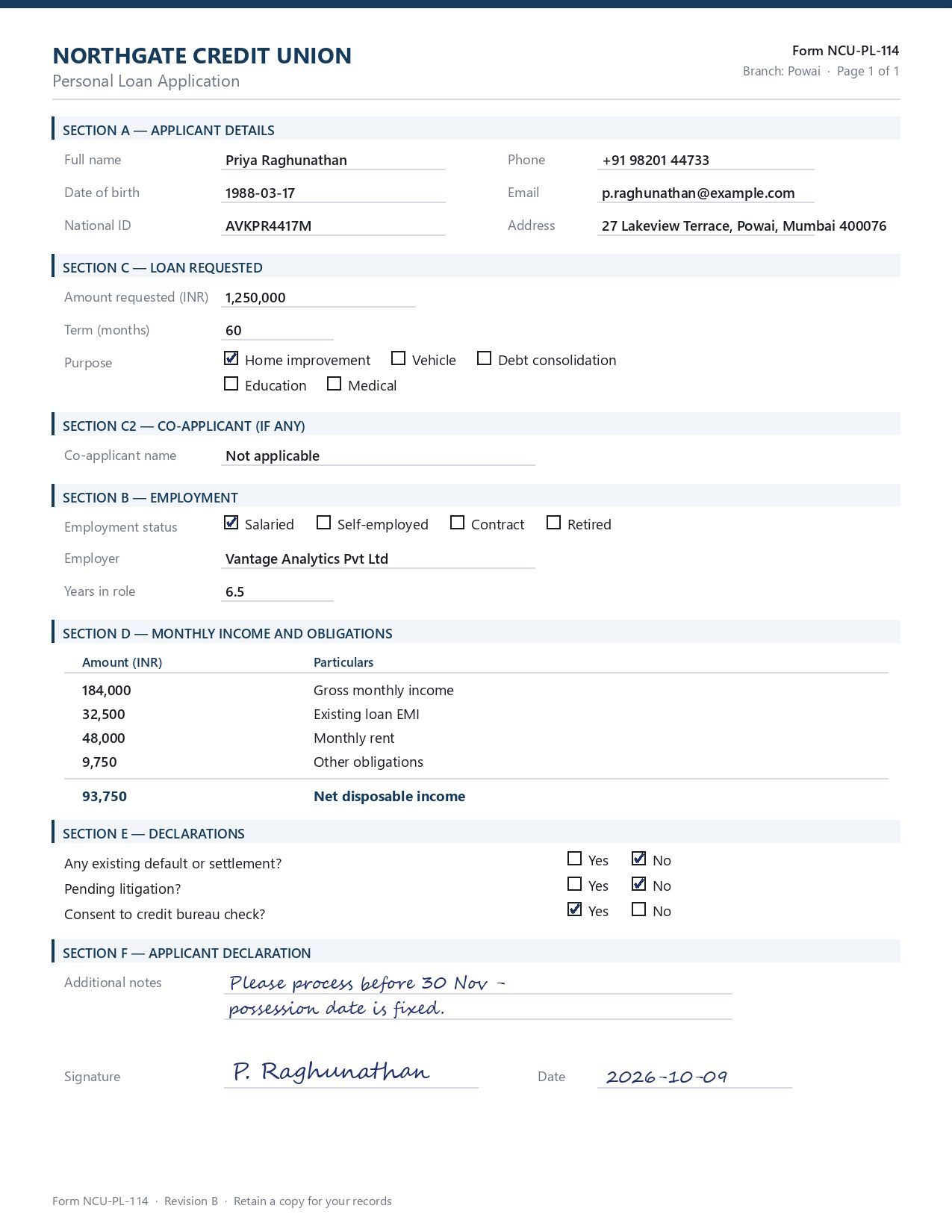
On a loan application the string 1988-03-17 means nothing in isolation. It becomes a date of birth only because it sits on the ruled line beside the words "Date of birth". An extraction system that recovers the text but discards that association has produced an image of text in machine-readable form and nothing more. The label-value pair is the atomic unit of a form, and the actual task is to reconstruct it.
A Significant Share of the Information Is Not Text at All
Checkboxes, radio options, signature presence and initialed boxes carry decisions that no text recognition pass will return, because there is no character to recognize. A tick in the box beside "Salaried" determines the underwriting path of a loan file, and reading every printed word on that page while ignoring the mark leaves the most consequential field empty. This is the domain of optical mark recognition, and it is routinely treated as an afterthought.
Forms Mix Machine Print With Handwritten Text
A typed application still carries a handwritten signature, a handwritten date, and often a note in a free-text area where the applicant wrote something the form did not anticipate. Recovering those requires intelligent character recognition rather than standard print recognition. The accuracy levels of these two types of recognition are not comparable.
Understanding Structured, Semi-Structured, and Variable Forms
A structured form holds its fields in the same place on every instance. A tax declaration issued by a revenue authority, or an application printed by the bank that will receive it, arrives as the same page every time. That consistency is the condition that makes position-based extraction viable at all, and it is also what persuades teams the approach will carry further than it actually does.
A semi-structured form keeps consistent field names while their position moves with the content. An invoice always carries a total and a line-item table, but that table runs to three rows on one document and forty on the next, so everything printed below it shifts down the page. The field names are predictable. The coordinates are not.
A variable form offers neither guarantee. Where a business process is served by paperwork that each originator designed independently, the documents differ in wording and in field names, and often in which fields exist at all. One motor insurer asks for “Date of loss”; another asks for “Incident date” and adds a police report number that the first never collects.
A lender taking pay stubs from four hundred employers, or a carrier taking claim forms from every broker in its network, is working with a document class that has no canonical layout to configure against. There is no template to build here, because there is no single form to build it from, which is why variable forms are the case that most decisively separates a semantic extraction pipeline from a positional one.
The category that causes the most production incidents, though, is none of these three. It is the structured form that stayed structured right up until the organization issued a new revision. Adding one mandatory consent field near the top of a page pushes every field beneath it down by a line, and each zone configured against the previous copy begins reading the value that belongs to its neighbor. Nothing throws an error. The form still looks, to any human reader, exactly like the form it replaces.
Why Traditional OCR for Forms Breaks in Production
Traditional OCR does what it was designed to do: convert pictures of characters into character codes. Its limitation is not accuracy but output. What comes back is a sequence of characters with no record of which question any of them answered. A form, unlike a page of prose, keeps most of its meaning in exactly the structure that recognition discards. Let’s look at where it typically breaks:
Template and Zonal Dependency
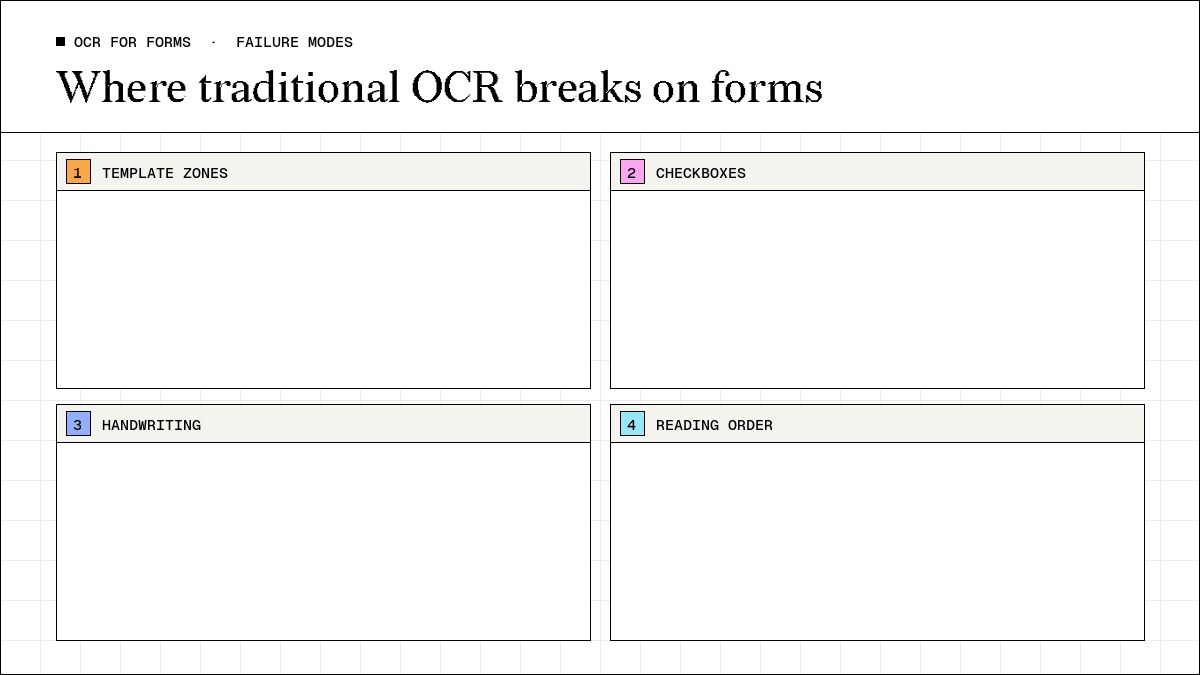
The conventional approach defines zones—rectangular regions mapped to target fields, with the OCR engine run inside each one. It works for exactly as long as the incoming document matches the template that was configured. The dependency is on coordinates, which are the least stable property of a business form. Adding a section shifts every field below it. Moving an address block to the other column invalidates its zone. Reordering two table columns leaves the zones intact and silently fills them with the wrong values, which is worse than failing outright. Every revision becomes a new template to configure, test, and maintain.
Marks Carry Meaning That Text Extraction Cannot See
A checkbox has no characters in it. An approach built entirely on text recognition returns the labels "Salaried" and "Self-employed" with equal prominence, because both are printed on the page, and offers no indication of which the applicant selected. Handling it requires detecting the box, determining its filled state, and associating that state with the adjacent label. This is a different operation from character recognition, performed on the same page, and one that has to survive ticks, crosses, filled blocks, and marks that overflow the box.
Handwriting Is a Different Recognition Problem
Print recognition degrades gracefully with scan quality. Handwriting recognition, on the other hand, degrades with the writer, as legibility varies between applicants, sometimes within one applicant's own form. Handwritten fields therefore need their own accuracy expectations and their own review policy. Treating them as ordinary fields, subject to the same automated-approval threshold as a typed account number, is how incorrect data usually reaches a system of record. Our comparison of OCR for handwritten forms covers the tools built for this.
Reading Order Is Not Reliable on a Form
A general-purpose OCR engine reads broadly left to right and top to bottom. Forms violate that order constantly: two-column applicant blocks, labels in one column and values in another, tables whose header row describes columns the eye jumps between. A linear stream of text from a two-column form interleaves values from both columns. The sequence is also not recoverable without the geometry that produced it. Together, these are why flat text is the wrong target for form processing, and why the choice of document parsing software matters more here than the choice of recognition engine.
The Recognition Layers a Form Actually Requires for Extraction
Production form processing is not one capability but several, applied selectively to different regions of the same page. Let’s look at each:
- Layout analysis: This step identifies the structural components of the page before any value is read — section headers, label-value pairs, tables, checkbox groups, signature areas. It then dispatches each region to the appropriate recognition mode: optical character recognition for machine print, intelligent character recognition for handwritten entries, and optical mark recognition for checkbox state. This is a machine learning problem rather than a rules problem, and the vision-language models now used for it interpret page structure directly rather than inferring it from character positions.
- Schema-aligned extraction: This process maps the recovered content onto the fields a downstream system expects, with types, and with an explicit statement of what each field means. This is the stage that replaces coordinates: instead of "the value in the rectangle at these pixel offsets", the instruction becomes "the employment status option whose checkbox is ticked". The first instruction is invalidated by a layout revision.
- Validation: It checks the extracted record against itself and related records before anything is approved, which forms support unusually well because they frequently state values recomputable from other values on the same page.
A Worked Example: The Same Form, Two Layouts
To test how much of form extraction depends on position, the demonstration below uses a filled personal loan application produced in two variants carrying identical values. The second differs only in geometry: the contact block moves from the left column to the right, the loan section precedes employment, a co-applicant block is inserted mid-page, and the obligations table has its amount column moved to the left of the particulars. To a human reader the two are the same form; to any coordinate-based extraction they are unrelated documents.
What Parsing Returns
The first stage reconstructs the page as structured content rather than as a stream of characters. The call is short, and the parameters that matter are the tier and the expansion that returns the reconstructed markdown.
text
from llama_cloud import LlamaCloud

client = LlamaCloud()
f = client.files.create(file=open("loan_application_v1.pdf", "rb"), purpose="parse")
result = client.parsing.parse(
    file_id=f.id,
    tier="agentic",
    version="latest",
    expand=["markdown"],
)
markdown = "\n\n".join(page.markdown for page in result.markdown.pages)
The output preserves the thing that matters most on a form, which is the association between a label and its value, and it represents checkbox state explicitly rather than discarding it:
html
### SECTION B — EMPLOYMENT

* **Employment status**:
    - [x] Salaried
    - [ ] Self-employed
    - [ ] Contract
    - [ ] Retired

* **Employer**: Vantage Analytics Pvt Ltd

* **Years in role**: 6.5
The selected option is carried as [x] and the unselected options as [ ]. This is a small detail with a large consequence: the decision encoded by a mark on paper has survived into a text representation, which means it can be validated, logged and audited like any other field. A pipeline that returns only recognized characters loses this information at the first step and has no way to recover it later.
The obligations table is returned as a table rather than as flattened lines, with the header row intact:
html
<table><tr><th>Particulars</th><th>Amount (INR)</th></tr>
<tr><td>Gross monthly income</td><td>184,000</td></tr>
<tr><td>Existing loan EMI</td><td>32,500</td></tr>
<tr><td>Monthly rent</td><td>48,000</td></tr>
<tr><td>Other obligations</td><td>9,750</td></tr>
<tr><td><strong>Net disposable income</strong></td><td><strong>93,750</strong></td></tr></table>
In the second variant, where the columns were deliberately reversed, the parse output reflects that reversal faithfully — the amount column is returned first because that is where it appears on the page. Parsing describes the document as it is. Reconciling that description to a fixed schema is the next stage's responsibility, and the separation between the two is what makes the pipeline resilient. The same principle governs OCR for tables, where column order and merged cells vary between issuers of otherwise identical document types.
Defining the Schema
Extraction is configured by describing the record a downstream system needs. The field descriptions are not documentation; they are the instructions the extractor works from, and on a form they are what replaces a coordinate.
html
from pydantic import BaseModel, Field

class LoanApplication(BaseModel):
    applicant_full_name: str = Field(description="Applicant's full name")
    national_id: str = Field(description="National identification number")
    employment_status: str = Field(
        description="The employment status option whose checkbox is ticked: "
                    "Salaried, Self-employed, Contract or Retired")
    loan_purpose: str = Field(
        description="The loan purpose option whose checkbox is ticked")
    gross_monthly_income: str = Field(description="Gross monthly income amount")
    existing_loan_emi: str = Field(description="Existing loan EMI amount")
    net_disposable_income: str = Field(description="Net disposable income amount")
    bureau_consent: str = Field(
        description="Answer ticked for consent to a credit bureau check: Yes or No")
    additional_notes: str = Field(
        description="The handwritten note in the additional notes area")
    signature_name: str = Field(description="The name as handwritten in the signature area")
Note what the checkbox fields ask for. They do not ask for the text near a position; they ask for the option whose box is ticked. That phrasing is portable across every revision of the form, because it describes meaning rather than placement.
The extraction call applies the schema and returns a typed record:
html
efile = client.files.create(file=open("loan_application_v1.pdf", "rb"), purpose="extract")
job = client.extract.create(
    file_input=efile.id,
    configuration={
        "data_schema": LoanApplication.model_json_schema(),
        "extraction_target": "per_doc",
        "tier": "agentic",
        "cite_sources": True,
        "confidence_scores": True,
    },
)
The extraction_target parameter deserves attention in a forms context. The per_doc setting treats the whole form as one record, which is correct for an application. Where a form carries a repeating section — multiple dependents, multiple properties, multiple line items — per_table_row returns one record per entity instead, which prevents the repeating section from being collapsed into a single overloaded field.
The Measurement
Both variants were parsed and extracted with the same schema and the same configuration. Each extracted field was then compared against the value the form actually carries, and the two variants were compared against each other.
html
24 fields scored against the values the form actually carries

v1  24/24 correct (100.0%)
      checkbox     5/5
      derived      1/1
      handwritten  3/3
      typed        15/15
v2  24/24 correct (100.0%)
      checkbox     5/5
      derived      1/1
      handwritten  3/3
      typed        15/15

identical across the two layouts: 24/24 (100.0%)
cross-field validation: 184000 - obligations = 93750, form states 93750 -> reconciles
The result worth examining is not the accuracy figure but the agreement figure. Twenty-four of twenty-four fields were identical across the two layouts, including the five checkbox decisions and the three handwritten entries, and including the obligations table whose columns had been reversed. The geometry changed substantially and the extracted record did not change at all, because nothing in the configuration referred to geometry.
A template-based pipeline run against the same pair would have required two templates. The second would have had to be built, tested and deployed before the revised form could be processed at all, and until it was, the production path would either reject the documents or fill the old zones with values from the wrong fields.
What This Demonstration Does Not Show
Two limits apply. The forms were clean digital renders with script-font handwriting, so the result says nothing about scans, phone photographs, or real cursive. And one form with twenty-four fields shows that a layout change left the output unchanged, not an accuracy rate for a document class.
What does generalize is structural: an extraction instruction that names meaning survives a layout revision, and an instruction that names a position does not.
The Production Workflow for Form Processing
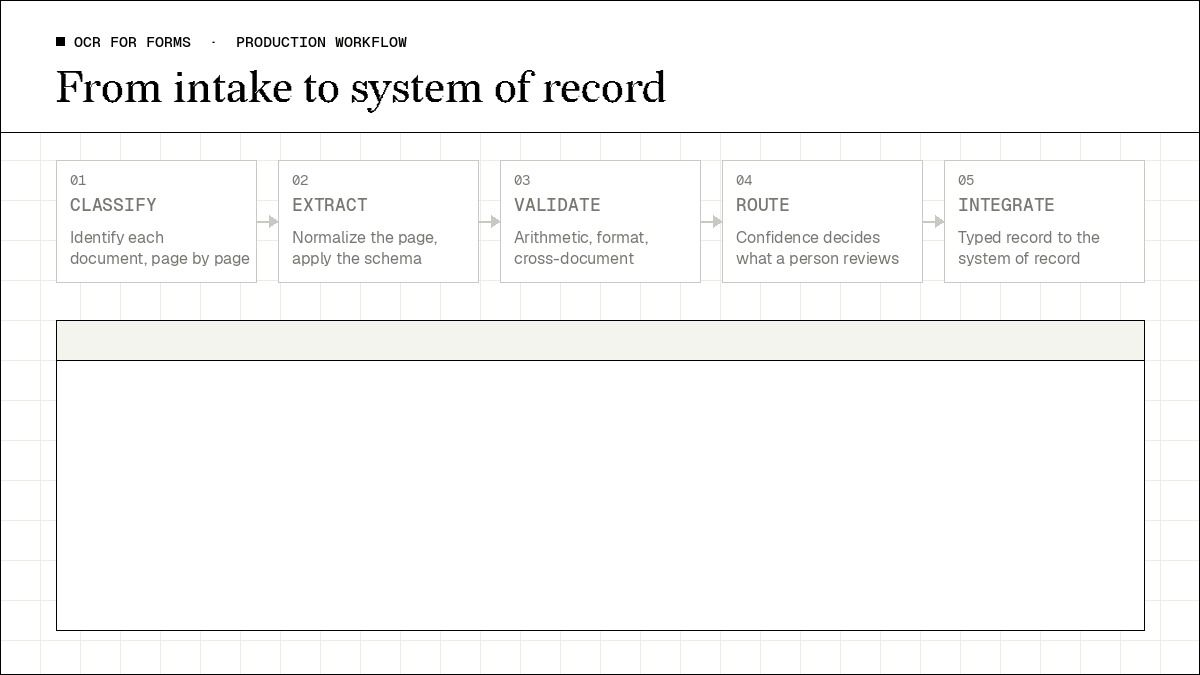
A demonstration processes one document. A production system processes a stream of documents of uncertain type and quality, and the engineering is mostly in the stages around extraction rather than in extraction itself.
Ingestion and Classification
Forms arrive through scanners, email attachments and upload portals, as PDF files, as images, and as mixed bundles where a single PDF holds an application followed by supporting documents. Before any field can be extracted the pipeline must determine what each document is, because applying a loan application schema to a bank statement produces confident nonsense rather than an error — which is why document classification belongs upstream of extraction rather than alongside it.
Classification also has to operate at page level, not only file level. A sixty-page mortgage packet is not one document type; it is an application, two pay stubs, three months of statements, an identity document and a property record, concatenated. Treating the packet as a single unit means every schema is wrong for most of its pages.
Normalization and Field Extraction
Inputs then need a consistent representation: orientation corrected, skew removed, resolution standardized, multi-page files split along document boundaries. This stage is unglamorous and disproportionately determines downstream accuracy, because every recognition component inherits whatever quality it is handed — a page rotated ninety degrees does not produce slightly worse extraction, it produces unusable extraction.
With the document identified and normalized, the schema for that document type is applied and the recovered content is mapped to typed fields. The output of this stage should be a record, not a transcript: values associated with names, in the shape the receiving system expects.
Validation
Extraction establishes what the form says. Validation establishes whether what it says is coherent. Forms support three distinct checks, and a production pipeline should implement all three.
Internal arithmetic is the strongest and the most underused. The loan form above states a net disposable income of 93,750 and separately states the four figures it derives from, so recomputing the total and comparing it to the stated value is a complete, self-contained correctness check requiring no external system: in the run above, 184,000 minus obligations of 90,250 reconciles exactly to 93,750. Any form that totals or computes a derived figure offers this check for free, and the same reasoning underpins validation in OCR for accounts payable workflows.
Format and domain validation confirms each value is the right shape and drawn from the right set: a date that parses, an identifier matching its expected pattern, a checkbox answer that is one of the permitted options rather than free text.
Cross-document validation compares the form against the documents submitted with it. A declared salary should agree with the applicant's pay stub, and the income pattern should be consistent with the deposits visible in the submitted statements. This is where pay stub verification and bank statement OCR stop being separate products and become stages of one underwriting check.
Confidence Scoring and Exception Routing
Not every field warrants the same treatment. A typed account number recovered cleanly and a handwritten note recovered from a cramped ruled area are not equally reliable, and a pipeline that treats them identically either reviews far too much or approves far too little. Confidence scoring attaches a reliability measure to extracted values, which is what makes selective review possible: records whose fields clear the threshold and pass validation proceed automatically, while records with low-confidence fields or failed checks are routed to a person. The configuration above enables this with the confidence_scores flag alongside cite_sources, which records where in the document each value was found.
The design principle is that human review is an architectural component rather than a fallback. The objective is not to review every form but to concentrate attention where it changes an outcome — on a loan application, the handwritten entries, the checkbox decisions that determine routing, and any field that failed a validation check. Corrections made during review are recorded alongside the originally extracted value, preserving an auditable history of every change and giving teams evidence for refining schemas and field descriptions on the document types that generate the most exceptions.
Integration
The final stage delivers the typed record into the system that acts on it: a loan origination system, a claims system, an HR system of record. A correct extraction in a shape the receiving system rejects has not saved anyone any manual data entry, so the integration contract — field names, types, enumerations, required fields — should be settled before the schema is designed. Choosing a document processing platform that returns structured, typed output rather than text is what makes this stage a mapping exercise instead of a parsing exercise.
Real-World Challenges That Determine Whether This Works
Several revisions of the same form are always in flight at once: regulatory change, product change and ordinary redesign all produce new versions, and old ones keep arriving for months because applicants use the copy they already had. That is the practical significance of the measurement earlier in this article.
Input quality compounds it, and varies by channel rather than randomly: upload portals produce clean files, branch scanners produce output that is consistent within a branch and inconsistent across branches, and phone photographs bring perspective distortion. Because quality correlates with channel, extraction accuracy is worth measuring per channel rather than in aggregate.
Supporting Documents Are Part of the Form
Almost no form arrives alone. Loan documents arrive with identity proof, income proof and statements; insurance claims arrive with invoices, reports and photographs. The form is the structured spine of a bundle and the information needed to approve it is distributed across that bundle, so pipelines designed around the form alone handle the spine correctly and leave the dependent checks manual — capping the achievable automation rate regardless of extraction accuracy. This is a recurring pattern in insurance document automation and real estate document automation, where the supporting pack is larger than the form itself.
Signatures, Consents and Completeness
Many forms carry legal weight, and the fields that establish it are the ones automation handles worst: whether the signature is present, the date filled, the consent box ticked, the mandatory fields complete. These are presence and state checks rather than value extraction, and they belong in the validation layer as explicit rules — a form that extracts perfectly but is unsigned is not a processed form. The same consideration governs OCR for legal documents, where execution details carry as much weight as content.
Processing Forms With LlamaParse
LlamaParse approaches form processing as intelligent document processing combined with structured parsing and validation orchestration rather than as a text-recognition tool with a template layer on top, and the distinction is architectural.
Within LlamaParse, document analysis begins with layout-aware parsing that identifies the structural components of a page — label-value pairs, checkbox groups, tables, headers and free-text areas — so that extraction follows document structure rather than pixel coordinates. The checkbox representation and the preserved table structure shown earlier are the direct output of that stage.
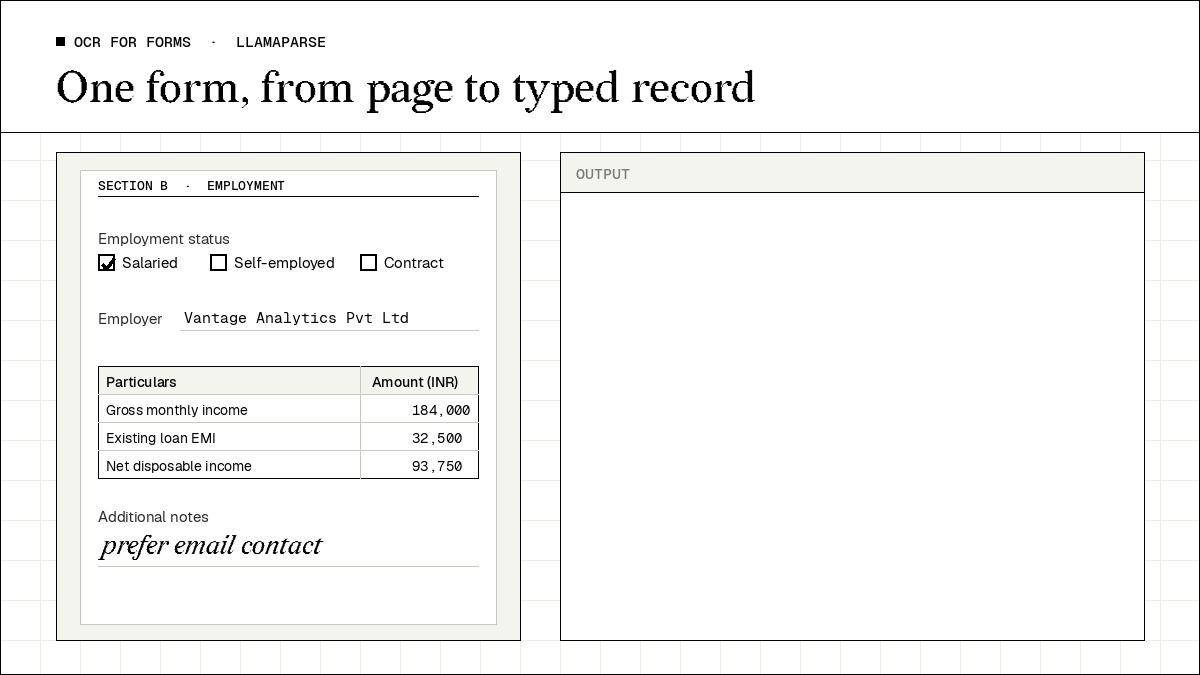
Schema-aligned extraction then maps the parsed content onto typed records defined by the fields a downstream system needs, with field descriptions carrying the semantic instruction that position-based configuration cannot express. Extraction can target the document as a whole or produce one record per entity for repeating sections, which allows a form with a variable number of dependents or properties to be handled without a bespoke parser. Confidence scoring and source citation are available as configuration flags, supporting the selective review that makes human-in-the-loop workflows economical rather than universal.
For mixed volumes, LlamaParse includes a feature called Cost Optimizer, which lets organizations balance accuracy against cost. It evaluates each page individually, routing simple, text-dominant pages to an economical tier while keeping pages dense with tables, marks and mixed layouts on a more thorough tier, and processes both groups in parallel so the savings do not add latency.
Where a bundle contains one dense application form and twenty pages of straightforward supporting material, per-page routing matches the workload better than a single tier applied to the whole packet. Teams assessing this category often start from overviews such as top document parsing APIs and best OCR software before validating on their own forms, and the structured output model described in agentic document workflows extends the same foundation to multi-step processing where extraction feeds decisions.
Forms such as loan applications and patient intake sheets carry personal and financial data, so where the pipeline runs can matter as much as how it reads. Alongside the hosted service, LlamaParse can be deployed on Enterprise plans in an organization's own AWS, Azure or Google Cloud account or in its own data center, so that documents and results stay in that environment. Inference can be managed by LlamaIndex or run on the organization's own GPUs. Parsing on the Cost Effective and Agentic tiers can run entirely on locally hosted models, while schema-based extraction and forms mode call an external model provider and therefore need outbound access, which rules them out of fully air-gapped installations. The deployment guide sets out each option.
Final Thoughts
The determining question in form processing is not which OCR engine reads characters most accurately. It is whether the extraction instruction describes meaning or position. The measurement in this article is narrow — one form, two layouts, twenty-four fields — but the pattern it illustrates is the one that governs maintenance cost in production: a configuration that names what a field means survived a layout revision that would have invalidated a coordinate template entirely, and it did so while recovering checkbox decisions and handwritten entries that a text-only pass would have returned empty.
One measurement discipline separates a pilot that reports well from a pipeline that holds: score accuracy at the record level, not the field level. A 98% field accuracy rate on a twenty-four field form implies that roughly four forms in ten carry at least one incorrect field, and straight-through processing rate — the share needing no human touch — is always the lower and more honest number.
Published figures, including the one above, are properties of the documents they were measured on; comparative reviews such as best document processing software and automated document extraction software help with shortlisting, but fifty documents from your own intake answer the question that matters.
LlamaParse supports this approach directly, combining layout-aware parsing, schema-aligned extraction, validation logic and configurable confidence scoring within one processing pipeline, so that form variability becomes a property the system absorbs rather than a maintenance backlog. To see how it handles your own forms, try LlamaParse for free or book a demo.