A vendor you've billed against for three years reships the same invoice with the header block pushed down half an inch to make room for a new logo. Nothing about the data changed. The invoice number, the line items, and the total are all exactly where a human eye expects them. But your extraction pipeline now pulls the PO number into the invoice-number field, and the first anyone hears about it is when a payment posts to the wrong account.
That's the failure mode that sends teams looking for an alternative to template OCR. The instinct is to go find a better template engine, one with fuzzier anchoring or more forgiving zone tolerances. That instinct is the trap. Template OCR breaks because the approach itself ties extraction to where data sits on the page instead of what the data is. The durable fix is to drop fixed templates entirely and read the document the way a person does, not to build a smarter template.
Template OCR Works in the Demo Because the Demo Never Changes the Layout
Template OCR, also called zonal OCR, is a coordinate program underneath. You take a sample document, draw boxes over the fields you care about, and tell the engine where each one lives: the invoice number sits in the rectangle from (412, 88) to (560, 110), the total down here, the vendor name up there. Run OCR inside each box, clean it with a regex, and you have structured data. On the document you built it from, it's flawless, which is why the demo always works.
The layout is the program, and that's the whole problem. Anything that moves the data relative to those coordinates produces a confident, silent error:
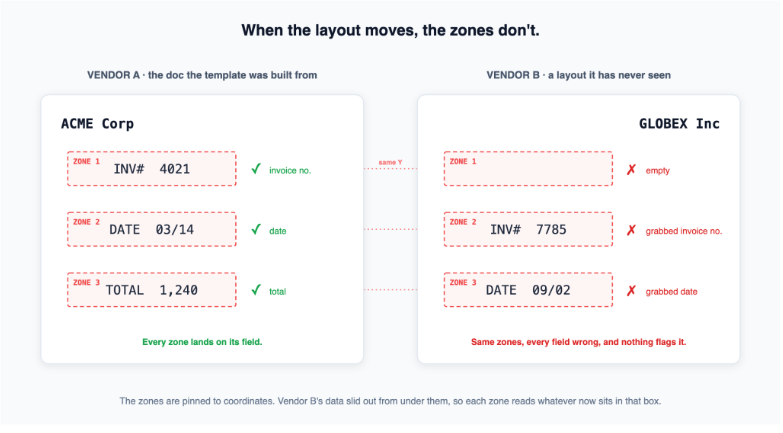
The list of things that move data off its zone is long and ordinary:
- A vendor redesigns their invoice, a scan comes in rotated two degrees
- A line-item table runs 40 rows instead of the 6 your template grid allotted for
- A multi-page statement arrives with the pages in a different order
This is what the big intelligent document processing vendors have spent two decades managing rather than solving. IDP platforms like ABBYY FlexiCapture, Kofax, and Rossum, along with cloud services like AWS Textract's custom forms and Google Document AI, all let you build more sophisticated templates with fuzzier anchoring. They raise the ceiling on how much variation a template tolerates. Compare any of the major document processing platforms and you'll find the same underlying premise: you're still describing documents by where things sit.
What a Template Library Actually Costs You
The real expense of template OCR shows up after go-live, and it never makes it into the ROI deck. Every distinct layout needs its own template. A mid-size accounts payable operation deals with a wide range of vendor formats, often several hundred, and each one is a small software artifact someone has to build, test, and maintain.
The costs compound in ways that are easy to miss up front:
- Onboarding lag. A new vendor can't be processed until someone draws and validates a template. Until that's done, those invoices route to manual entry, so the automation you bought has a queue of exceptions it structurally can't touch.
- Drift maintenance. Every template is one vendor redesign away from breaking, and it breaks silently. You find out from a downstream error, not from the extraction step.
- Regex sprawl. Date formats, currency symbols, thousand separators, and tax-line variants get patched with post-processing rules stacked on post-processing rules until no one fully understands the pipeline.
Add it up and the metric that suffers is the one operations actually tracks: straight-through processing rate, the share of documents that flow end to end with no human touch. High accuracy on the 200 layouts you templated is worth very little when layout 201 walks in and the rate drops to zero. A template library doesn't degrade gracefully. It works perfectly inside its coverage and not at all outside it, and the edge of that coverage moves every time a vendor changes anything.
Machine-learning document classification helps here, and it's the pitch you'll hear from most modern IDP vendors. A classifier can recognize a layout and pick the right template automatically instead of making you sort documents by hand. But it still treats the layout as the unit of work, which means it inherits the same ceiling.
The Real Alternative: Read the Document Instead of Mapping Its Coordinates
The way out is to stop describing documents by coordinates at all. Agentic OCR reads a page the way a person does, by recognizing what each region is before deciding how to handle it.
LlamaParse works this way. Layout-aware computer vision segments each page into its real components first (this block is a header, this is a line-item table, this is a logo, this is a signature) and routes each component to the model best suited to it. Clean printed text goes to fast OCR, a handwritten note or a stamped field goes to a vision-language model, a dense table goes to a model built for tabular structure. There's no zone to define, and nothing to redraw when the next vendor's invoice looks different, because the system isn't hunting for a rectangle but for an invoice number, wherever it happens to be.
That single architectural change removes the entire maintenance burden from the section above. No template library, no onboarding lag, no drift. A vendor you've never seen and one you processed yesterday go through the same document processing platform with no configuration change.
The contrast is sharpest at the exact events that break a template library:
| Real-world event | Template (zonal) OCR | Agentic OCR (LlamaParse) |
|---|---|---|
| A new vendor's invoice arrives | Nothing flows until someone draws and validates a template. Until then the invoices route to manual entry. | Processed on the first invoice, no setup. The page is segmented and read like any other document. |
| The line-item table runs 1 row or 60 | The fixed grid assumes a set row count. Extra rows spill past the zone or drop off, short tables read blank space. | The line-item region is detected as a table and read in full, however many rows it holds. |
| A page comes in rotated or skewed | Coordinate mapping scrambles. Every zone lands on the wrong text and fails silently. | Layout detection runs on the page as imaged, so orientation doesn't move fields off their target. |
| The vendor redesigns next quarter | The template breaks the day the redesign ships, and you hear about it from a downstream error. | No template to break. The redesigned invoice reads the same as every other one. |
It also produces something a template never could: a confidence signal. Because each field is extracted through a model that reports how certain it is, low-confidence values get flagged for review instead of flowing silently into your system. That's what makes targeted human-in-the-loop review possible. You route the genuinely uncertain 5% to a person and let the rest process straight through, instead of re-keying everything because you can't tell which extractions to trust. (When you need fields pulled against a fixed schema rather than a parsed document, that's where the distinction between parsing and extraction comes in.)
That confidence signal is concrete. Every field comes back from extraction with a score attached, so a new vendor's invoice flags its own uncertain values for review instead of posting them silently:
html
from llama_cloud import LlamaCloud

invoice_schema = {
    "type": "object",
    "properties": {
        "invoice_number": {"type": "string"},
        "po_number": {"type": "string"},
        "total": {"type": "number"},
    },
}

client = LlamaCloud()

# A vendor layout the system has never seen. No template, no zones.
uploaded = client.files.create(file="vendor-invoice.pdf", purpose="extract")
job = client.extract.run(
    file_input=uploaded.id,
    configuration={
        "data_schema": invoice_schema,
        "extraction_target": "per_doc",
        "tier": "agentic",
        "confidence_scores": True,  # a plain flag now, not a mode you opt into
    },
)

# Pull the finished job back with its per-field confidence metadata.
result = client.extract.get(job.id, expand=["extract_metadata"])
fields = result.extract_result
field_meta = result.extract_metadata.field_metadata.document_metadata

# Only the genuinely uncertain fields reach a human.
for name, value in fields.items():
    if field_meta[name]["confidence"] < 0.9:
        flag_for_review(name, value, field_meta[name]["confidence"])
LlamaParse has processed over a billion documents across 90+ file formats on this approach, with no per-vendor templates anywhere in the stack.
What "No Template" Means at Runtime
The difference is easiest to see at the moment a new vendor shows up. With template OCR, a new layout is a project: someone draws zones, tests them against a few samples, and ships the template before a single real invoice can flow. With agentic OCR, the new vendor is just another document. The pipeline segments it, routes each region, validates the output, and returns structured data on the first invoice it ever sees from that sender. The onboarding step that gated everything simply isn't there.
Where Dropping Templates Changes the Outcome
Templates hurt most where formats vary faster than anyone can keep up with. Three workflows make the point, and each is a place where automated document extraction lives or dies on format variation.
Accounts Payable: Invoices and POs Across Every Vendor
AP is the canonical template-OCR use case and its worst case. A company with a few hundred suppliers is looking at a few hundred invoice layouts, each with different field positions, line-item structures, tax lines, and currencies, and the set grows every time procurement signs a new vendor. This is exactly where template libraries turn into a full-time maintenance job, and where the same financial document field extraction problems repeat across every format. An approach built for invoice data extraction that reads structure instead of position handles a new supplier's first invoice with no setup, which is the difference between automating AP and staffing it. For teams running this at volume, accounts payable OCR and invoice scanning workflows stand or fall on exactly this.
Remittance Advice and EOBs
Remittance advice and explanation-of-benefits documents are format sprawl by nature. Every payer formats them differently, and the same logical fields (claim number, paid amount, adjustment code) land in different places on every sender's layout. A fixed zone can't follow a field that moves per payer, which is why these documents defeat template extraction even inside a single industry.
Logistics and Customs Documents
Bills of lading, packing lists, and commercial invoices cross borders, carriers, and languages with no canonical layout to anchor to. A template built for one freight forwarder's bill of lading is useless against the next. Reading the document by structure rather than coordinates is the only approach that survives that much variation.
The Template Era Is Ending
Template OCR made sense when document variety was small and stable. Draw a few zones, process a predictable stream, done. That world is gone. Vendors redesign on their own schedules, document types multiply, and the rate of layout change has outrun the rate at which anyone can maintain templates against it. Patching that gap with more templates is a losing position, and the teams feeling it most are the ones with the biggest template libraries.
The architecture that creates the problem can't solve it, because the problem is the architecture. Tying extraction to coordinates is what makes every layout change a break. LlamaParse replaces that approach with layout-aware, agentic document parsing that reads documents by structure, validates its own output, and reports confidence per field, so a new layout is just another document instead of another template. The honest test is the one a demo can't fake: take the vendor whose invoices break your templates most often and run that document through LlamaParse. The layout that breaks your templates is usually the one that proves the point.