We’re seeing an interesting trend where the primary way agents are able to read and interact with unstructured context is through files. This blog paints an overview of the core interface, where they’re being used, and questions we still need to explore going forward.
I’m noticing 3 main ways files are being used:
- As a primary way for agents to store and search longer-running conversation histories
- As a primary format for agents to retrieve massive amounts of external context, replacing naive RAG patterns
- As a way to equip agents with “skills” and bypass MCP altogether
These patterns are primarily adopted through popular coding agent tools like Claude Code and Cursor. But coding agents are equivalent to general reasoning agents anyways, and I’m seeing a general trend where agentic applications are centralizing around files and filesystems as core abstractions for context management.
The File Interface
A file for an agent is the same as a file on your computer. Files come in all different shapes and formats:
- plain-text files: all code files (.py, .tsx, …), and other plaintext files like .txt, .md, .csv, .json, etc. You can directly put this text into the LLM context window.
- document formats: .pdf, .docx, .pptx, .xlsx. These formats are not natively machine-readable, and require parsing to translate into an LLM-ready format (more on this later!)
- images: .png, .jpeg, etc
- Anything else (video, audio, application binaries) - they are currently irrelevant for agents, at least not until computer use becomes a real thing.
Agents interact with files and filesystems in various ways. By default, they have access to the CLI, and can use commands like ls and grep to traverse and search across files (esp. plaintext ones). They are also equipped with first-party tools like Read in order to read subsections from plain-text files. If you’d like, you can also equip coding agents with semantic search capabilities.
Instead of one agent with hundreds of tools, we’re evolving towards a world where the agent really only has access to a filesystem and ~5-10 tools:
- CLI over filesystem
- code interpreter
- web fetch
and this is just as general, if not more general, than agent with 100+ MCP tools.
Files are used to store long context and actions
1. Files are a core abstraction for agents to store and search longer-running conversation histories
Context windows remain one of the main limitations in deploying frontier agents on long-running knowledge work tasks. This is readily apparent in coding agents. I get a sense of dread every time I see the “Context left until auto-compact” notification pop up on Claude Code. Once you trigger compaction, the agent inevitably gets amnesia and isn’t able to fulfill the rest of the task reliably.
One of the primary workarounds, either triggered by humans or the agent itself, is to store these conversations to a file. Claude Code had one of the simplest instantiations of this with the Claude.md file, a static file that lets the coding agent get access to a general pool of context on instantiation. More recently, Cursor’s blog post showed their approach towards storing past chat history as searchable files when context compaction is triggered; this allows the agent to dynamically look up previous conversation history if it feels like its existing context window is insufficient to solve the task at hand.
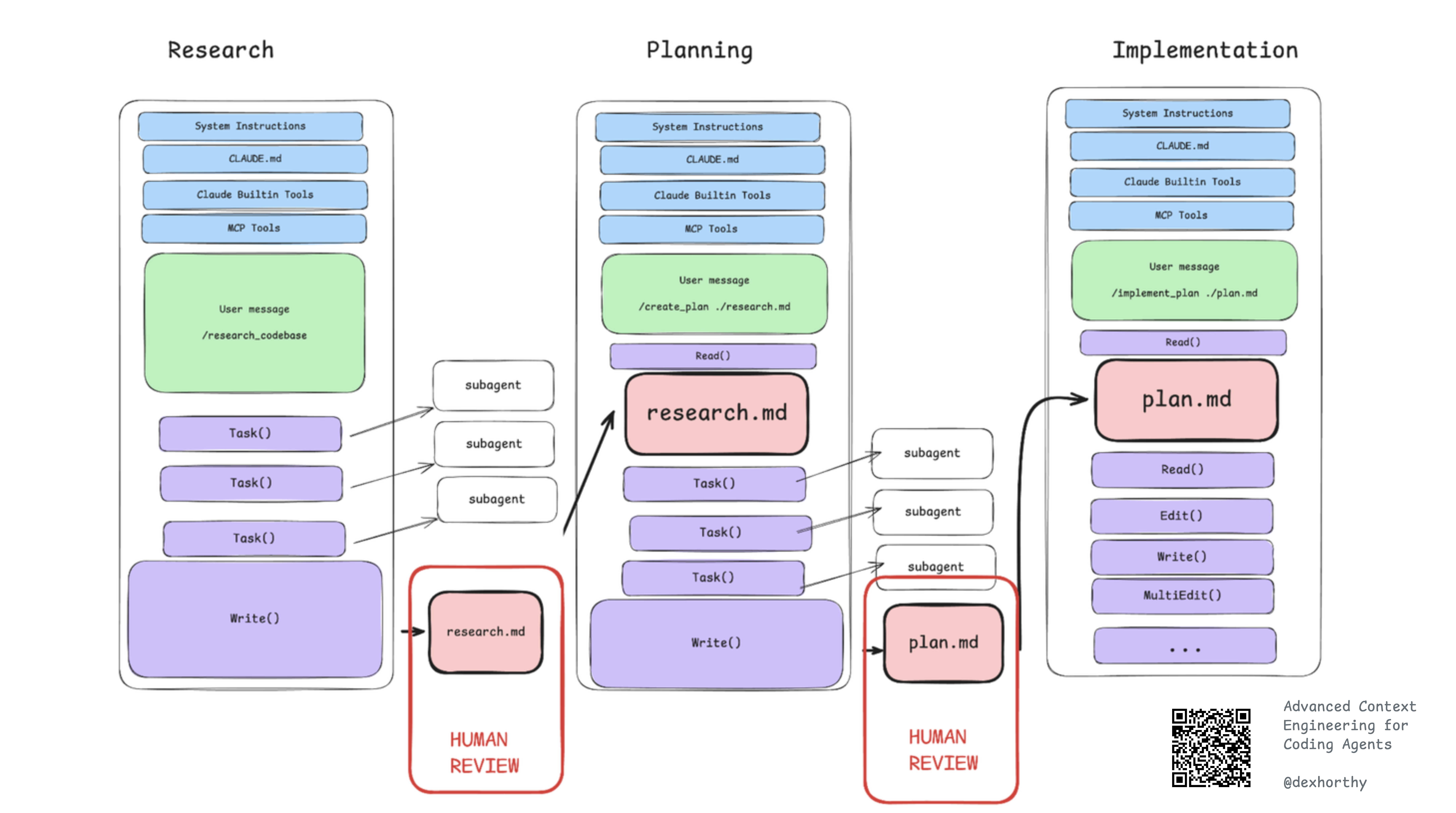
Users are manually defining workflows that create and edit files within their coding agent environments. Dex Horthy has a ton of resources here. He has an incredible 3-step Research, Plan, Implement process that anecdotally massively increases the performance of coding agents. This has the agent first create a research.md file, then a plan.md file that allows compaction of existing context for human review, before passing it into downstream steps. HOn a related note, Kyle Mistele also wrote about the concept of “Progressive Disclosure” where you point the agent to nested MD files.
2. Files are a primary format for agents to retrieve massive amounts of external context, replacing naive RAG patterns
RAG being terrible was a 2023 problem, and I made plenty of videos detailing ways to make it better. The issue is that all of these techniques only solved subsets of the problem. We were still far from achieving the promise of an agent that could dynamically read any pile of context from a repository of any size in order to answer a question of any complexity.
Agents with simple file search tools gets us way closer to the goal. Agents can interleave search with Read() operations where similar to a human, they can choose to scan across files or scroll up or down a single file to solve the task.
More recently, in our own experiments, we found two things:
- Reasoning agents with file system tools and semantic search lets agents dynamically traverse context to answer questions of any complexity.
- Even file search on its own outperforms naive semantic search on small to medium sized document collections (ignoring latency).
In practice, you will likely need semantic indexing anyways, but you can always do this as a command that complements existing filesystem CLI commands (see semtools).
The nice thing about the file abstraction is that you can also reduce any pre-existing pool of massive unstructured context into a file. Both Cursor and Claude Code automatically dump long MCP tool responses into files, which allows an agent to use the aforementioned filesystem tools to postprocess this content without truncation.
3. As a way to equip agents with “skills” and bypass MCP altogether
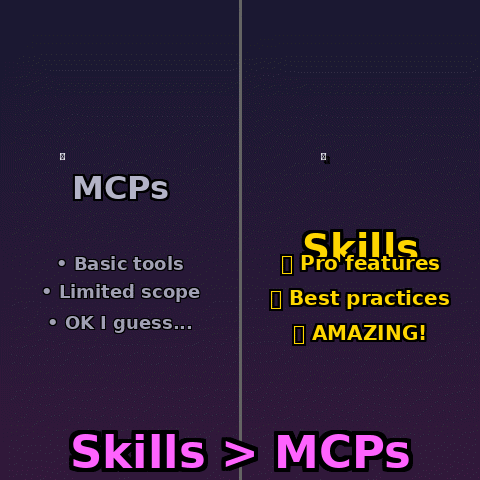
Anthropic first introduced the concept of “Skills” in October. The concept is trivially easy to understand. Similar to Claude.md files, Claude Skills are also literally just files, sometimes folders of files, that you give to an agent to teach it things. The agent relies on its filesystem tools in order to traverse these files, and by traversing these files they learn to do things.
Simon Willison said it first: skills might replace MCP. Instead of explicitly giving an agent MCP tools, you could just give it a bunch of files + CLI/code interpreter/web access to do things. On paper there are a few benefits to this approach:
- They are way easier to define and share. Just copy/paste some API spec into a .md file. Or type in a few unstructured bullet points. And voila - the agent now knows how to do something. From my own experience writing MCP tools was comparatively a pain in the ass.
- They don’t automatically bloat the agent context window. If the MCP server defines a
searchendpoint and returns 100k+ tokens worth of search results, an MCP calling agent would by default just swallow the whole thing. Files give agents a natural interface to read and search for context snippets that are relevant. - They let the agent do arbitrary, more flexible things through code. With skills, the agent can arbitrarily interact with APIs of any service through code execution, even if that service doesn’t have MCP defined. They also allow agents to do things like upload file binaries, which would be impossible through an agent directly writing the tool calling parameters.
Gaps + The Road Ahead
I’ve mentioned that generalized agent reasoning + filesystems are a good initial proxy for computer use (see Claude Cowork). That being said, there are still some core gaps that need to be solved in order for coding agents to solve more tasks in a more accurate, reliable, scalable manner.
- Parsing non-plaintext docs: Coding agents do not have an innate ability to read non-plaintext file formats like PDFs, Word, Powerpoint, Excel. In order for them to do so, they would have to call out to good OCR tools to read these files into LLM-interpretable representations. This is exactly what we’re building within LlamaParse with our entire suite of Parse, Extract, Sheets, and other capabilities. We’ve also built open-source wrappers like semtools to easily make this accessible as commands to coding agents.
- Scalable File Search: Coding agents are already using CLI tools as their primary means for file search, but we’ve noted that this approach doesn’t scale to massive document collections (1k-1m+). The native search tools in OS’s like Mac OSX are not very good. It will be interesting to see how we can combine semantic/keyword indexing with file search operations for scalable but dynamic search.
- File Editing and Generation: Coding agents can easily apply edit patches to code and plain text files. But they need specialized tools in order to handle more complex formats and more complex workloads, like creating a presentation, editing an image, or filling out a form. There is an initial set of Claude skills for PPTX, DOCX, XLSX - but these use primitive open-source tools. There’s a lot of opportunity to create a focused set of tools to equip coding agents with solving more e2e work tasks.
It’s not clear whether files as a format will remain the main mechanism agents read and interact with context, but it’s emerging as the best mode today. It coincides well with this overall trend we’re seeing of programming being done through natural language vs. through code. It is also a stepping stone towards general computer use.
We’re not building generalized coding/computer use agents, but we’re excited to be a core part of this journey. Document-based files need processing, and we provide best-in-class technology to help you convert PDFs, Powerpoints, Excel, Word, HTML, and more into agent-ready context. Come check us out!