In this age of agentic AI, there’s often areas of human work that we’re sad (or let’s be honest, scared) about AI taking over. But, my honest opinion is that there’s a genre of work we’re more than happy to hand over to the capable hands of AI agents. Because it’s repetitive, boring, and the actual work starts once the initial admin work is done and dusted. Tasks that I’m going to be referring to as ‘clerical’ or ‘back office’ work from here on out falls straight into that category, at least in my opinion. And lucky for me, I work at LlamaIndex, a company that provides a suite of agentic document processing tools alongside an agent orchestration framework, so that I (and you) never have to worry about boring tasks ever again.
For example: operations teams are drowning in documents. Invoice decks that need splitting and routing. Resume books requiring structured extraction. Purchase orders waiting for validation. Contract batches needing classification.
The technical challenge isn't just about parsing these documents, it's about orchestrating complex, multi-step workflows that can handle real-world document processing at scale. In this article, I’ll cover how LlamaAgents combined with LlamaParse's agentic document processing platform approaches the challenge.
The Real Challenge with Document Operations
A lot of admin work is in essence repetitive, multi-step document workflows. Take invoice processing: a 50-page PDF arrives containing invoices from multiple vendors. You need to split it into individual invoices, extract structured data from each (vendor info, line items, totals), validate against purchase orders, and route to appropriate departments for approval.
Or resume screening: HR receives a 100-page resume book. The workflow requires separating individual resumes from cover pages and curriculum info, extracting structured candidate data (education, experience, skills), matching against job requirements, and flagging top candidates for review.
Contract management follows a similar pattern. Legal gets a batch of vendor contracts and needs to classify contract types (MSA, NDA, SLA), extract key terms and dates, check for non-standard clauses, and route for appropriate approval workflow.
The challenge with these workflows is simple when you think about it: the documents that are the star of show here (resumes, contracts, legal reports, whatever they may be), are designed by humans, for humans. They often come with lots of elements with humans (naturally) in mind. Think of the fancy looking layout you picked for your resume, or the intricately designed images or charts you put into your reports etc. For an AI agent to understand the added context these elements provide, we have to actually get these documents into a format designed with LLMs in mind. And ideally, we need to do that in a way where we lose as little context as possible. This is exactly why we built LlamaParse..
The LlamaParse Agentic Document Processing Platform
LlamaParse provides three specialized tools for document processing. LlamaSplit intelligently categorizes pages in multi-document files - you upload a concatenated PDF, define categories (invoices, receipts, cover pages), and get back page ranges for each document type. LlamaClassify classifies individual documents based on your custom labels. LlamaExtract handles structured data extraction - define a Pydantic schema for what you want, extract structured data that matches your schema, and get confidence scores for each extraction. LlamaParse provides document parsing that handles complex layouts, tables, and forms while maintaining semantic structure across document types.
LlamaAgents Workflows is on the other hand, the orchestration layer. Define your custom multi-step agent pattern that can handle fan-out/fan-in, self-reflection or human-in-the-loop patterns to process multiple documents concurrently.
Real Example: Resume Book Processing Agent
Let me show you how this works in practice using the resume book processing example.
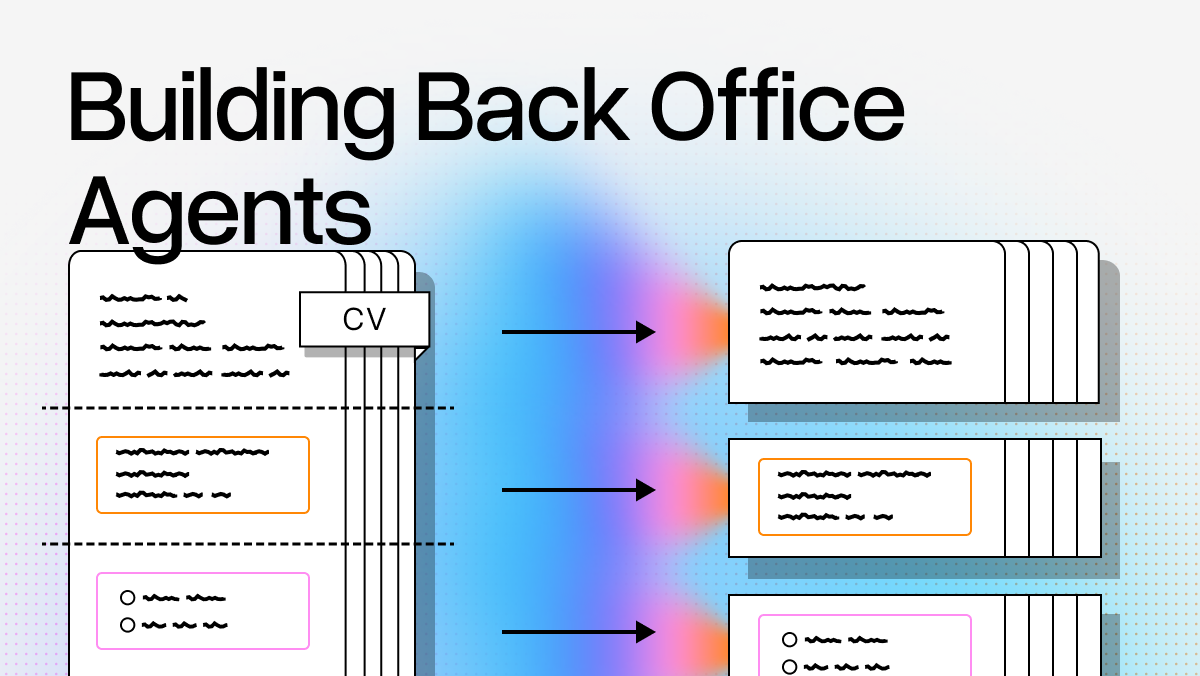
The document is a 100-page PDF containing individual resumes, a curriculum page, and a cover page all concatenated together. The challenge is extracting structured candidate data from each resume while filtering out non-resume content.
Step 1: Split the Document
python
from llama_cloud import AsyncLlamaParse

client = AsyncLlamaParse(api_key=os.getenv("LLAMA_CLOUD_API_KEY"))

file_obj = await client.files.create(file="resume_book.pdf", purpose="split")

split_request = await client.beta.split.create(
    document_input = {"type": "file_id", "file_id": file_obj.id},
    categories = [
        {
            "name": "resume",
            "description": "Individual resume containing candidate info"
        },
        {
            "name": "curriculum",
            "description": "Program curriculum listing"
        },
        {
            "name": "cover_page",
            "description": "Title or intro page"
        }
    ]

)

response = await client.beta.split.wait_for_completion(
    split_request.id,
    polling_interval=1.0,
    verbose=True,
)
LlamaSplit analyzes document structure and returns segments: Segment 1 is a cover_page on Pages 1-2, Segment 2 is curriculum on Pages 3-4, Segment 3 is a resume on Page 5, Segment 4 is another resume on Page 6, and so on.
Step 2: Extract Structured Data
Define what you want to extract using Pydantic schemas:
python
from pydantic import BaseModel, Field
from typing import Optional, List

class Education(BaseModel):
    degree: str = Field(description="Degree type (e.g., B.S., M.S., Ph.D.)")
    institution: str = Field(description="Name of the educational institution")
    field_of_study: Optional[str] = Field(None, description="Field of study or major")
    graduation_date: Optional[str] = Field(None, description="Graduation date or year")
    gpa: Optional[str] = Field(None, description="GPA if mentioned")

class WorkExperience(BaseModel):
    company: str = Field(description="Company or organization name")
    position: str = Field(description="Job title or position")
    start_date: Optional[str] = Field(None, description="Start date")
    end_date: Optional[str] = Field(None, description="End date (or 'Present' if current)")
    description: Optional[str] = Field(None, description="Job description or key responsibilities")

class ResumeSchema(BaseModel):
    name: str = Field(description="Full name of the candidate")
    email: Optional[str] = Field(None, description="Email address")
    phone: Optional[str] = Field(None, description="Phone number")
    location: Optional[str] = Field(None, description="Location or address")
    education: List[Education] = Field(description="List of educational qualifications")
    work_experience: List[WorkExperience] = Field(description="List of work experiences")
    skills: List[str] = Field(description="List of skills, programming languages, or technical competencies")
    certifications: Optional[List[str]] = Field(None, description="Certifications or licenses")
    languages: Optional[List[str]] = Field(None, description="Languages spoken")
    summary: Optional[str] = Field(None, description="Professional summary or objective")
Extract data from each resume:
python
from llama_cloud.types.extraction.extract_config_param import ExtractConfigParam

EXTRACT_CONFIG = ExtractConfigParam(
    extraction_mode="FAST",
    system_prompt=None,
    use_reasoning=False,
    cite_sources=False,
    confidence_scores=True,
    page_range='5'
)

extracted_result = await client.extraction.extract(
    data_schema=ResumeSchema, file_id=file_obj.id, config=EXTRACT_CONFIG
)
You get back structured data with the candidate's name, contact info, education history including degree, institution, field of study and graduation date, work experience with company, position, dates and descriptions, and a list of skills. Everything validated against your schema.
Step 3: Orchestrate with LlamaAgents Workflows
The workflow handles the complete process by coordinating splitting and extraction:
python
from workflows import Workflow, step, Context
from workflows.events import StartEvent, StopEvent, Event

class ExtractResume(Event):
    file_path: str
    category: str
    pages: list[int]

class ResumeBookAgent(Workflow):

    def __init__(self, *args, **kwargs):
        super().__init__(*args, **kwargs)

        class ResumeSchema(BaseModel):
            name: str = Field(description="Full name of the candidate")
            email: Optional[str] = Field(None, description="Email address")
            phone: Optional[str] = Field(None, description="Phone number")
            location: Optional[str] = Field(None, description="Location or address")
            education: List[Education] = Field(description="List of educational qualifications")
            work_experience: List[WorkExperience] = Field(description="List of work experiences")
            skills: List[str] = Field(description="List of skills, programming languages, or technical competencies")
            certifications: Optional[List[str]] = Field(None, description="Certifications or licenses")
            languages: Optional[List[str]] = Field(None, description="Languages spoken")
            summary: Optional[str] = Field(None, description="Professional summary or objective")

        self.extract_schema = ResumeSchema
        self.categories = [
            {
                "name": "resume",
                "description": "A resume page from an individual candidate containing their professional information, education, and experience",
            },
            {
                "name": "curriculum",
                "description": "The overall student curriculum page listing the program curriculum",
            },
            {
                "name": "cover_page",
                "description": "Cover page, title page, or introductory page of the resume book",
            },
        ]

        self.client = AsyncLlamaParse(api_key=os.getenv("LLAMA_CLOUD_API_KEY"))

    @step
    async def split_document(self, ev: StartEvent, ctx: Context) -> ExtractResume:
        uploaded_file = await self.client.files.create(
            file="resume_book.pdf",
            purpose="split"
        )

        print(f"✅ File uploaded: {uploaded_file.name}", flush=True)
        split_request = await self.client.beta.split.create(
            document_input = {
                "type": "file_id",
                "value": file_id,
            },
            categories = self.categories
        }
        completed_job = await self.client.beta.split.wait_for_completion(
					  split_request.id,
					  polling_interval=1.0,
				    verbose=True,
				)
        segments = completed_job.get("result", {}).get("segments", [])
        async with ctx.store.edit_state() as state:
	        state.segments_count = len(segments)
        for segment in segments:
            ctx.send_event(ExtractResume(file_path=ev.file_path, category=segment["category"], pages=segment["pages"]))

    @step
    async def extract_resume(self, ev: ExtractResume, ctx: Context) -> StopEvent:
        state = await ctx.store.get_state()
        ready = ctx.collect_events(
            ev, [ExtractResume] * await state.segments_count
        )
        if ready is None:
            return None
        extraction_result = []
        for event in ready:
            if event.category == "resume":
                config = ExtractConfigParam(page_range=f"{min(event.pages)}-{max(event.pages)}")
                extracted_result = await self.client.extraction.extract(
                    data_schema=self.extract_schema, file=event.file_path, config=config)
                extraction_result.append(extracted_result.data)
        return StopEvent(result=extraction_result)
Run the complete workflow:
python
agent = ResumeBookAgent(timeout=1000)
resp = await agent.run(start_event=StartEvent(file_path="resume_book.pdf"))

# Now you have structured data for all candidates
for resume in resp[1:3]:
    print(f"\\n{'='*60}")
    print(f"Name: {resume.get('name', 'N/A')}")
    print(f"Education: {resume.get('education', 'N/A')}")
    print(f"Skills: {', '.join(resume.get('skills', []))}")
    print(f"{'='*60}")
How the Architecture Handles Real Operations Workflows
The fan-out/fan-in pattern is what makes this work for production operations. The workflow splits documents in the first step, emits an event for each segment, processes them concurrently, then collects results. This pattern shows up everywhere: split invoice decks into individual invoices, process each one, aggregate for reporting. Split contract batches by type, extract terms from each, compile for legal review.
State management happens through the workflow's context store. When you split a document into 50 segments, the workflow tracks how many extraction events to expect before aggregating results. If one extraction fails, you know exactly which segment to retry without reprocessing everything.
Type-safe schemas mean your extraction output matches your data model. Define a Pydantic schema once for invoices or contracts or resumes, and every extraction validates against it. You catch schema mismatches before data hits your database.
Each tool is composable. LlamaSplit handles document categorization. LlamaExtract handles structured extraction. LlamaParse handles complex layouts. You build workflows that combine them based on your specific business logic, not a one-size-fits-all pipeline.
Getting Started
The example uses the new llama-cloud SDK that we announced last week.
Key resources are:
- LlamaSplit docs at https://developers.llamaindex.ai/python/cloud/split/getting_started/
- LlamaExtract docs at https://developers.llamaindex.ai/python/cloud/llamaextract/getting_started/
- LlamaAgents Workflows at https://developers.llamaindex.ai/python/llamaagents/workflows/
- Complete resume book example at https://developers.llamaindex.ai/python/cloud/llamaextract/examples/split_and_extract_resume_book/