

LlamaParse vs Docling
LlamaParse is the agentic document processing platform at the frontier of price-performance built for accurate extraction from complex documents. Docling is a legacy, open-source OCR package built by IBM and compatible with Watson AI workflows.
Last updated: October 28, 2026
Capabilities
LlamaParse vs Docling: at a glance
LlamaParse is more accurate than Docling in every ParseBench category, extracts the data you need across pages, and puts a confidence score on every value. For a free local option, LiteParse runs with no models and no GPU.
Features | LlamaParse | Docling |
|---|---|---|
Parsing accuracy | Scores 86.61 on ParseBench and leads Docling in every category, 93.37 to 66.41 on tables and 90.19 to 52.76 on charts. | Parses text and simple layouts, but loses structure on complex tables and charts: 66.41 on tables and 52.76 on charts in ParseBench. |
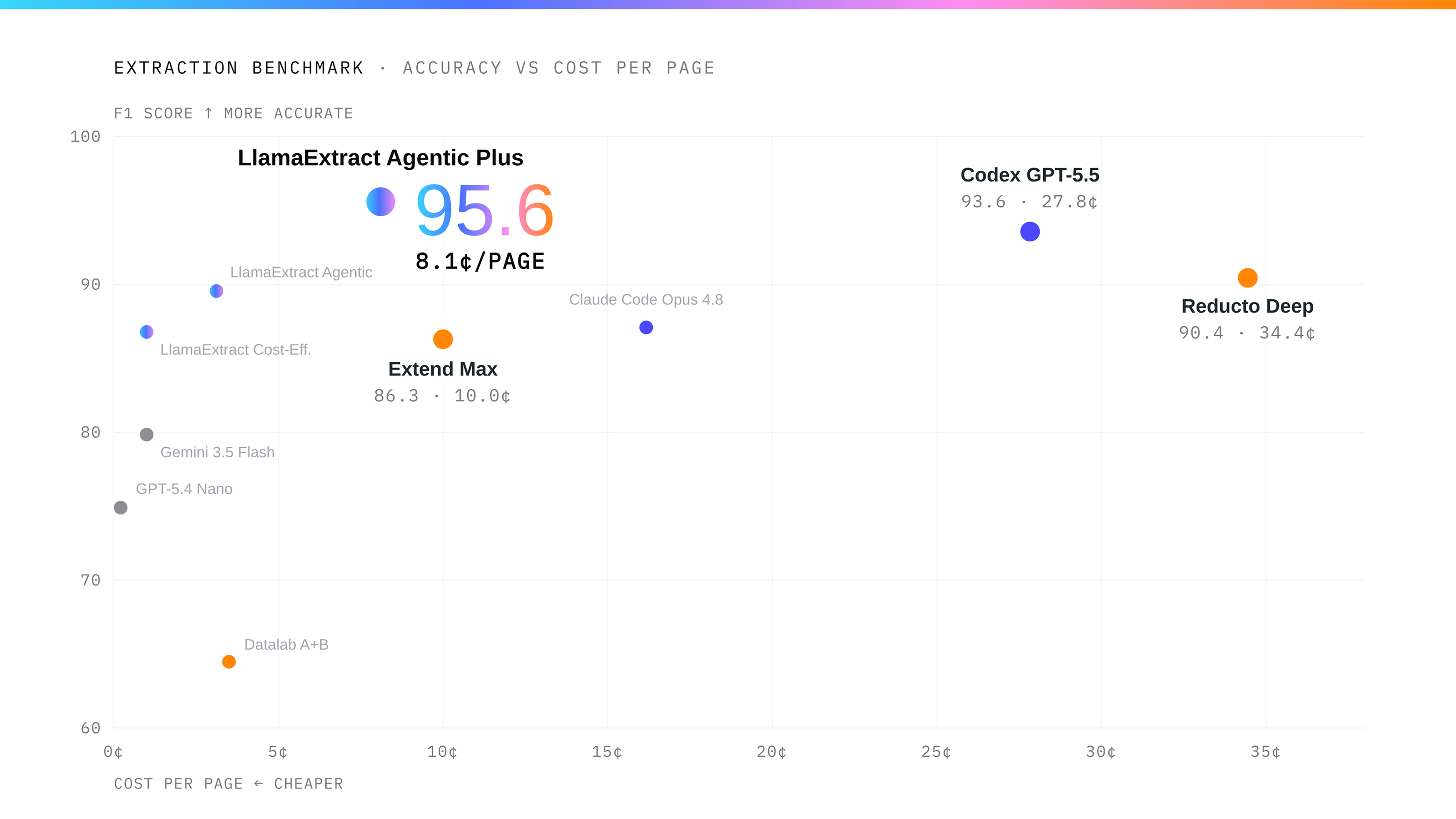
Extraction accuracy on complex documents | Extracts the data you need as one result, even when it spans pages, and scores 96.17% on ExtractBench. | Extracts one page at a time, so joining data across pages is your code. |
Automating review | Scores and cites every extracted value, so reviewers only check the uncertain ones. | Reports a conversion quality score per page, not a confidence score per extracted field, and no citations. |
Price for parsing and extraction | Costs $10 per 1,000 pages at the entry tier and $31.25 at the higher tier, parsing and extraction included. | Free to download. You pay for the servers, hosting and upkeep. |
File formats | Handles 130+ formats, including PDFs, Word, PowerPoint, Excel and CSV, and extracts straight from Excel and CSV cells. | Parses a dozen or so formats, including PDF, Word, PowerPoint, Excel and HTML. Its extraction step runs on PDFs and images only, so there is no direct extraction from spreadsheet cells. |
Enterprise deployment | Runs hosted, as a dedicated deployment, in your own cloud, or on-premises. | Runs wherever you install it, and you manage the servers. |
Connectors | Pulls files from Google Drive, SharePoint, S3 and Confluence. | No connectors. |
ParseBench and ExtractBench are LlamaIndex benchmarks with public data and code. Scores are for Agentic Plus; the Docling result uses its docling-models configuration. Prices are USD per 1,000 PDF pages, before add-ons or discounts. | ||
Parses the most complex documents
LlamaParse parses nested and multi-page tables, charts, merged headers, dense financial statements, scans, handwriting and photographed pages, across 130+ file formats. It is the most accurate parser on ParseBench overall and leads Docling in every category.
Extracts the data you need
Define the fields you need in a schema, such as policy number, deductible and each claim line item, and LlamaParse Extract returns them as structured JSON in one result, including records that span pages and data read straight from Excel and CSV cells. Docling’s extraction tool works one page at a time, so combining pages into one record is code you write.
Confidence scores and citations on every value
Every value LlamaParse extracts carries a confidence score and a citation to the source text, so reviewers check only the low-confidence values and accept the rest. Docling reports a conversion quality score per page; it gives no confidence score or citation on an extracted field.
Free to start with LiteParse
LiteParse is LlamaIndex’s open-source parser: a single Rust binary with no models to download and no GPU. It reads the text layer of digital PDFs, OCRs scanned pages, converts Office files and images, and returns Markdown with headings, tables and lists plus the position of every line. It runs from the command line, Python, Node or the browser, and flags scanned and table-heavy pages so you can send those to LlamaParse.
Connects to your files
Pull files from Google Drive, SharePoint, S3 or Confluence straight into LlamaParse. Docling converts and chunks documents; getting files to it is your code.
Runs in your own cloud or on-premises
LlamaParse is hosted in North America and the EU, or as a dedicated deployment run by LlamaIndex. Enterprise customers run it in their own AWS, Azure or Google Cloud account, or on-premises. LlamaIndex has a SOC 2 Type II audit, offers BAAs on Enterprise, and does not train on customer data by default.
FAQ
01
What’s the difference between LlamaParse and Docling?
01
What’s the difference between LlamaParse and Docling?
LlamaParse parses 130+ file formats and the most complex layouts, including nested and multi-page tables, charts, merged headers, scans and handwriting, then extracts the data you need and scores every value for confidence. Docling converts documents to Markdown and JSON.
02
Which is more accurate on complex PDFs, tables and charts?
02
Which is more accurate on complex PDFs, tables and charts?
LlamaParse Agentic Plus scores 86.61 overall, 93.37 on tables and 90.19 on charts in ParseBench, compared with 50.65, 66.41 and 52.76 for Docling.
03
How are uncertain values flagged for review?
03
How are uncertain values flagged for review?
LlamaParse gives every extracted value a confidence score and a source citation, so reviewers only check the uncertain ones. Docling reports a conversion quality score per page; its extraction tool returns no confidence score or citation on an extracted field.
04
How do LlamaParse and Docling pricing compare?
04
How do LlamaParse and Docling pricing compare?
LlamaParse costs $10 per 1,000 PDF pages for parsing and extraction at the entry tier and $31.25 at the higher tier. Parsing alone starts at $3.75 on Cost Effective, which scores 78.02 on ParseBench to Docling’s 50.65.
Docling is free to download; your team pays for the servers, hosting and upkeep. LiteParse, LlamaIndex’s open-source parser, is also free and runs locally.
05
Can LlamaParse extract directly from Excel and CSV files?
05
Can LlamaParse extract directly from Excel and CSV files?
Yes. LlamaParse reads Excel and CSV cells directly into the fields you define, with no PDF conversion.
06
Can LlamaParse run on-premises or in a private cloud?
06
Can LlamaParse run on-premises or in a private cloud?
Yes. Enterprise customers can run LlamaParse in their own AWS, Azure or Google Cloud account, or on-premises. LlamaParse is also hosted in North America and the EU, or as a dedicated deployment run by LlamaIndex.
07
Can I migrate from Docling to LlamaParse?
07
Can I migrate from Docling to LlamaParse?
Yes. Replace Docling conversion calls with LlamaParse's Parse API, or use Extract to return the fields and records you need. Define your JSON Schema and update the code that reads the results.