A form is one of the most critical types of documents for a business since it carries valuable input data from clients and customers. On top of the complexities that come with processing a large amount of text, including cost, performance, and latency, a form presents a unique set of challenges for any document processing pipeline. Forms carry more structure than standard Markdown can represent, including textboxes, checkboxes, and labels that own the control next to them. So the system has to be designed around those properties specifically. The output has to stay consistent across documents of the same form type, while still absorbing the variations that show up in the same form from one year to the next. Hallucination hurts more here than almost anywhere else. A form has a precise structure, and getting it slightly wrong changes the meaning completely. Whether a checkbox is checked or unchecked can flip the entire downstream action an agent takes. In this post, we walk through why forms need special processing, how LlamaParse represents a form as JSON, and the failure modes we see when asking a VLM to do the same job.
Why forms need a purpose-built parser
There are many ways to parse a form, but they vary a lot in price and performance. While a VLM is a reasonable tool to experiment with (just pass in a page screenshot and ask for an output), it comes with challenges in terms of cost, reliability, and performance. A VLM is optimized for general reasoning, not for document or form processing, and our own results have shown that increased reasoning doesn’t really translate to better parse results.
LlamaParse is built specifically for document and form understanding, and it beats a general VLM at a fraction of the cost. Under the hood, optimized pipelines for form content extraction and bounding box detection are tuned and combined for optimal results.
Representing a form’s structure
A form can be represented as a tree of fields and sections. Fields may have an id , a label , and a value . Their field property identifies the input type, while a section groups related fields in items . Below are examples of elements in our forms schema:
- id: The short designator printed on the form, such as
1,12aore. - label: The text describing what that field is.
- field: The type of a field
- checkbox: A box with a boolean value:
truewhen checked andfalsewhen unchecked. - text: A field for entered text, including numbers, dates and addresses.
- signature: A signature box, either signed or unsigned
- checkbox: A box with a boolean value:
- value: Value of the field. Text for a text field; true/false for a checkbox or signature
The form object can be represented via the simple Pydantic classes below. The structure can have an arbitrary level of nesting, according to the real complexity of the form.
View a minimal schema as Pydantic classes:
python
from typing import Literal, Optional, Union
from pydantic import BaseModel, Field


class FormField(BaseModel):
    """One entry on the form: a text box, a checkbox, a signature, or a group of choices."""
    field: Literal["text", "checkbox", ...]
    id: Optional[str] = Field(None, description="Designator printed on the form, e.g. '1', '12a', 'e'")
    label: Optional[str] = Field(None, description="Caption printed next to the field")
    value: Optional[Union[str, bool]] = Field(
        None, description="Verbatim text for a text field; true/false for a checkbox or signature")


class FormSection(BaseModel):
    """A printed grouping of fields, such as 'Part III' or 'Sign Here'."""
    type: Literal["section"] = "section"
    id: Optional[str] = None
    label: Optional[str] = None
    items: list["FormNode"]


FormNode = Union[FormField, FormSection]
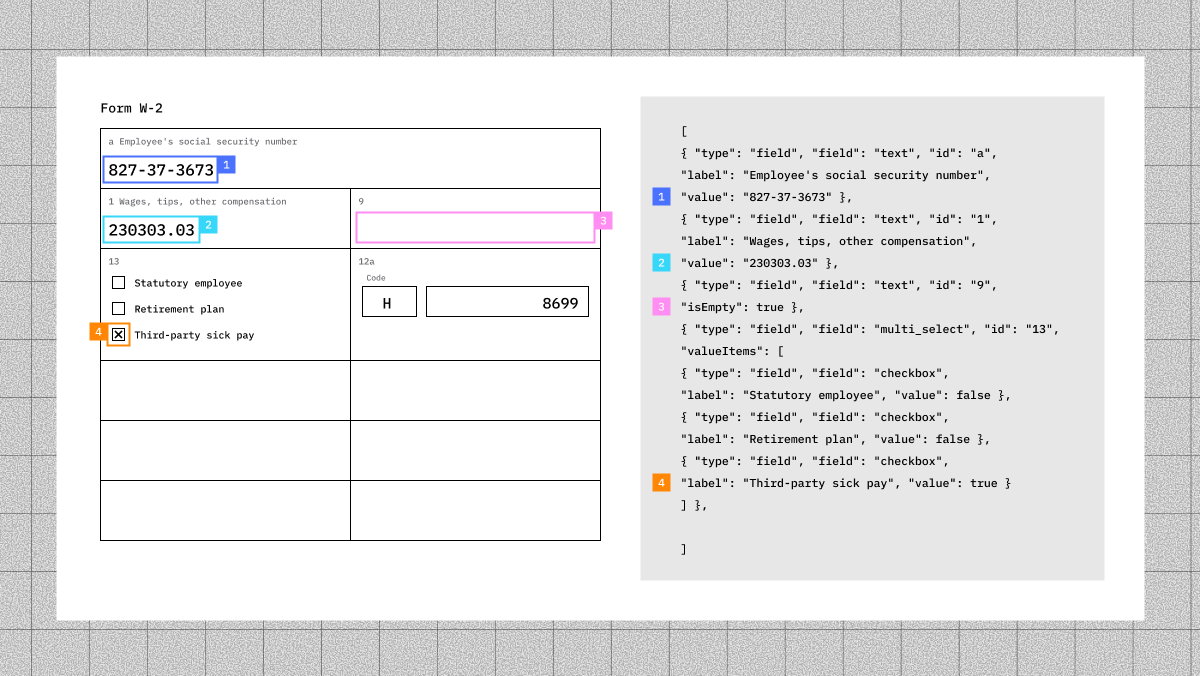
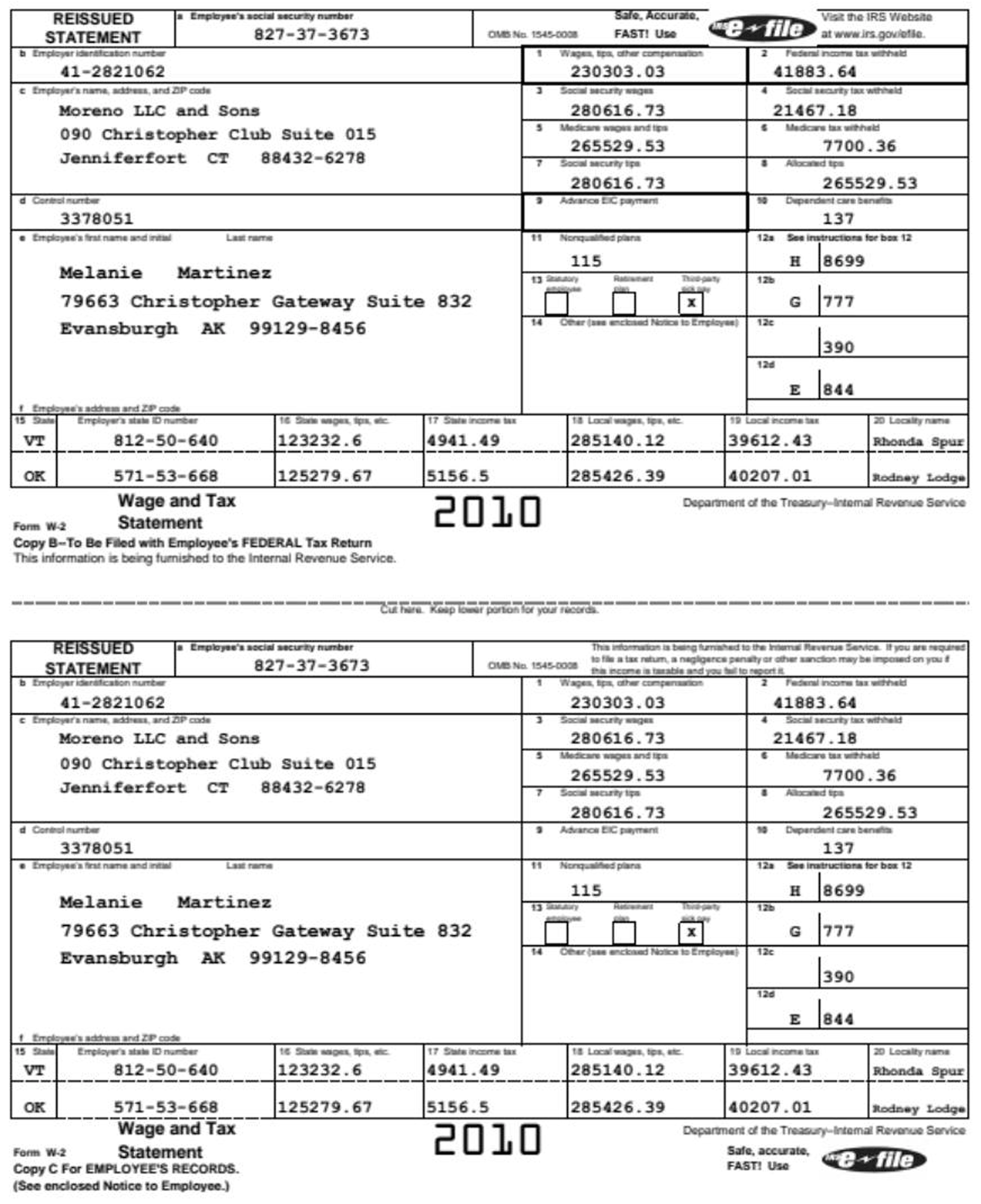
Figure 1 shows how those pieces fit together on a W-2. Box 1 becomes a text field with the id 1 , the label Wages, tips, other compensation and the value 230303.03 . Box 13 stays one group with three checkbox options. Box 9 is empty, but it is still present in the output.
View JSON output
json
[
  {
    "type": "field",
    "field": "text",
    "id": "a",
    "label": "Employee's social security number",
    "value": "827-37-3673"
  },
  {
    "type": "field",
    "field": "text",
    "id": "1",
    "label": "Wages, tips, other compensation",
    "value": "230303.03"
  },
  {
    "type": "field",
    "field": "text",
    "id": "9",
    "isEmpty": true
  },
  {
    "type": "field",
    "field": "multi_select",
    "id": "13",
    "valueItems": [
      {
        "type": "field",
        "field": "checkbox",
        "label": "Statutory employee",
        "value": false
      },
      {
        "type": "field",
        "field": "checkbox",
        "label": "Retirement plan",
        "value": false
      },
      {
        "type": "field",
        "field": "checkbox",
        "label": "Third-party sick pay",
        "value": true
      }
    ]
  },
  {
    "type": "section",
    "id": "12a",
    "items": [
      {
        "type": "field",
        "field": "text",
        "label": "Code",
        "value": "H"
      },
      {
        "type": "field",
        "field": "text",
        "value": "8699"
      }
    ]
  }
]
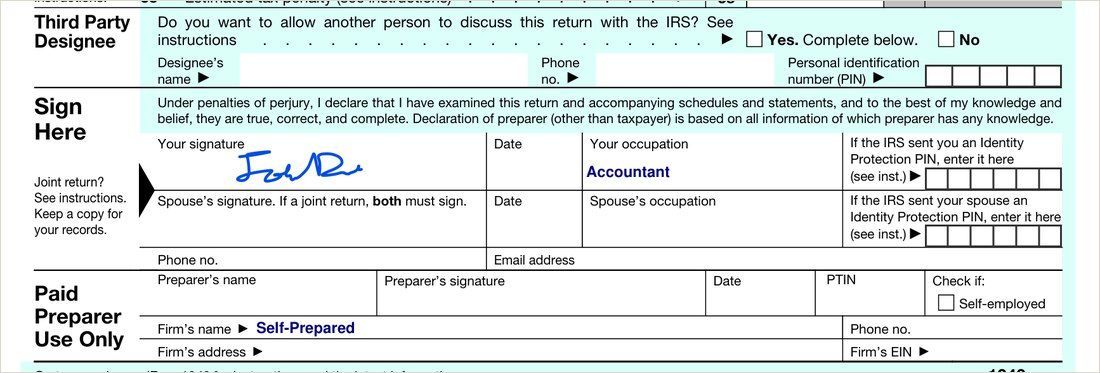
While getting the individual fields right is the first step, the output also has to preserve how they relate to one another. Figure 2 shows two printed sections with separate “Date” fields. A flat list of elements loses which section each field came from, so the two Date fields would become indistinguishable. LlamaParse instead groups fields into sections, associating each date field with its proper parent section.
json
Flat list
{ signature, "Your signature" }, { text, "Date" }, { text, "Phone no." },
{ text, "Preparer's name" }, { text, "Date" }      // 54 nodes, 0 sections

Grouped into sections
{ section, "Sign Here",              items: [ signature, Date, occupation, Phone ] },
{ section, "Paid Preparer Use Only", items: [ name, Date, PTIN, Phone ] }
                                                            // 28 nodes, 5 sections
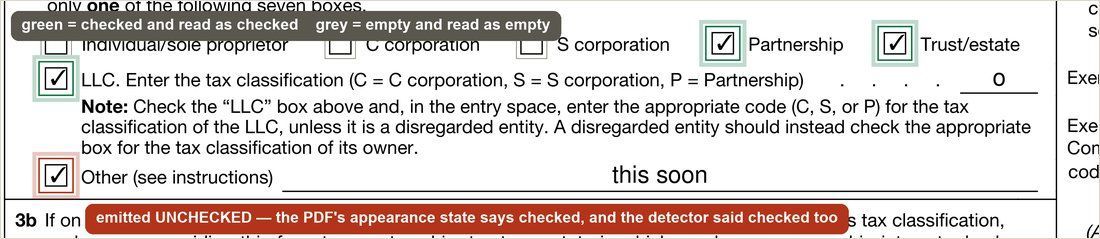
While checkbox state is one of the most critical pieces of information on the form, it’s a challenging task for a VLM since it is reading the entire page and predicting all of its content at once. To overcome the limitations we observe with VLMs, we built a small checkbox-state classifier, which looks at each box individually to predict the state and correct the model’s original prediction.
Figure 3 shows a ticked box that the initial VLM parse returned as false ; our classifier corrects it and reads it as checked with high confidence.
json
before   { "field": "checkbox", "label": "Other (see instructions)", "value": false }
                                          // state model reads that box checked @ 0.94
after    { "field": "checkbox", "label": "Other (see instructions)", "value": true }
                                          // value corrected, box untouched
Finding the boxes
A bounding box is the rectangle around the object you care about, which on a form means a text field or checkbox. Bounding boxes are critical for downstream applications and verification since they let reviewers and the user check against the original document.
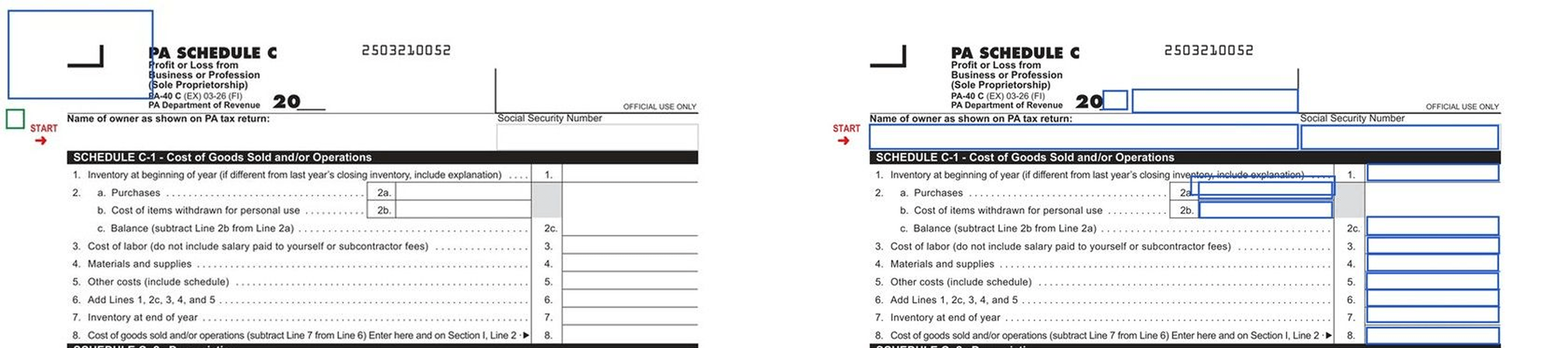
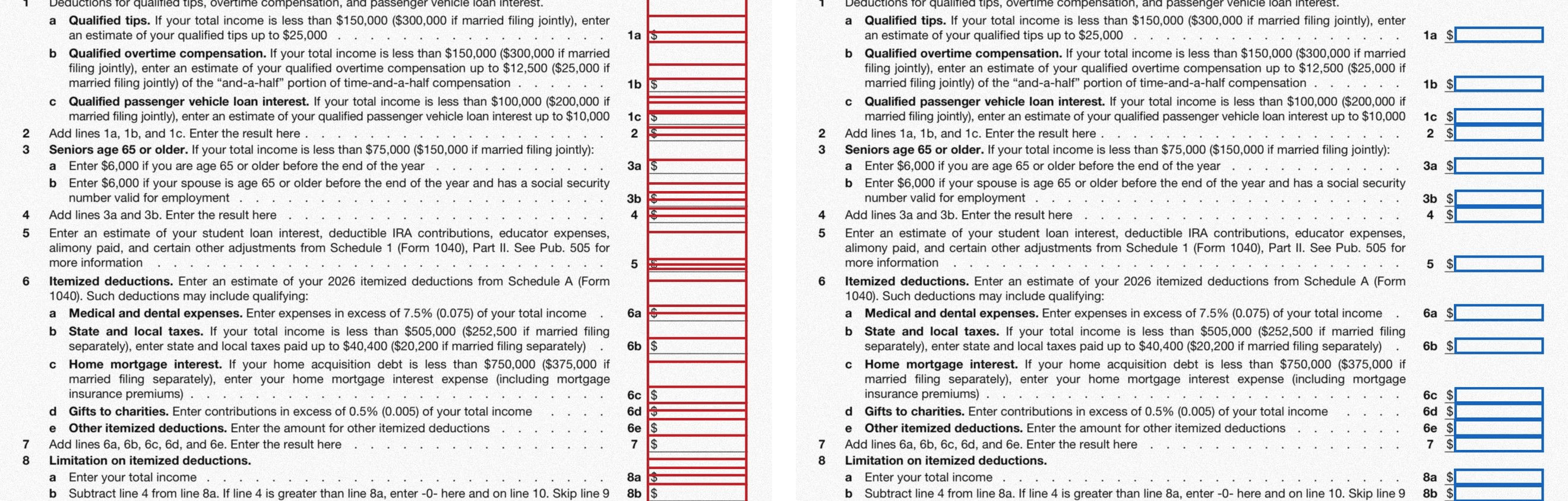
A VLM particularly underperforms at this task and will miss lots of bounding boxes. Using a purpose-built deterministic model results in a far superior outcome. At LlamaIndex, we trained a form bounding box detection model from ground up to greatly improve performance on this task.
Figure 5 shows one observed failure: the raw VLM returned only two boxes in this run, while LlamaParse detected all field bounding boxes.
Even when a VLM manages to output lots of bounding boxes, aligning those detected boxes to real boxes on the page remains a challenge for VLMs.
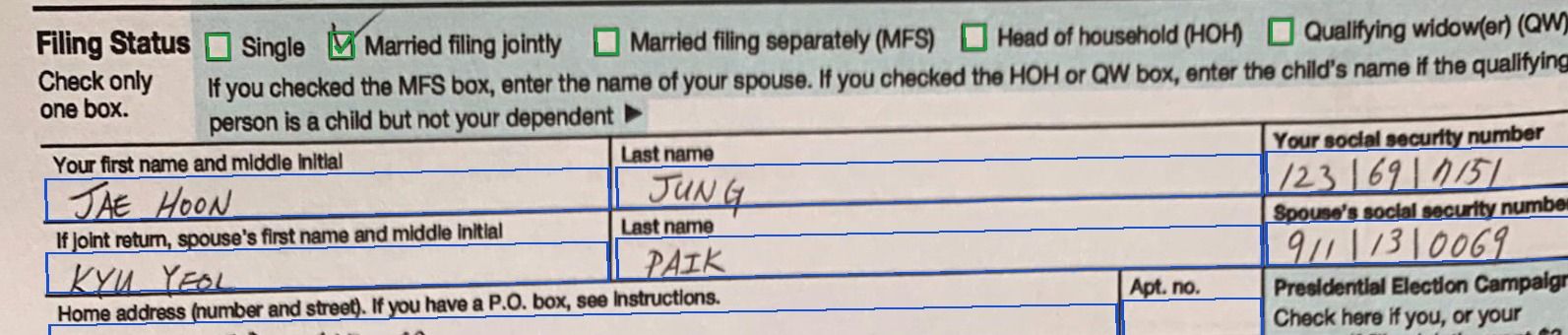
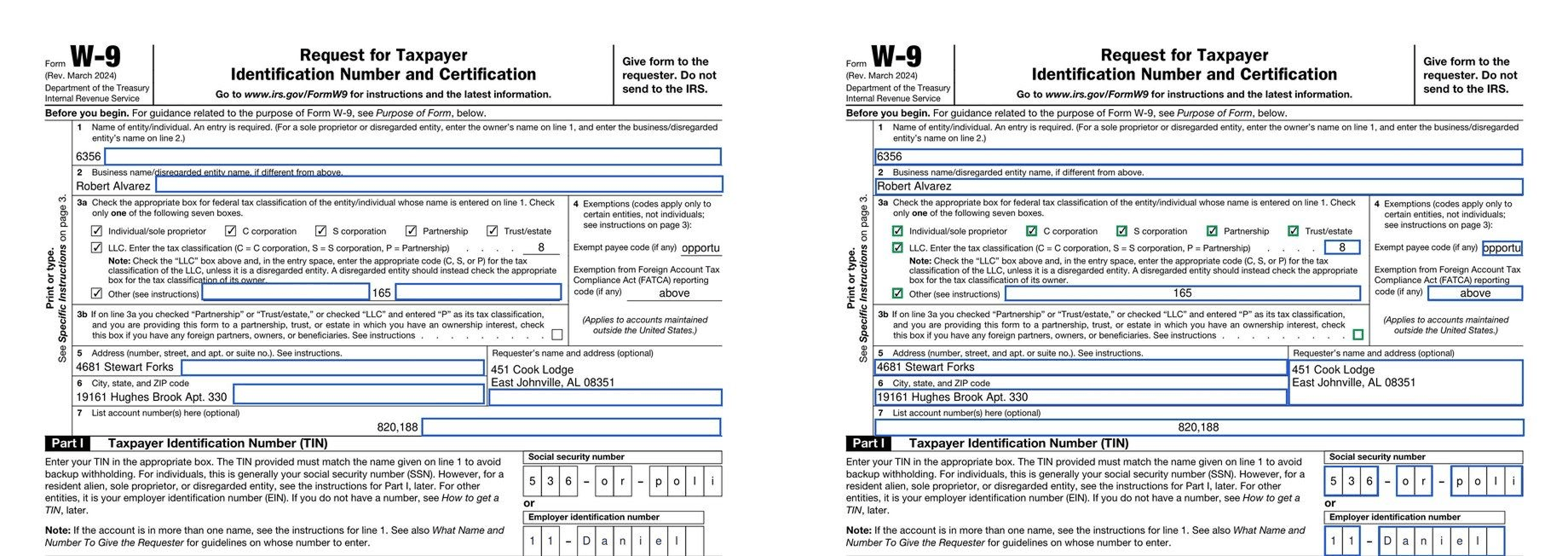
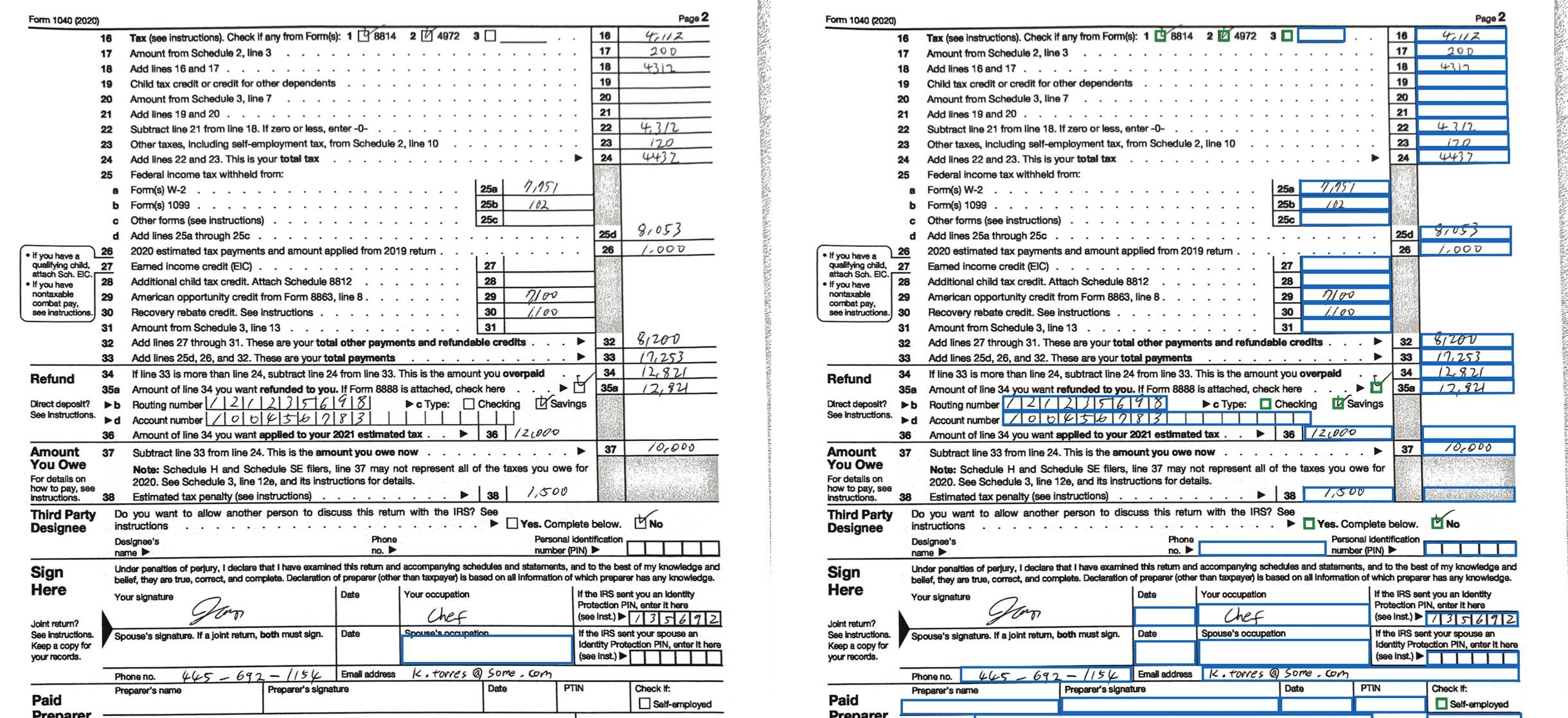
There are also some open-weight models, such as FFDNet, that are built and measured on digital forms, and they can beat a VLM on accuracy. But the open models are trained and benchmarked on blank digital forms, and lack the robustness for filled data or scans. Figure 7 shows these failures on a filled W-9, while Figure 8 shows them on a scanned, hand-filled 1040.
Attributing boxes to fields
Attribution is what makes AI document processing auditable. Once bounding boxes have been extracted, they have to be linked back to the form element they correspond to.
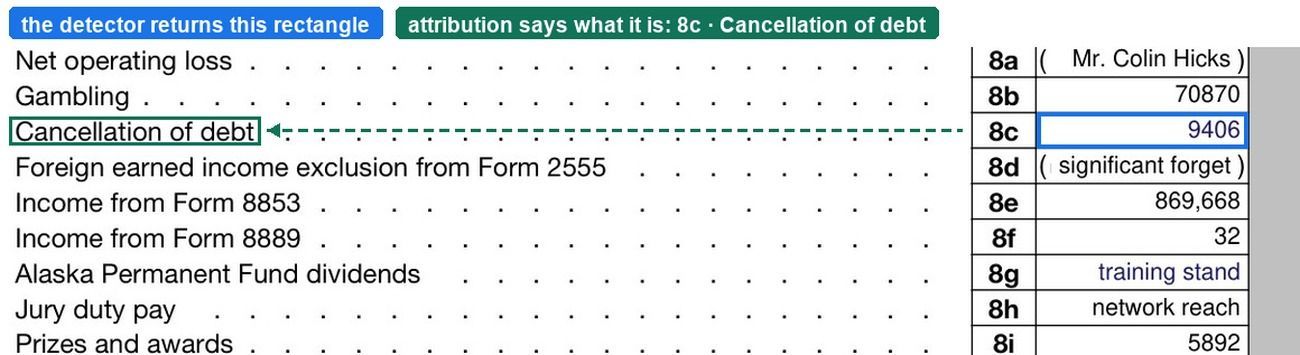
A general VLM can attempt this attribution, but with limited reliability. Matching a bounding box to the right content requires understanding what each component in a form means. The complexity grows as the form becomes denser. Unfortunately, matching can fail silently even when the text is read perfectly. Figure 10 shows a VLM attribution failure: the model returns the correct value for line 8b, 70870 , but attaches its bounding box to line 8a.

Parsing forms with LlamaParse
Forms pose a unique set of challenges. Parsing them correctly requires a purpose-built solution that can represent the form’s structure, detect bounding boxes, and attribute each box to the right element so its source can be tracked. At LlamaIndex, we have developed a form-parsing solution that outperforms VLMs at a fraction of the price.
To try it on your own form, add one option to a parse request. Enriched forms runs on the cost_effective , agentic and agentic_plus tiers and adds 10 credits per form page (it adds 0 credits for pages that don’t contain forms).
python
from llama_cloud import LlamaCloud

client = LlamaCloud()  # reads LLAMA_CLOUD_API_KEY from the environment

file = client.files.create(file="w2-2024.pdf", purpose="parse")
result = client.parsing.parse(
    file_id=file.id,
    tier="agentic",
    version="latest",
    processing_options={"forms": "enrich"},   # run the form pass
    expand=["forms"],
)

for page in result.forms.pages:
    for form in page.forms:
        for node in form.json_:   # FormNode tree, in reading order
            print(node)
The first field of a W-2 comes back like this — the value as printed, and the box it was read from:
json
{
  "type": "field",
  "field": "text",
  "id": "1",
  "label": "Wages, tips, other compensation",
  "value": "230303.03",
  "bbox": [{"x": 356.6, "y": 143.2, "w": 96.4, "h": 14.0}]
}
For more information on how to get started, try one of our cookbooks: