Every AI agent needs to read documents. However, most popular document parsing tools are either fast but inaccurate (e.g. pypdf) or VLM-dependent, which is higher accuracy but slower, cloud hosted, or requires local GPU compute. Agents end up waiting (and sometimes timing out) for parsing when what they really need is some rough output to guide their reasoning and continue iterating.
We've spent years building LlamaParse into the most accurate document parser for production AI systems. Along the way, we learned a lot about what fast, lightweight document parsing actually looks like under the hood, and today we're open-sourcing that core as LiteParse.
bash
npm i -g @llamaindex/liteparse
lit parse anything.pdf
LiteParse is a CLI and TS-native library for parsing out layout-aware text from PDFs, Office docs, and images. It runs entirely locally, has zero Python dependencies, and is designed specifically for LLM pipelines and agents. LiteParse is the best AI-native text parsing tool for agents. It’s a great starting point for anyone (or thing) needing real-time, reliable parsing.
LiteParse vs LlamaParse
LiteParse is for coding agents and real-time pipelines where speed, simplicity, and local execution matter. It's the core processing from LlamaParse, open-sourced. The output format is limited (text, screenshots, bounding boxes) since it avoids a lot of processing that typically adds latency.
LlamaParse is for complex document processing where you need higher accuracy on difficult layouts, structured output modes (markdown tables, JSON schemas), and premium OCR. It's a cloud service with proprietary models that can scale, and is not replaced by LiteParse.
If you're building an agent or real-time application that needs to quickly read a PDF and move on, use LiteParse. If you're building a document intelligence product that needs to nail every table, use LlamaParse.
Hyper-tuned for Agents
Creating a parsing tool for agents means understanding how agents iterate when searching documents. We’ve seen Anthropic’s official PDF skill encourage writing python code with tools like pypdf or pdfplumber, but this means the agent is writing new code every time it needs to process PDFs.
Another common pattern we’ve observed is the agent writing code to quickly parse text, and then find screenshots for more detailed analysis. Again, this flow works, but it’s not exactly reusable since the code is typically not portable between documents and chat sessions.
LiteParse is built to handle exactly these flows, for PDFs and beyond. It’s made to pull text out quickly, and provide screenshots for deeper multimodal reasoning.
bash
lit parse report.pdf | grep "table"
...
lit screenshot report.pdf -o "./report_images" --pages "1-3"
This enables a powerful agent pattern: parse text for fast understanding, fall back to screenshots when deeper visual reasoning is needed. We've packaged this as a skill for coding agents.
bash
npx skills add run-llama/llamaparse-agent-skills --skill liteparse Text Output for Modern LLMs
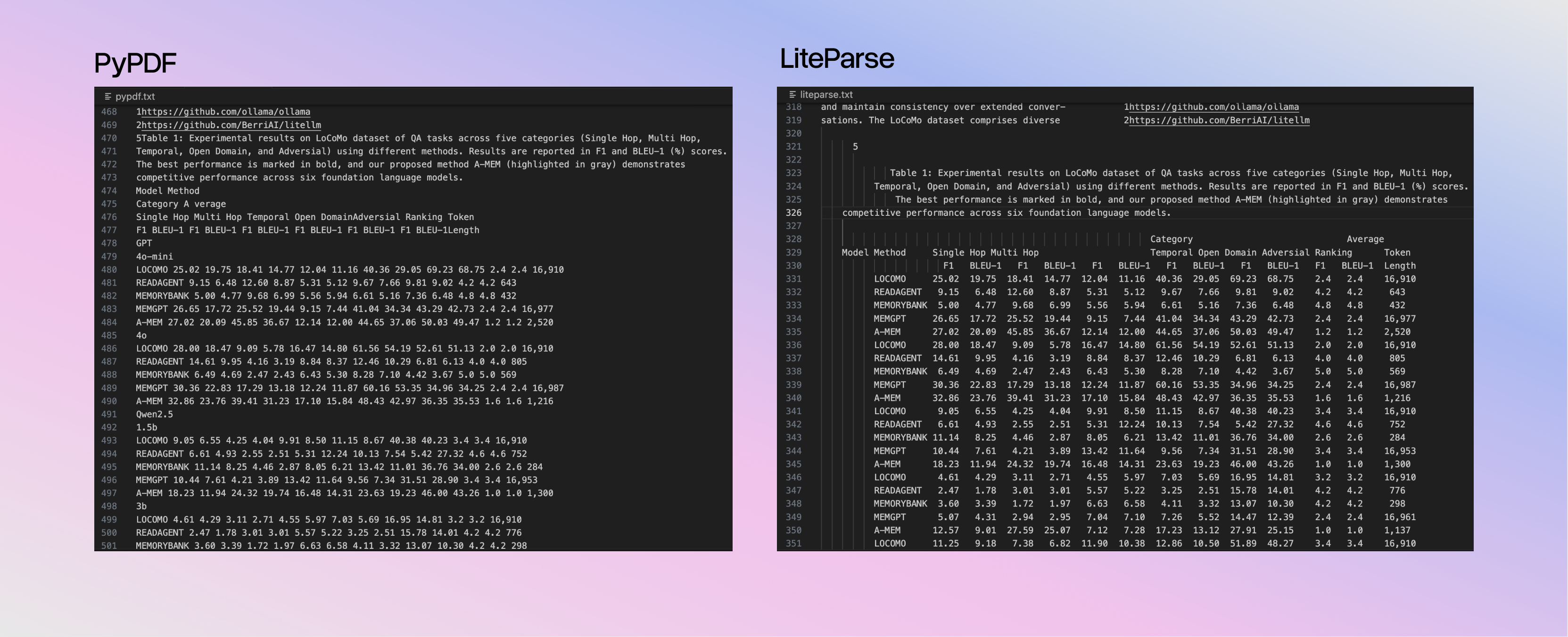
The philosophy is to preserve layout rather than detect structure. Most tools try to identify tables and convert them to markdown, which can just add complexity and failure modes. LiteParse just keeps the spatial relationships intact by projecting text onto a spatial grid.
html
Name        Age    City
John        25     NYC
Jane        30     LA
LLMs already understand this format. They're trained on ASCII tables, code indentation, and READMEs. Why build a complex table-detection pipeline when the model can just read the columns?
Supported Formats
LiteParse handles the most common formats:
- PDFs: Native text parsing with spatial reconstruction. OCR kicks in automatically for scanned pages or embedded images.
- Office docs (DOCX, XLSX, PPTX): Converted to PDF via LibreOffice, then parsed with the same spatial pipeline.
- Images (PNG, JPG, TIFF): Converted to PDF via ImageMagick, then OCR'd.
It’s open source and easy to add more formats, so contributions are welcome! The core pipeline is unified by relying purely on PDFs or converting to PDFs.
Flexible OCR Support
Tesseract.js is built in. While OCR can be computationally demanding, it parallelizes across your CPU cores automatically to handle large docs.
bash
# OCR invoked automatically
lit parse scanned.pdf

# Or point to an external OCR server for better accuracy
lit parse scanned.pdf --ocr-server <http://localhost:8000/ocr>
We included example servers for PaddleOCR and EasyOCR if you need higher accuracy on difficult documents. Any other OCR model can be plugged in as long as it returns bounding-boxes and text.
Benchmarks
To verify the parsing quality of LiteParse (and find/fix bugs!) we conducted rigorous benchmarking. However, all existing OCR datasets that we could find do not account for the way that LiteParse outputs texts. Non-markdown output, line breaks related to layout, font handling, etc. all led to differences that while not incorrect, fail in popular benchmarks like OlmOCR.
Furthermore, we are not trying to benchmark against VLM-based tools (LlamaParse, Docling, etc.). Instead, we wanted to compare to more basic libraries that focus on popular text extraction without VLMs, which included PyPDF, PyMuPDF, and Markitdown.
This led us to creating our own benchmarking and evals pipeline: use an LLM to generate question-answer pairs based off of screenshots, audit the dataset manually, and then evaluate against several parsers with LLM-as-a-judge.
In evals, LiteParse output leads to improved accuracy in page-based QA, with top tier parsing latency for large documents.
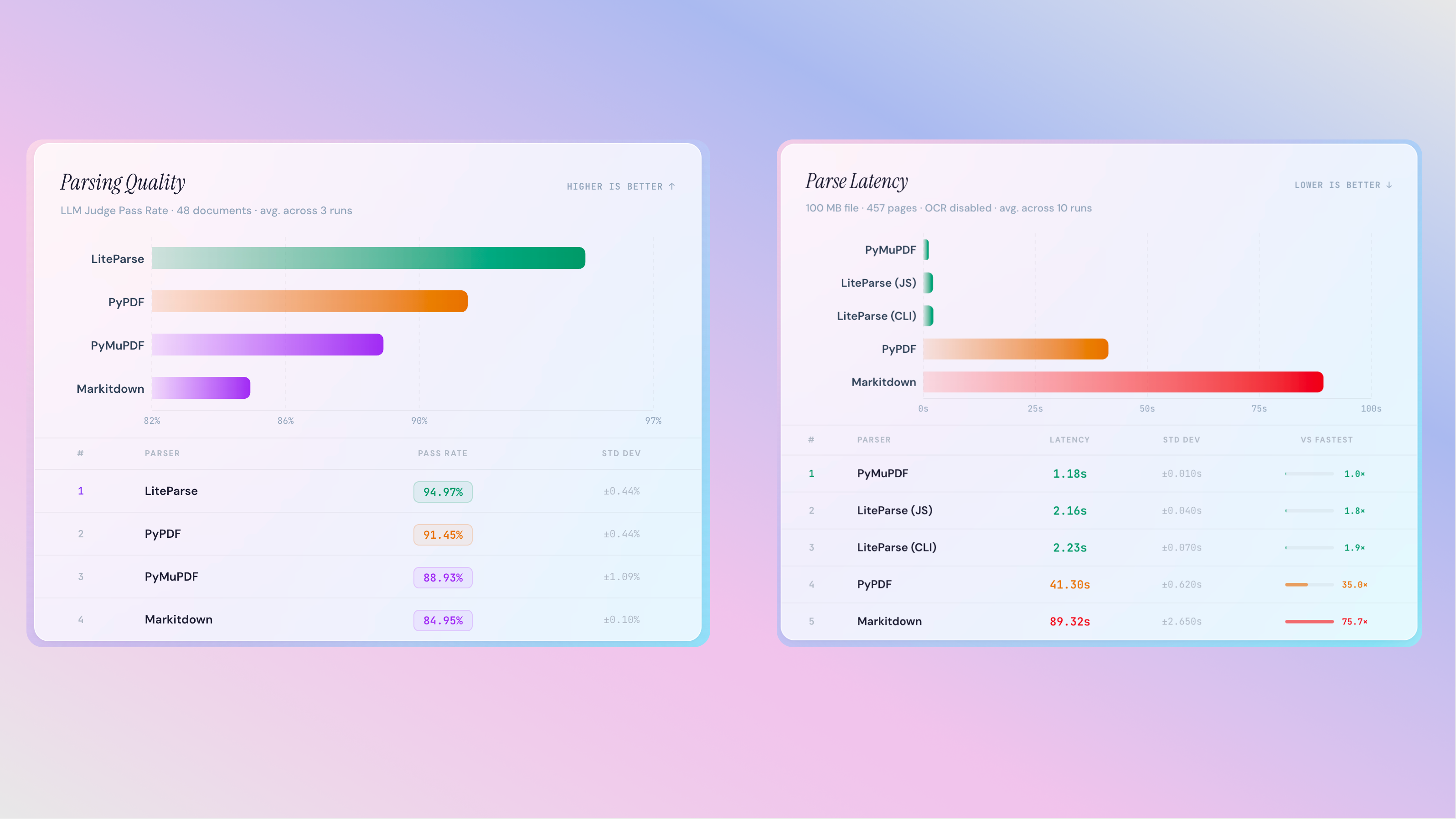
The code for creating the datasets and running the evaluations is available in the GitHub repo, and the dataset itself is available on HuggingFace.
Get Started
Install the CLI and get started instantly:
bash
npm i -g @llamaindex/liteparse
lit parse anything.pdf
In addition to a CLI, you can also use LiteParse programmatically in either JS/TS library (native library):
typescript
// npm i @llamaindex/liteparse
import { LiteParse } from '@llamaindex/liteparse';

const parser = new LiteParse({ ocrEnabled: true });
const result = await parser.parse('document.pdf');
console.log(result.text);
Or in Python (a CLI wrapper):
python
# npm i @llamaindex/liteparse
# pip install liteparse
from liteparse import LiteParse

parser = LiteParse()
result = parser.parse("document.pdf")
print(result.text)