Mortgage loan processors spend a surprising amount of time on what should be mechanical work: pulling numbers out of documents and checking that they match. According to industry estimates, manual document handling consumes 40-60% of a loan processor's time. The average mortgage file is 500+ pages across dozens of document types — tax returns, pay stubs, bank statements, W-2s, the 1003 application, appraisals, title docs, and more.
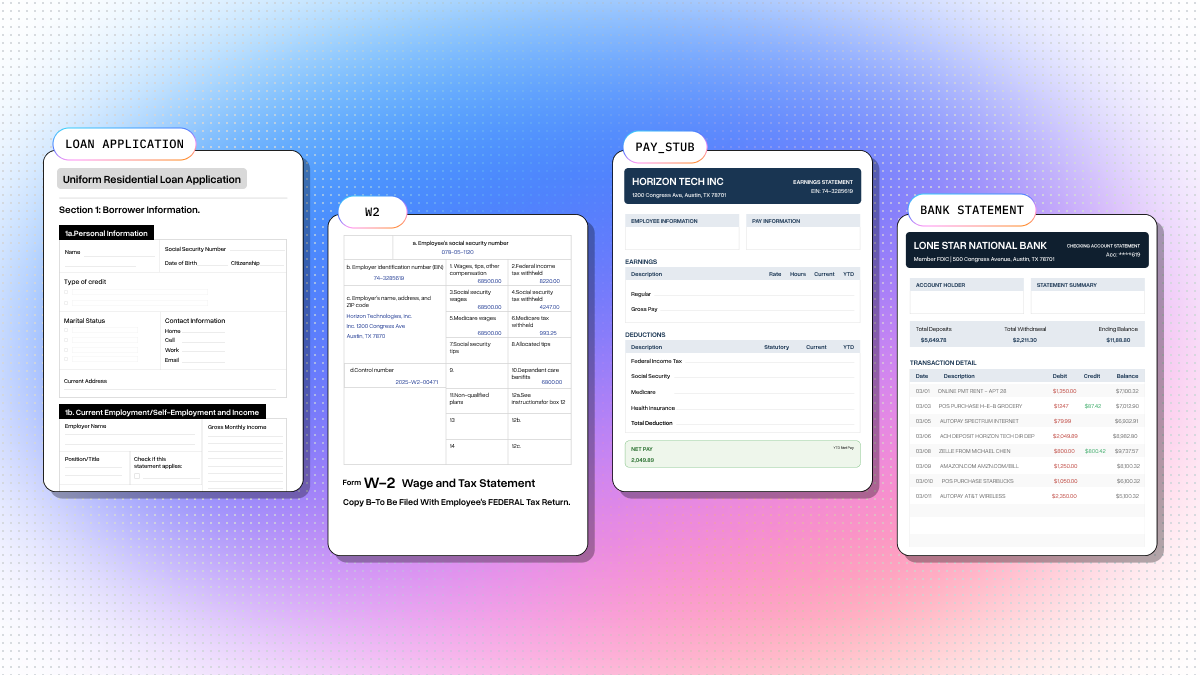
The core challenge is income consistency. The same income figure needs to be verifiable across the loan application (stated income), W-2 (employer-reported annual income), pay stub (current pay rate), and bank statement (actual deposit patterns). Discrepancies like a recent raise, unexplained deposits, or employer name abbreviations are exactly what a processor must catch and document before submitting to underwriting. Companies like Ocrolus have built entire products around automating this cross-source validation.
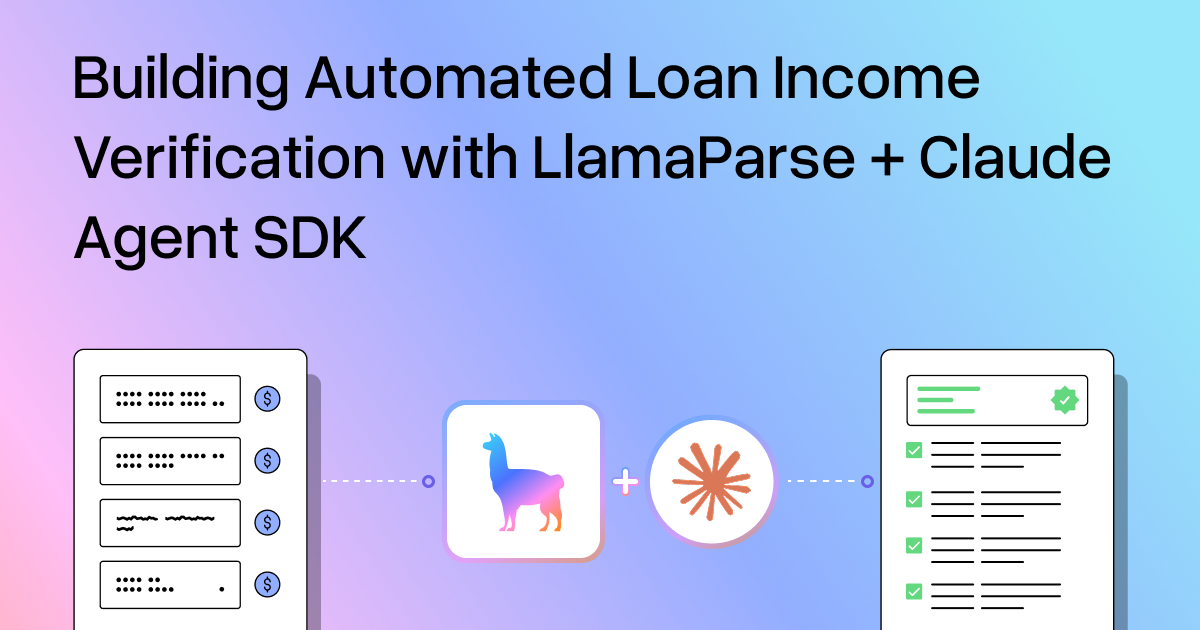
This is a neat use case for LlamaParse and LLMs. Extract handles the structured extraction across wildly different document formats, and Claude reasons about the cross-document relationships. I built a full working pipeline for this, so here's how it works.
What We're Building
A loan income verification pipeline in 3 steps:
- Extract structured data from 4 documents (loan application, W-2, pay stub, bank statement) using Extract
- Cross-validate with Claude structured outputs — income consistency, employer name matching, deposit pattern analysis
- Generate a self-contained HTML report with extraction results, confidence scores, validation checks, and a processor recommendation
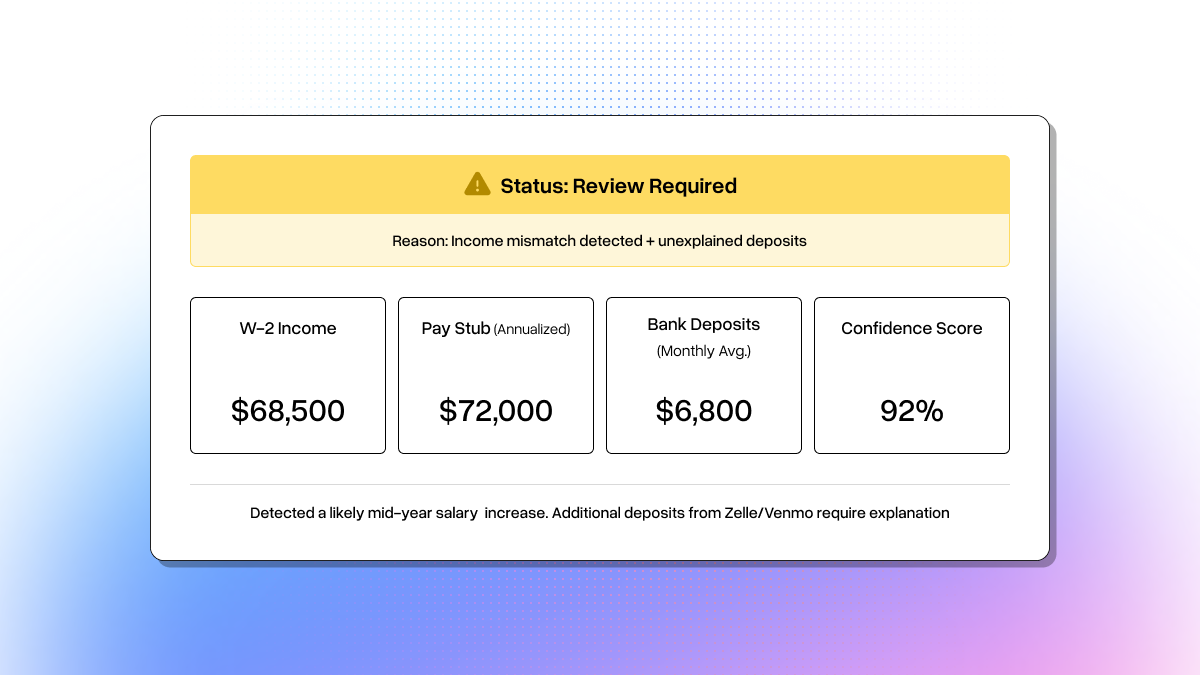
The sample documents use a synthetic borrower (Sarah M. Chen) where the W-2 shows $68,500 (prior year) while the pay stub annualizes to $72,000 (current). That gap is consistent with a mid-year raise, but it still needs documentation. The bank statement also includes unexplained Zelle/Venmo deposits beyond payroll. Claude catches both.
Step 1: Define Extraction Schemas
Each document type gets a Pydantic model. The description field guides Extract on what to look for in each document:
html
from pydantic import BaseModel, Field

class LoanApplication(BaseModel):
    borrower_name: str = Field(description="Full name of the borrower (first middle last)")
    ssn: str = Field(description="Social Security Number (format: XXX-XX-XXXX)")
    date_of_birth: str = Field(description="Date of birth (MM/DD/YYYY)")
    current_address: str = Field(description="Full current residential address")
    employer_name: str = Field(description="Name of current employer")
    position: str = Field(description="Job title or position")
    monthly_income: float = Field(description="Monthly base income in dollars")
    loan_amount: float = Field(description="Requested loan amount in dollars")
    property_address: str = Field(description="Address of the property being purchased")
    property_value: float = Field(description="Estimated property value or purchase price")


class W2Form(BaseModel):
    employee_name: str = Field(description="Full employee name (first and last)")
    employee_ssn: str = Field(description="Employee Social Security Number")
    employer_name: str = Field(description="Employer name and address")
    employer_ein: str = Field(description="Employer Identification Number (EIN)")
    wages_tips_other: float = Field(description="Box 1: Wages, tips, other compensation")
    federal_tax_withheld: float = Field(description="Box 2: Federal income tax withheld")
    social_security_wages: float = Field(description="Box 3: Social security wages")
    medicare_wages: float = Field(description="Box 5: Medicare wages and tips")


class PayStub(BaseModel):
    employee_name: str = Field(description="Employee name (may be in LAST, FIRST format)")
    employer_name: str = Field(description="Employer or company name")
    pay_period_start: str = Field(description="Start date of pay period")
    pay_period_end: str = Field(description="End date of pay period")
    pay_date: str = Field(description="Payment date")
    gross_pay: float = Field(description="Current period gross pay in dollars")
    net_pay: float = Field(description="Current period net pay (take-home) in dollars")
    ytd_gross_pay: float = Field(description="Year-to-date gross pay in dollars")
    ytd_net_pay: float = Field(description="Year-to-date net pay in dollars")
    federal_tax: float = Field(description="Current period federal income tax withheld")
    pay_frequency: str = Field(description="Pay frequency: weekly, biweekly, semi-monthly, or monthly")


class BankStatement(BaseModel):
    account_holder_name: str = Field(description="Name on the account")
    account_number: str = Field(description="Account number (may be partially masked)")
    statement_period_start: str = Field(description="Statement period start date")
    statement_period_end: str = Field(description="Statement period end date")
    opening_balance: float = Field(description="Beginning balance in dollars")
    closing_balance: float = Field(description="Ending balance in dollars")
    total_deposits: float = Field(description="Total deposits/credits in dollars")
    total_withdrawals: float = Field(description="Total withdrawals/debits in dollars")
Pretty straightforward. You define the fields you care about, add descriptions so the model knows what to extract, and Extract handles the rest regardless of whether it's a 15-page AcroForm-filled 1003 or a synthetic reportlab pay stub.
Step 2: Extract with Extract
Upload each document, run extraction with confidence scores and citations enabled, and poll for results:
html
import time
from llama_cloud import LlamaCloud

client = LlamaCloud()  # uses LLAMA_CLOUD_API_KEY env var

def extract_document(client, file_path, schema_class, label=""):
    """Upload a document, extract with schema, return (result_dict, metadata_dict)."""
    file_obj = client.files.create(file=file_path, purpose="extract")

    job = client.extract.create(
        file_input=file_obj.id,
        configuration={
            "data_schema": schema_class.model_json_schema(),
            "tier": "agentic",
            "cite_sources": True,
            "confidence_scores": True,
        },
    )

    while job.status not in ("COMPLETED", "FAILED", "CANCELLED"):
        time.sleep(3)
        job = client.extract.get(job.id)

    if job.status != "COMPLETED":
        raise RuntimeError(f"Extraction failed for {label}: {job.status}")

    result = job.extract_result or {}
    detailed = client.extract.get(job.id, expand=["extract_metadata"])
    return result, metadata
The agentic tier handles all four document formats without any format-specific configuration. You get back structured JSON with per-field confidence scores and source citations pointing to exact text and bounding boxes in the source document.
Here's what comes back for the W-2:
html
{
  "employee_name": "SARAH M. CHEN",
  "employee_ssn": "078-05-1120",
  "employer_name": "Horizon Technologies, Inc.\n1200 Congress Ave\nAustin, TX 78701",
  "employer_ein": "74-3285619",
  "wages_tips_other": 68500.0,
  "federal_tax_withheld": 10275.0,
  "social_security_wages": 68500.0,
  "medicare_wages": 68500.0
}
Clean structured data from a multi-box tax form layout.
The confidence scores and citations are especially useful here. In a production system you'd want to flag any low-confidence extractions for human review before they flow into the validation step.
Step 3: Cross-Validate Income with Claude
This is the cool part. Instead of writing brittle comparison rules, we send all four extraction results to Claude and let it reason about income consistency across the documents. Define the output schema:
html
from typing import Literal
from anthropic import Anthropic

class IncomeCheck(BaseModel):
    check_name: str = Field(description="E.g. 'Stated Income vs W-2 Wages'")
    doc_a_label: str
    doc_a_value: str
    doc_b_label: str
    doc_b_value: str
    passed: bool
    reasoning: str
    check_type: Literal["income", "employer", "deposit"]


class IncomeMetrics(BaseModel):
    stated_annual_income: float
    w2_annual_income: float
    annualized_pay_stub: float
    monthly_income: float
    income_trend: str
    unexplained_deposits: float


class LoanProcessorDecision(BaseModel):
    checks: list[IncomeCheck]
    metrics: IncomeMetrics
    decision: Literal["COMPLETE", "REVIEW", "FLAG"]
    decision_reasoning: str
Then call Claude with structured outputs:
html
def validate_income_with_llm(app_data, w2_data, stub_data, stmt_data):
    client = Anthropic()

    prompt = f"""You are a mortgage loan processor performing income verification.
Cross-validate the income information across these four documents...

Document 1 — Loan Application: {json.dumps(app_data, indent=2)}
Document 2 — W-2 (prior year): {json.dumps(w2_data, indent=2)}
Document 3 — Pay Stub (current): {json.dumps(stub_data, indent=2)}
Document 4 — Bank Statement: {json.dumps(stmt_data, indent=2)}

Perform these checks:
1. Stated Income vs W-2 (flag if >10% discrepancy)
2. Stated Income vs Pay Stub Annualized
3. W-2 vs Pay Stub Annualized (income trend)
4. Pay Stub Net Pay vs Bank Deposits (unexplained deposits)
5. Employer Name Consistency"""

    response = client.messages.parse(
        model="claude-sonnet-4-6",
        max_tokens=4096,
        messages=[{"role": "user", "content": prompt}],
        output_format=LoanProcessorDecision,
    )
    return response.parsed_output
Claude returns a structured decision. Here's what the validation output looks like:
html
[PASS]  Stated Income vs Pay Stub Annualized
        Application: $72,000  |  Pay Stub: $72,000
        Current biweekly gross of $2,769.23 x 26 = $72,000, matches stated income.

[FLAG]  Stated Income vs W-2 Wages
        Application: $72,000  |  W-2: $68,500
        ~5.1% discrepancy. W-2 is prior year — consistent with a mid-year raise.
        Needs raise documentation (promotion letter or updated offer letter).

[FLAG]  Unexplained Bank Deposits
        Expected payroll: ~$2,050 biweekly
        Additional: $800 (Zelle) + $750 (Venmo) = $1,550 unexplained
        Source of these funds needs documentation.

Decision: REVIEW — Income is broadly consistent but the W-2/pay stub gap
needs raise documentation, and $1,550 in unexplained deposits need sourcing.
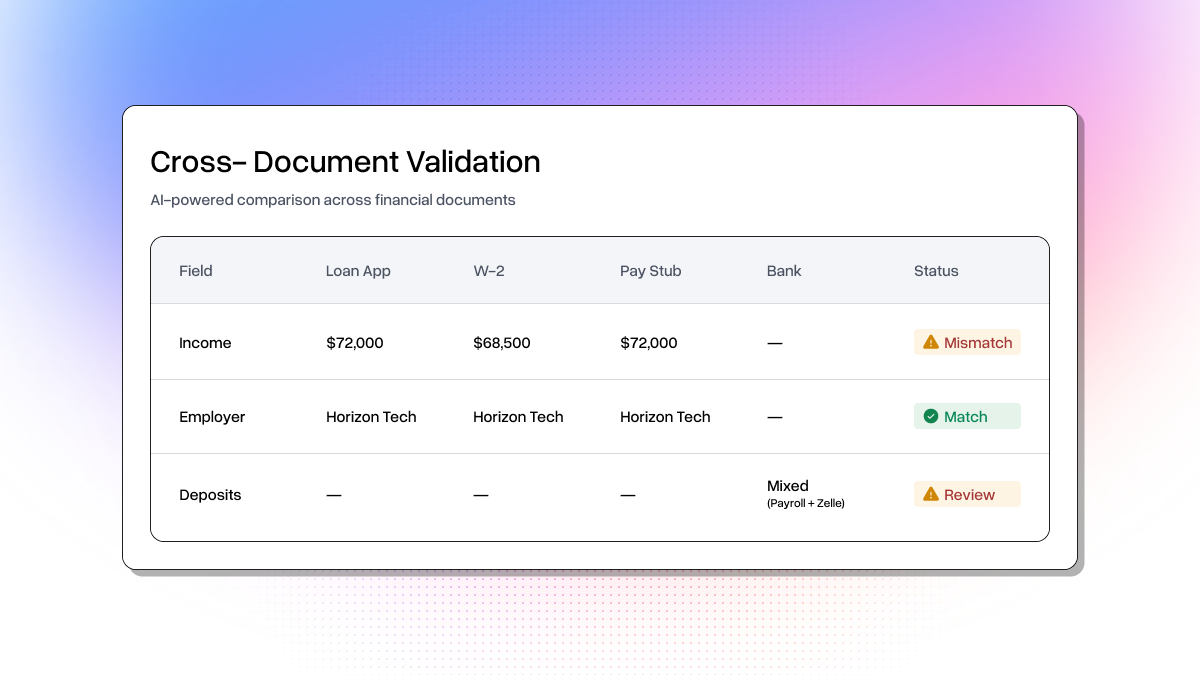
Claude correctly identifies the W-2/pay stub gap as a likely raise (not fraud), but still flags it because the processor needs raise documentation on file. It also catches the Zelle and Venmo deposits that don't match payroll patterns. Exactly the things a human processor would flag, but done in seconds instead of hours.
The Report
The full pipeline generates a self-contained HTML report with income summary cards, document extraction details with confidence scores, a cross-document validation table, and a color-coded decision banner (green for COMPLETE, yellow for REVIEW, red for FLAG).
Running It
html
# Clone the repo
git clone https://github.com/jerryjliu/llamaparse_use_cases.git
cd llamaparse_use_cases/loan_processing/

# Install dependencies
pip install 'llama-cloud>=2.1' anthropic pydantic pypdf reportlab requests

# Set API keys
export LLAMA_CLOUD_API_KEY=llx-...
export ANTHROPIC_API_KEY=sk-ant-...

# Generate sample documents
python sample_docs/generate_docs.py

# Run the full pipeline
python loan_pipeline.py

# View the report
open output/loan_report.html
The whole thing runs e2e in a few minutes. The sample doc generation downloads the actual Fannie Mae 1003 URLA form and an IRS W-2 template, fills them via AcroForm, and generates synthetic pay stub and bank statement PDFs with reportlab — so you're testing against realistic document formats, not toy examples.
Try It Out
The same pattern here applies to insurance claims, contract review, compliance audits, and plenty of other document-heavy workflows: schema-driven extraction with Extract, cross-document validation with an LLM, and structured report generation.
- Get your LlamaParse API key and try the full loan processing pipeline
- Check out the llamaparse_use_cases repo for more examples across different industries
- Read the Extract docs to build your own extraction pipelines