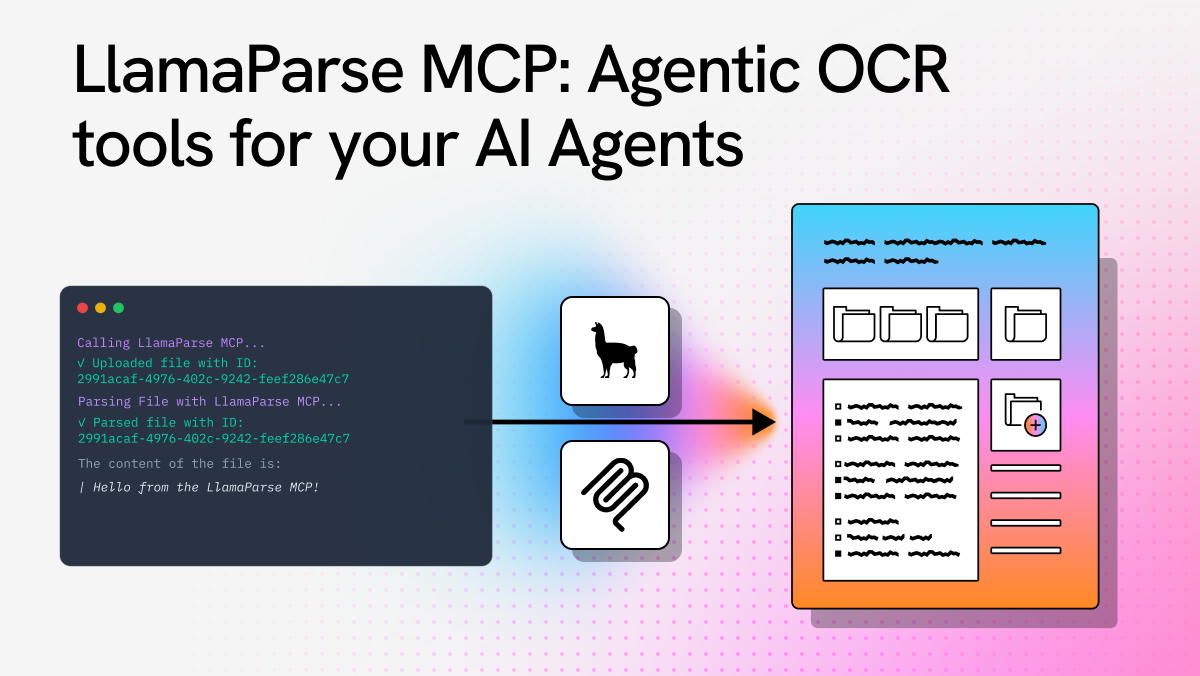
We recently refactored the LlamaParse Platform MCP, shifting its focus from storage and retrieval toward document processing powered by our Parse, Classify, and Split services. In this post, we cover what the MCP exposes, how to connect to it, and the design decisions that shaped its implementation.
Using the MCP
The LlamaParse MCP server is live at https://mcp.llamaindex.ai/mcp : you can connect any MCP-compatible client to it and sign in with your LlamaCloud account to get started.
Tools
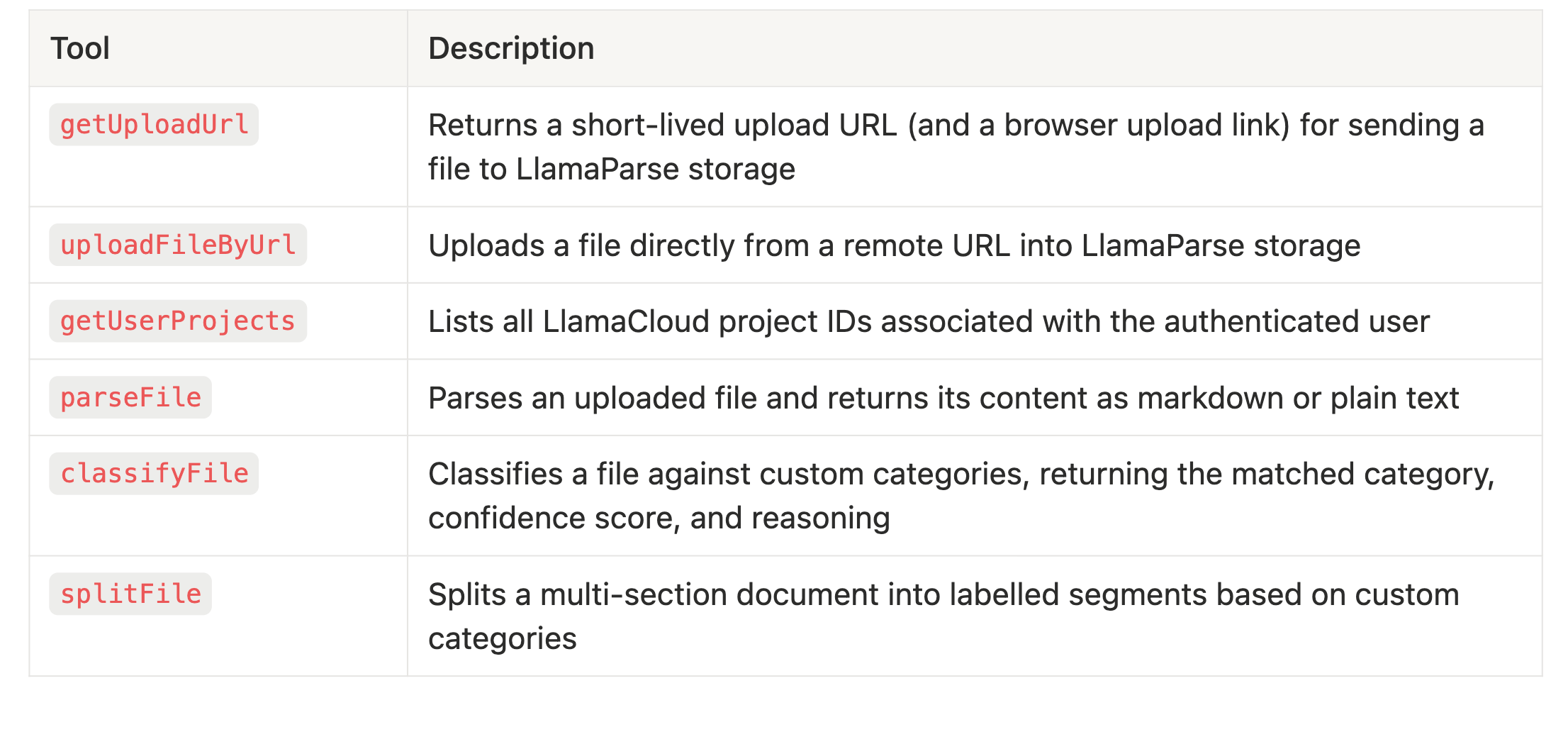
Connecting your client
Claude Desktop — add to ~/Library/Application Support/Claude/claude_desktop_config.json (macOS) or %APPDATA%\\Claude\\claude_desktop_config.json (Windows):
html
{
  "mcpServers": {
    "llamaparse": {
      "type": "http",
      "url": "https://mcp.llamaindex.ai/mcp"
    }
  }
}
Restart Claude Desktop, then run /mcp , select llamaparse, and click Re-authenticate.
Claude Code:
html
claude mcp add --transport http llamaparse https://mcp.llamaindex.ai/mcp Run /mcp inside a Claude session, select llamaparse, and complete the OAuth flow in your browser.
Cursor — add to ~/.cursor/mcp.json :
html
{
  "mcpServers": {
    "llamaparse": {
      "type": "http",
      "url": "https://mcp.llamaindex.ai/mcp"
    }
  }
}
GitHub Copilot (VS Code) — add to settings.json :
html
{
  "mcp": {
    "servers": {
      "llamaparse": {
        "type": "http",
        "url": "https://mcp.llamaindex.ai/mcp"
      }
    }
  }
}
On first use, each client will redirect you to authenticate with your LlamaCloud account. The OAuth flow takes seconds and tokens refresh automatically.
OAuth
Authentication is a critical component of any MCP server, enabling granular access control over the tools, resources, and prompts it exposes, rather than making everything available to every caller.
Beyond access control, authentication also lets you verify user identity, opening the door to integrating with third-party services that share the same backend, enabling seamless and secure cross-system interactions.
This is the approach we took when redesigning our MCP's OAuth flow. Instead of relying on Google as a provider alongside manually entered API keys, we adopted WorkOS OAuth, aligning MCP authentication with the same system we use across the LlamaParse Platform.
Starting from a reference implementation, we configured our MCP server (built on @vercel/mcp-adapter ) to validate every incoming request. Each request must include an access token, which is used to verify user identity and passed downstream as a bearer token for requests to the LlamaParse Platform API. Here is a visualization of the flow:
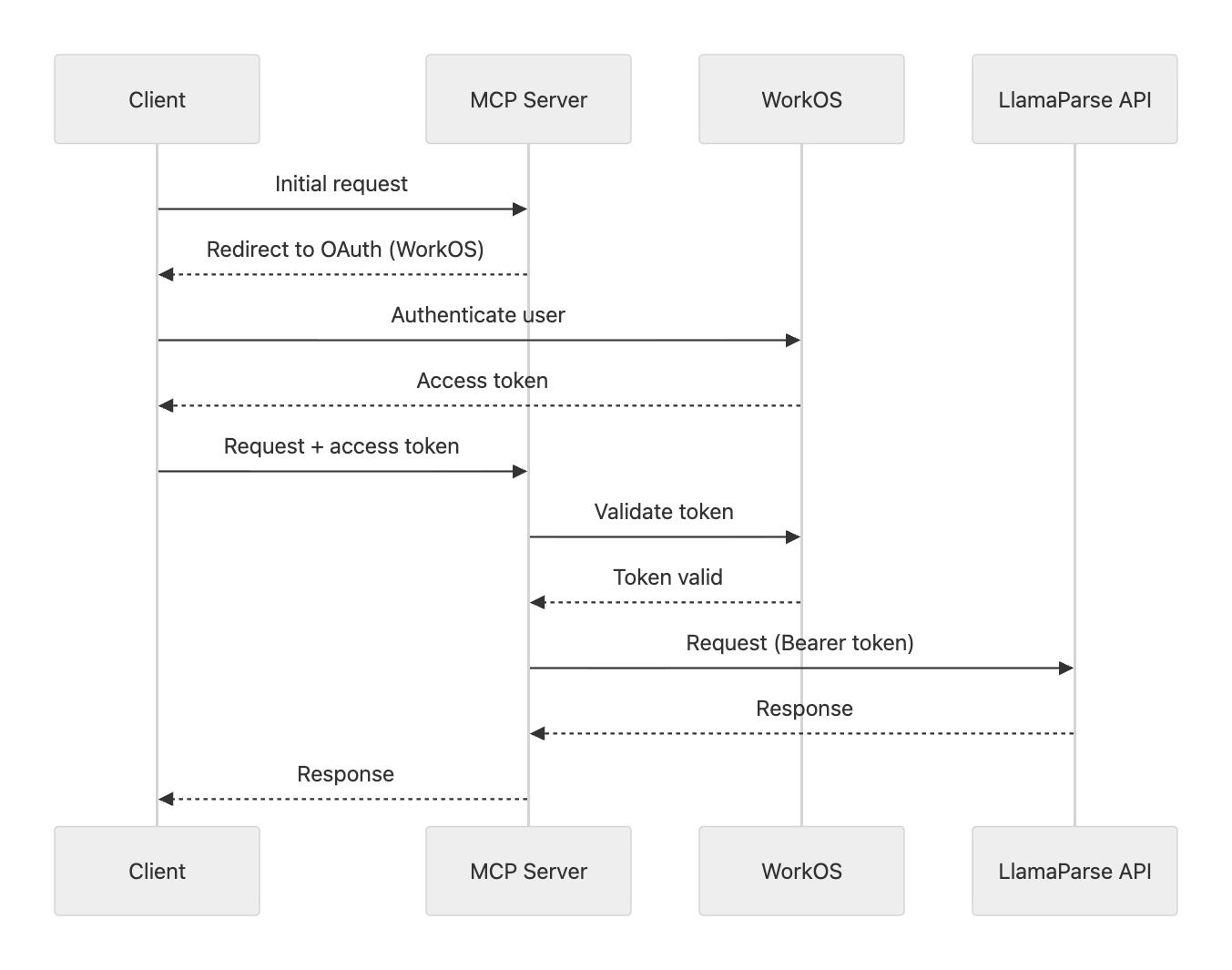
The OAuth flow typically completes in a few seconds and is triggered automatically on first request. When the access token expires, clients prompt for re-authentication.
What makes this approach well-suited to MCP is that it aligns the server's identity model with the broader platform: users authenticate once and the same credentials gate access to all LlamaParse services, and there is no separate API key to copy, store, or rotate.
File Uploads
The LlamaParse platform is fundamentally file-centric: each core service (Parse, Classify, Extract, and Split) operates directly on files. This presents a challenge in the context of MCP, where servers do not natively support file uploads. Instead, all tool parameters must be generated directly by the model, with no built-in mechanisms for handling large or opaque client-provided resources.
For smaller files, one approach we explored was base64 encoding, allowing the LLM to reconstruct and write the file from encoded bytes. While this method is technically feasible and worked in practice, it introduces significant inefficiencies. Transmitting raw file data through an LLM as tokens is highly resource-intensive, comparable to describing an image pixel by pixel over a phone call.
Even for relatively simple text files, base64 encoding inflates the size substantially, resulting in roughly one token per character. This leads to disproportionately high computational and cost overhead for what would otherwise be trivial data transfer.
URL-based uploads
To address these limitations, we moved away from chunked uploads and introduced two complementary tools:
-
uploadFileByUrl: accepts a public file URL, fetches the file as binary data, and uploads it directly to the LlamaParse Platform. This approach carries inherent SSRF risks: an attacker could supply a crafted URL to probe internal services or exfiltrate cloud metadata. In our case, these risks are mitigated by the fact that the tool is running in an isolated network with no access to internal infrastructure or cloud metadata endpoints. -
getUploadUrl: generates a temporary, authenticated upload endpoint that clients can use to upload files via a standardPOSTrequest.
Upload-by-URL flow (token-based upload endpoint)
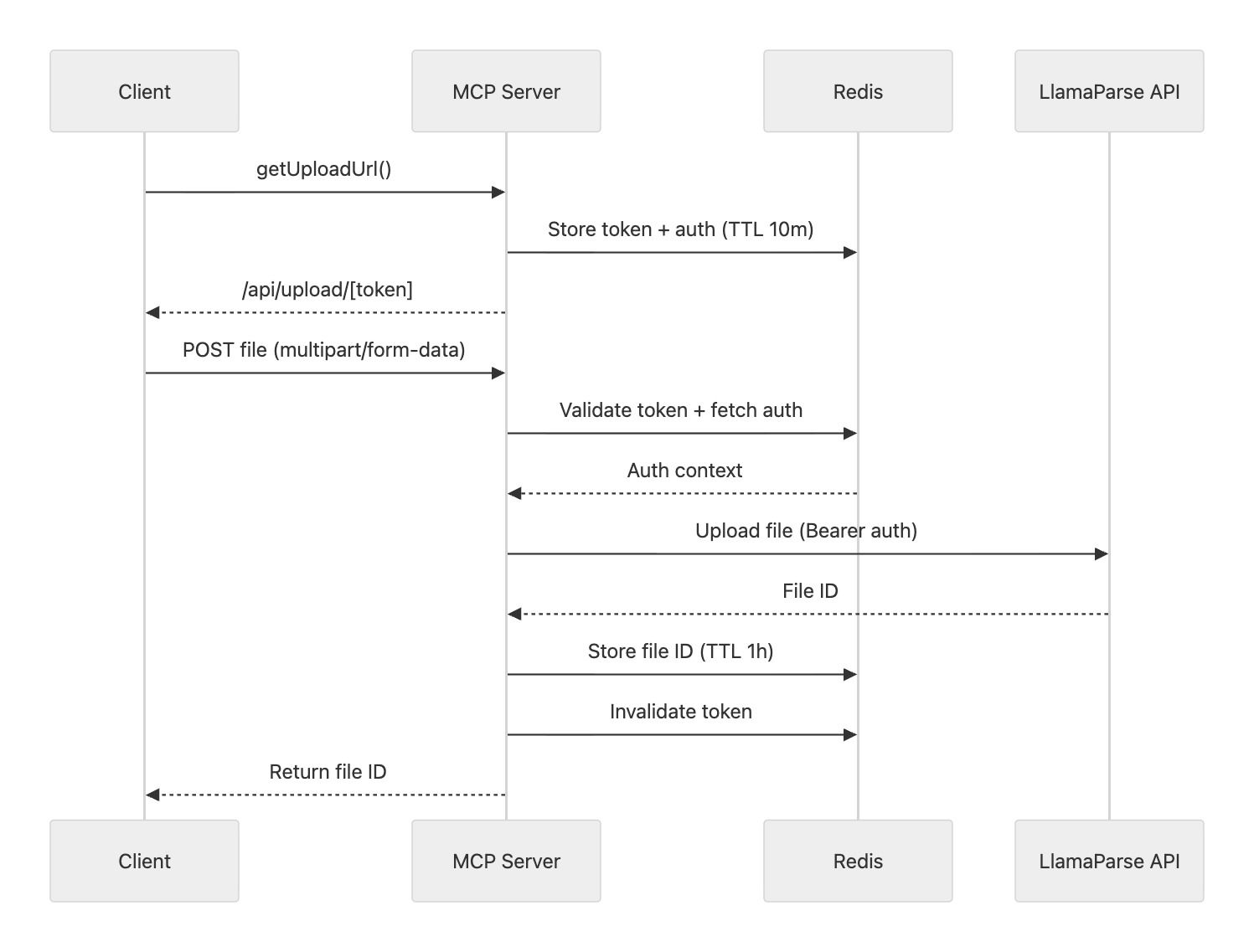
The getUploadUrl tool powers a more scalable and user-friendly upload flow:
- A random 48-byte token (URL-safe base64) is generated.
- The token, along with the user’s auth context, is stored in Redis with a TTL of 10 minutes.
- The tool returns a URL pointing to
/api/upload/[token].
Clients can then upload files directly to this endpoint using multipart form data. The server validates the token, retrieves the associated auth context, and forwards the file to the LlamaParse Platform. Upon success, the token is invalidated and the uploaded file ID is returned.
To improve resilience, the file ID is also cached in Redis (TTL: 1 hour) and associated with the token, so that repeated requests with the same token return the same result.
For agents without direct HTTP tooling (e.g., no bash access), users can alternatively visit /upload/[token] and upload the file through a simple UI.
Observability and Rate Limiting
To keep the server production-ready, we added lightweight observability and abuse protection. Every tool call is traced with OpenTelemetry (via @vercel/otel ), capturing duration, inputs, outputs, and errors, with spans exported via OTLP to Axiom for end-to-end visibility. Rate limiting is enforced at the /mcp entry point: 100 requests per minute per user using a sliding window strategy with rate-limiter-flexible . Clients that exceed the limit receive a Retry-After header that agents can surface directly to users.
Deployment
The server runs on Vercel as a Next.js application, which lets us co-locate the file upload UI and MCP endpoint in a single codebase. Ephemeral upload tokens are stored in Redis via Upstash. Pull requests automatically deploy to preview environments; main is production.
Conclusion
Building a production-ready MCP server surfaced constraints that aren't obvious when designing traditional APIs: authentication had to align with existing platform identity, file handling needed workarounds for MCP's lack of native upload support, and both observability and rate limiting were essential for safe operation at scale.
If you'd like to use LlamaParse tools in your AI workflow today, point any MCP-compatible client at https://mcp.llamaindex.ai/mcp and sign in with your LlamaCloud account. The full implementation is open source: feel free to explore it, experiment with it, and leave a star if you find it useful: https://github.com/run-llama/mcp-llamaindex-ai