Today we are releasing Turbo in beta, our fastest extraction tier yet, built for real-time workflows where latency is everything. On ExtractBench, it ran roughly four times faster than our Cost Effective mode, with a median processing time of 3.7 seconds per page and an F1 of 0.84 (the benchmark’s measure of value accuracy and completeness). It is live now on the LlamaParse Platform.
The fastest system we evaluated on ExtractBench
Turbo removes the separate parsing pass used by our other tiers. It extracts directly from the document pages and processes them in parallel.
We ran Turbo, our other tiers, and the fastest documented modes from several major providers on ExtractBench, our open benchmark for schema-guided document extraction. Turbo had the lowest median processing time of any system we evaluated.
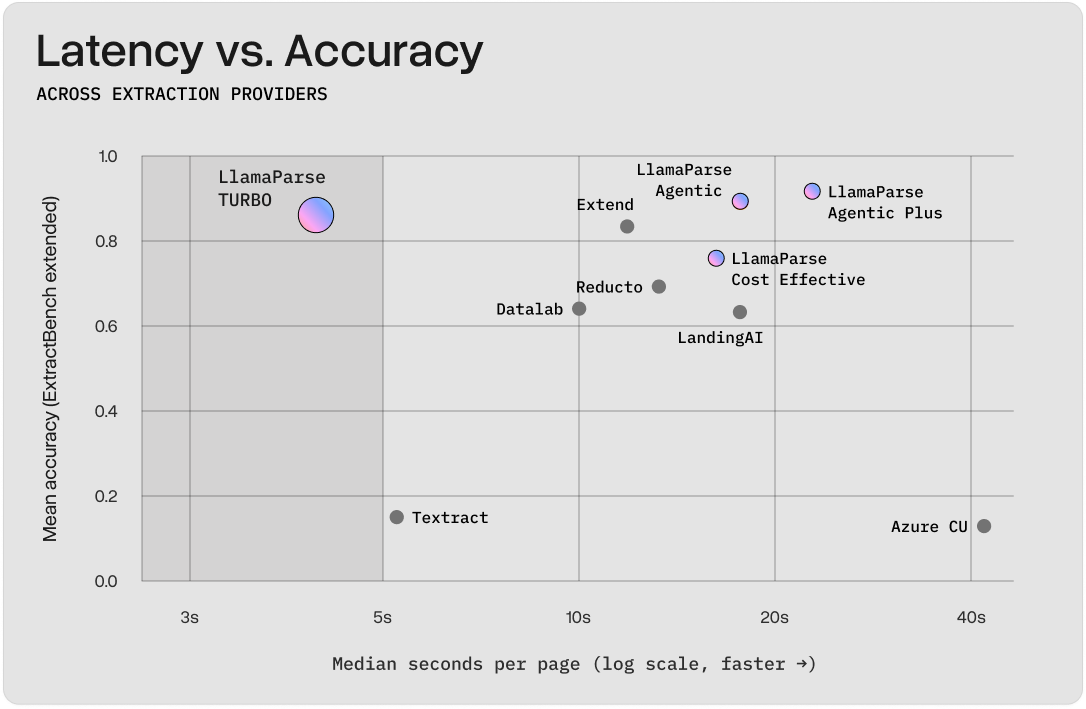
Extend, the next-closest system in accuracy, took 3.5× longer per page.
Document length is where the latency difference shows most prominently. Short documents run at about 3.7 seconds per page. On medium and long documents, Turbo dropped to about half a second per page because pages are processed in parallel. Past about 16 pages, every other system's latency climbs steeply. Turbo's barely moves.
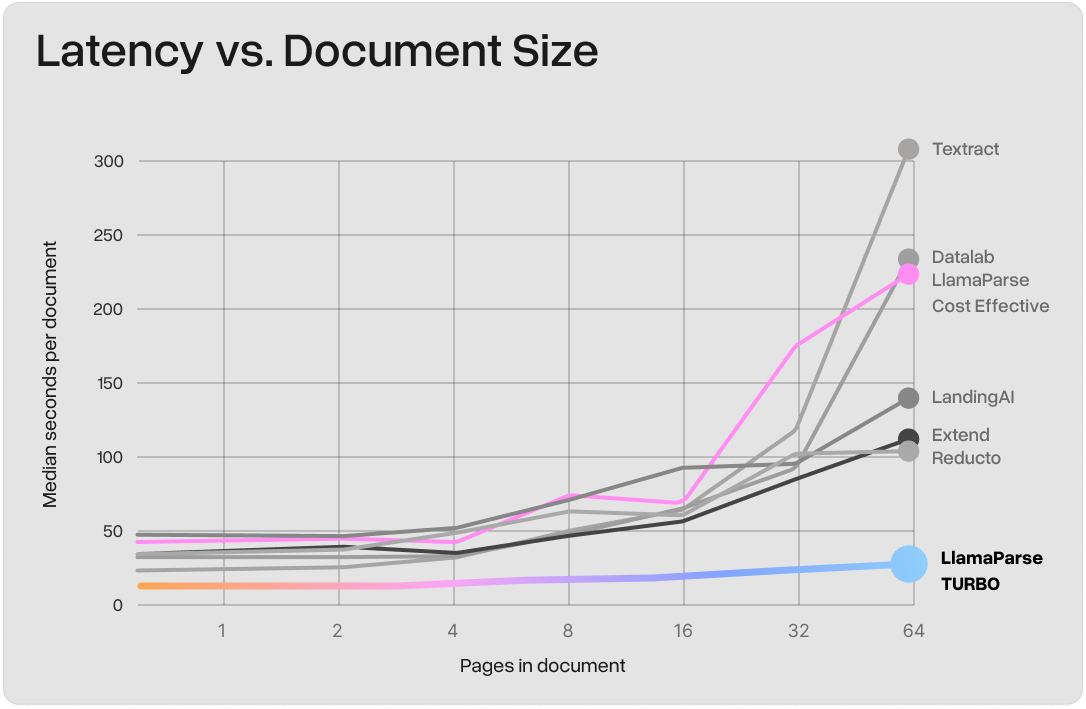
4x+ faster than all other Extract tiers in LlamaParse
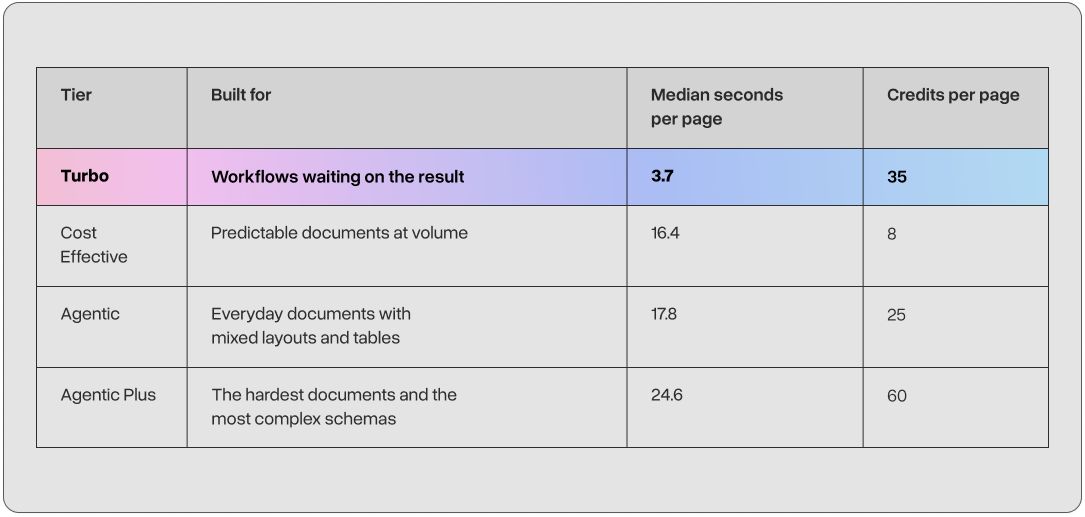
Our Turbo Tier is more than 4x faster than our most affordable Cost Effective tier and higher accuracy Agentic tier. We recommend using Turbo in settings where document complexity is medium and where generating near real-time user experiences is important for the downstream agentic loop.
We recommend using Turbo when extraction sits directly in the response path and every second matters. For background jobs where unit cost matters more than response time, Cost Effective remains the better fit. For the hardest documents and schemas, use Agentic or Agentic Plus.
What people are building
Our customers are already using Turbo in settings where extraction speed is not just a nice-to-have. High-volume, near-realtime workflows where extraction does not become the bottleneck for the rest of your application include:
- Auto-filling forms from uploads. A user uploads an invoice and the fields fill in while they watch. Turbo returns the extraction fast enough to keep the review-and-confirm flow in one sitting.
- Keying in purchase orders. A distributor receives purchase orders as email attachments, and someone retypes every part number and quantity into the order system. Turbo pulls the line items out in seconds, while the reply to the customer is still being written.
- Letting agents act on documents. An agent that has to read a contract or a claim form before its next tool call is only as fast as the extraction. Turbo returns the structured data in seconds, so extraction does not hold up the rest of the task.
What to keep in mind
Turbo is still in beta. It currently supports fewer input types and configuration options than all other Extract Tiers on the LlamaParse Platform. Refer to our docs for an in-depth background. Our team will be rapidly shipping improvements to this tier as we move it from beta to GA.
Try it
bash
curl -X POST 'https://api.cloud.llamaindex.ai/api/v2/extract?project_id={PROJECT_ID}' \
  -H 'Content-Type: application/json' \
  -H "Authorization: Bearer $LLAMA_CLOUD_API_KEY" \
  -d '{
    "file_input": "{FILE_ID}",
    "configuration": {
      "tier": "turbo",
      "data_schema": {
        "type": "object",
        "properties": {
          "vendor": {"type": "string"},
          "invoice_total": {"type": "number"}
        }
      }
    }
  }'
The response comes back with the schema filled in:
json
{
  "data": {
    "vendor": "Acme Industrial Supply",
    "invoice_total": 4820.00
  }
}
Turbo is available today for 35 credits per page. Try it on a latency-sensitive workflow and send us your feedback and the issues you find.