In this blog post, we go through how we improved our LiteParse skill for document parsing from into a cheaper, faster and higher-quality helper by evaluating the agent's usage of it, analyzing traces, and iterating.
Setup
We benchmark Claude's ability to answer questions over real corporate sustainability / ESG reports using the pdfQA-Benchmark ClimateFinanceBench dataset, downloading 30 PDF files along with annotated question-answer pairs.
We then run a Claude Agent (via theclaude-agent-sdk ) over 15 (PDF, question) pair. Every run produces a structured JSON answer and a full JSONL interaction trace.
Each Claude Agent has access to standard tools, is limited to the project scope and is conditionally allowed to invoke a skill based on the evaluation configuration.
We compare several configurations:
-
raw— Claude reads PDFs directly with the built-inReadtool -
liteparse— first cut of a skill wrapping the locallitCLI for fast, model-free PDF parsing. -
liteparse-targeted— a more directive variant. We were trying to get Claude to notice/use LiteParse more often. -
effective-liteparse— a skill optimized for effective LiteParse usage to reduce latency, based on analyzing evaluation traces.
This post is about how the last one came to be.
Why a skill at all?
LiteParse can be used either as a command-line application or as a library for Rust, Python, and JavaScript/TypeScript. Because document parsing is inherently I/O-bound and requires direct access to files or raw bytes, LiteParse is not a natural fit for an MCP server, which does not support file uploads and would require either base64-encoded strings or other workarounds documented in this other blog post.
A skill is therefore the most practical integration pattern. By packaging usage instructions into a markdown file that is injected into the agent’s context, we enable the agent to use the LiteParse CLI as a drop-in replacement for Claude’s built-in PDF reader or alternative parsing tools such as PyMuPDF and pdftotext. Using the CLI also makes it easy to compose LiteParse with standard Unix tools such as grep and sed , allowing agents to filter, search, and transform parsed output without requiring additional tooling.
However, making a tool available is only part of the challenge. The skill instructions must be carefully designed and evaluated so that the agent not only invokes LiteParse when appropriate, but also uses it effectively. A well-crafted skill helps the agent process documents faster, reduce token and compute costs, and achieve higher extraction accuracy than generic parsing approaches.
On the hunt for anti-patterns
After the first two evaluation cycles, we collected the first metrics (latency, turns, costs, tool calls…) and analyzed the JSONL traces from the first skill versions, finding a cluster of recurring, expensive mistakes:
- Re-parsing the same PDF over and over — in the worst trace,
lit parseran 9 times on a single document, once per search. Each call re-extracts the entire PDF. - OCR left on for born-digital PDFs — most ESG reports have a real text layer; running OCR was pure wasted time.
- Reading high-DPI page screenshots into context — a single page PNG cost ~140k characters of context, and agents often rendered the same page twice (default + hi-res).
- Unbounded, shotgun greps — huge keyword alternations dumping 15–25k characters into the conversation.
Despite these anti-patterns, the LiteParse approach showed significant potential. Because parsing is performed externally through the CLI, it is not constrained by the limits of Claude’s native document reader, which currently accepts PDFs of at most 32 MB and 600 pages. In practice, this gives LiteParse effectively unbounded parsing capacity, limited primarily by the available system resources.
That’s why we decided to create the effective-liteparse skill, encoding the fixes as hard rules: parse once to a temp file, then search the file; --no-ocr for born-digital PDFs; screenshots only as a last resort, one page, modest DPI; keep results small.
Besides hardened rules, we noticed that the Claude Agent would often perform several tight iterations with grep , sed and Read to find the right context within the parsed content to complete the evaluation task. In this sense, we expanded the surface of the skill by including a small, self-contained python script that concurrently reads, chunks, indexes and performs BM25-backed retrieval based on a provided. We included, within the skill, the directive to use this script to search more ambiguous keywords, defaulting to lexical search for pattern/substring search.
Parse, but don’t wander off
After the first fixes, a new signal stood out while analyzing the traces: effective-liteparse was cheaper but slower than raw Claude Code, and the cause was the number turns, not parsing per-se. The most called tools after parsing were grep andsed , used in a serial loop: grep → look → refine grep → a separate sed turn to read the window → grep again, with each turn being a full API roundtrip.
Ironically, two of our own earlier rules made this worse: "locate first, then read the window with sed " split every lookup into two turns, **and "don't shotgun" nudged the model toward many tiny serial greps. So we changed the guidance to minimize round-trips:
- Get context in the same command —
grep -n -i -C4 "term"returns the hit and its window in one turn, removing the follow-upsed. - Batch independent lookups into one command — a labeled
forloop probes several facts at once instead of one grep per turn. - A hard search budget — resolve in ≤3 commands; after two unsuccessful greps, fall back to the BM25 ranker once instead of firing keyword variants forever.
The traces confirmed adoption: a new for -loop batching pattern appeared in the post-parse tool mix, and average turns dropped by approx. 15% (13.1 → 11.1).
The numbers
We score answers with an LLM-as-judge panel (Gemini and GPT, each rating the answer and the reasoning behind it), and measure efficiency with trace analysis, on a matched 15-question subset.
Quality (LLM-as-judge, avg score, higher is better):
| Metric | raw | effective-liteparse |
|---|---|---|
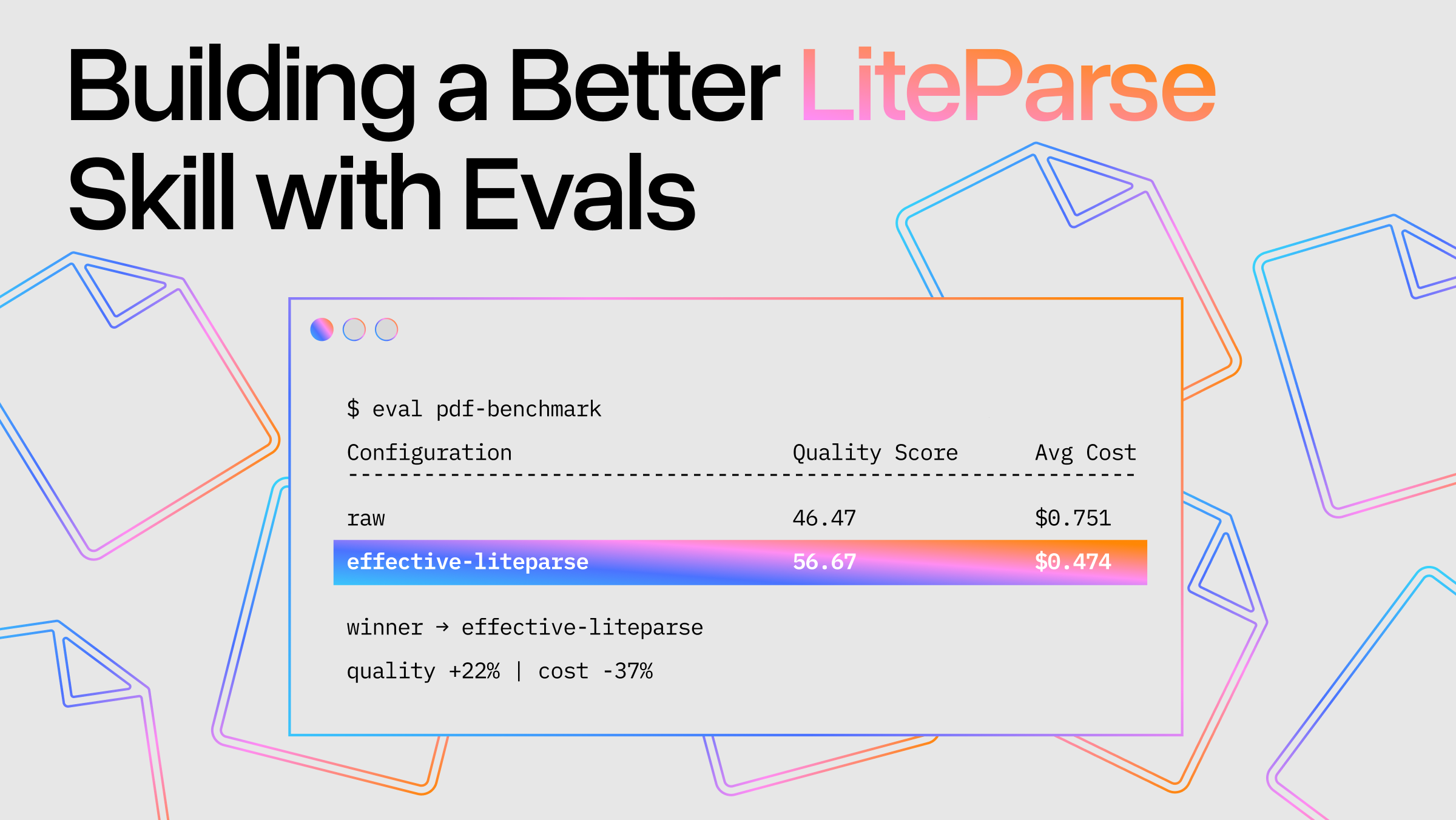
| Overall answer | 46.47 | 56.67 |
| Overall reasoning | 58.47 | 65.90 |
| Gemini answer | 58.53 | 78.33 |
| Gemini reasoning | 71.33 | 86.00 |
| GPT answer | 34.40 | 35.00 |
| GPT reasoning | 45.60 | 45.80 |
Efficiency (trace metrics):
| Metric | raw | effective-liteparse |
|---|---|---|
| Avg cost / question | $0.751 | $0.474 (−37%) |
| p95 cost | $1.323 | $0.746 |
| Avg turns | 8.47 | 11.08 |
| Avg turn duration | 6.5 s | 5.6 s (−14%) |
Token usage:
| Metric (avg per run) | raw | effective-liteparse |
|---|---|---|
| base input tokens | 23 | 17 |
| cache write (5m) tokens | 86,666 | 29,623 |
| cache read tokens | 214,924 | 354,330 |
| output tokens | 2,433 | 3,546 |
| total input tokens (all) | 301,612 | 383,970 |
| cost — cache write (5m) | $0.542 | $0.185 |
| cost — cache read | $0.107 | $0.177 |
| cost — output | $0.061 | $0.089 |
| avg cost (reported) | $0.751 | $0.452 |
The skill is 37% cheaper per question and scores higher on every judge metric. It is still a few seconds slower on the full task, while remaining faster in turn duration, allowing for more iterations.
A note on token usage
At first glance the effective-liteparse variant looks more expensive on tokens: it processes ~384k input tokens per run on average against ~302k for the raw baseline. But that headline number is misleading, because it lumps together input categories that are billed very differently. Once the input is broken out by billing category, the picture inverts: the extra volume in liteparse is overwhelmingly cache reads (tokens billed at the discounted $0.50/MTok rate) while the expensive part, fresh content written into the cache ($6.25/MTok), is roughly 3× lower than the baseline (29.6k vs 86.7k tokens). The raw approach re-caches large PDF image pages on every read, whereas liteparse parses documents locally and feeds back compact text, so the costly cache writes shrink dramatically even as cheap cache reads grow. The net effect is that liteparse runs at about 40% lower cost ($0.45 vs $0.75 avg) despite touching more tokens overall.
Costs use the published Claude Opus 4.7 rates ($5 base input / $6.25 5m-cache-write / $10 1h-cache-write / $0.50 cache-read / $25 output, per MTok). The reported cost is the runtime's total_cost_usd ; the small gap versus the per-category derived total comes from a secondary Haiku call that the top-level usage record omits.
Takeaways
- Traces are the ground truth. Every improvement here came from reading what the agent actually did.
- Skill guidance has second-order effects. "Locate then read" and "don't shotgun" sounded prudent but each addedround-trips. Optimize for total turns, not per-command tidiness.
- Separate the harness from the skill. The biggest cost number was a harness artifact, not a skill property. Measure carefully before attributing.
- Cheaper and better aren't a trade-off here. Disciplined, local parsing beat raw PDF ingestion on both cost and answer quality.
You can find the full benchmark and reproduce it at: https://github.com/run-llama/benchmark-claude-pdfs