
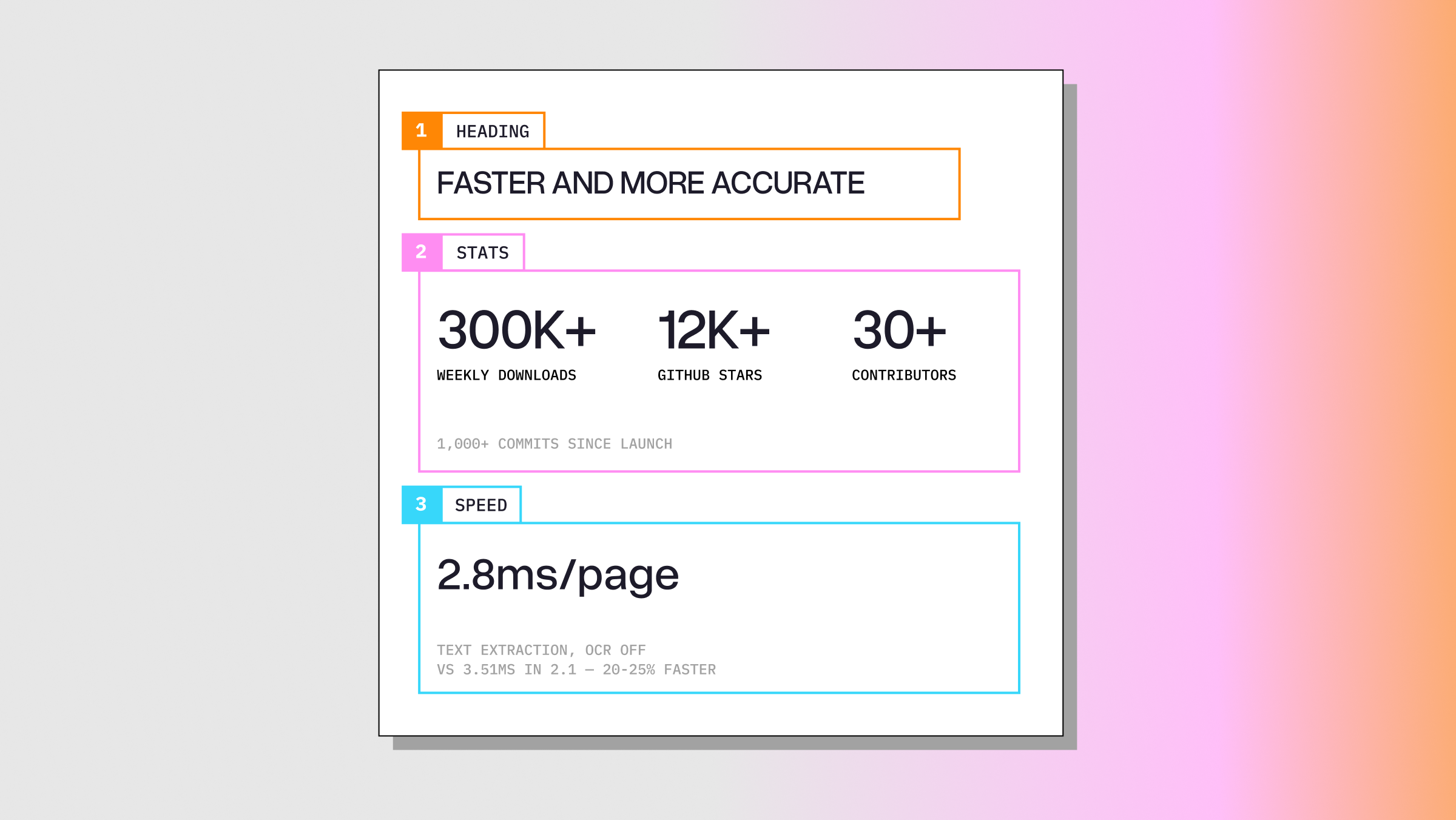
Since launching LiteParse earlier this year, we’ve seen a lot of exciting growth. Over 300k weekly package downloads, over 12K github stars, and over 1000 commits from 30+ contributors. The last major feature announcement was adding heuristic based markdown output, but we’ve also continued to stack onto those features to make LiteParse faster, more accurate, and more feature-rich, including:
- PDFium surgery in our fork cut 20-25% off the time PDFium spends extracting text. On realistic documents with OCR off, LiteParse now averages 2.8ms/page for text extraction and 3.9ms/page for full markdown rendering. The fastest of any open parser we’ve tested, in either mode.
- Table extraction improved across all three benchmarks. Notably, we saw 0.693 → 0.818 on OpendataLoader-Bench and olmOCR table_tests 48.2 → 52.5.
- Visual grounding is now possible! Each markdown element can be extracted as a “block” with an associated bounding box.
- A new
is-complexAPI to detect various attributes of a PDF for routing (scanned pages, text coverage, layout elements, etc.)
PDFium Surgery
Looking at the overall latency of LiteParse, the biggest bottleneck was concentrated in the PDFium calls to extract text. If you are unfamiliar, PDFium is a google-maintained library for working with PDFs. We have our own fork that we maintain, and therefore have the ability to profile this bottleneck in depth and make improvements.
We actually fixed quite a few issues to make this happen, for both the median document and long-tail issues:
- Caching and memoization on several hot paths (font widths, charcodes, etc.)
- Fixing quadratic complexities during space collapsing
- Reduced memory by eagerly releasing memory on lists
The most interesting fix by far was entirely around memory allocation. Profiling showed that two PDFium functions (FPDF_LoadPage and FPDFText_LoadPage) were accounting for over half the runtime. And during this runtime we observed a ton of tiny memory allocations and memory cleanups. So to optimize, we vendored mimalloc directly into the fork. To reduce risk, this only replaced PDFium's own allocation funnels, which meant libc malloc is untouched, so your Node or Python process keeps using its own allocator.
The end result all combined was 20-25% improvement (depending on the document) during text extraction. Measuring text extraction (i.e. lit parse doc.pdf --no-ocr ) on a set of real-world PDFs, we can see the following speedups:
| Tool | ms/page |
|---|---|
| LiteParse 2.14.6 | 2.76 |
| LiteParse 2.1 | 3.51 |
| pypdf | 35.78 |
In the same time since 2.1, markdown accuracy improvements have added some latency, and the PDFium changes help us win back that time. Doing a more complete comparison on markdown outputs against other tools for markdown on the same docs:
| Tool | ms/page (markdown) | vs LiteParse |
|---|---|---|
| LiteParse 2.14.6 | 3.94 | 1.0× |
| pdf-inspector 1.19 | 5.72 | 1.5× |
| opendataloader-pdf 2.5.7 | 24.15 | 6.1× |
| pymupdf4llm 1.28.2 | 140.80 | 35.7× |
| markitdown 0.1.7 | 191.07 | 48.5× |
Markdown Heuristics Accuracy
Markdown in LiteParse saw several variations of improvements across accuracy and latency. For latency, we merged in fixes for bounding box extraction and overlap detection for dense documents, clamping down page screenshot sizes to avoid memory blowups, and more (which helped offset some increases in latency due to improved page heuristics).
On the accuracy side, a lot of work was done to improve the quality of the markdown output. Things like better inclusion of drawn rule-lines, better column detection, multi-line header handling, and right-to-left vs. left-to-right text handling in multilingual docs.
This work is best shown in our updated accuracy metrics, which you can see in the tables below. All results are reported with OCR turned off (although turning it on will return modest improvements, especially using PaddleOCR).
opendataloader-bench — 200 documents. NID = reading order, TEDS = table structure, MHS = heading hierarchy.
| Engine | Overall | NID | TEDS | MHS |
|---|---|---|---|---|
| LiteParse 2.14.6 | 0.886 | 0.917 | 0.818 | 0.821 |
| nutrient (commercial) | 0.885 | 0.925 | 0.708 | 0.819 |
| LiteParse 2.1 | 0.875 | 0.913 | 0.693 | 0.817 |
| opendataloader 2.5.7 | 0.842 | 0.912 | 0.483 | 0.757 |
| pymupdf4llm 1.28 | 0.732 | 0.885 | 0.401 | 0.412 |
| markitdown 0.1.7 | 0.589 | 0.844 | 0.273 | 0.000 |
olmOCR-bench — 1,403 pages, % of rule checks passed.
| Engine | Overall | baseline | headers_footers | multi_column | table_tests | long_tiny_text |
|---|---|---|---|---|---|---|
| LiteParse 2.14.6 | 39.6 | 99.9 | 55.8 | 66.3 | 52.5 | 29.2 |
| LiteParse 2.1 | 39.1 | 99.9 | 56.1 | 65.8 | 48.2 | 29.2 |
| pymupdf4llm 1.28 (layout model on) | 37.3 | 87.2 | 37.6 | 66.6 | 60.3 | 33.7 |
| pdf-inspector 1.19 | 33.7 | 82.9 | 62.1 | 49.7 | 43.6 | 17.6 |
| opendataloader 2.5.7 | 32.5 | 86.9 | 36.6 | 63.7 | 24.9 | 34.8 |
| pymupdf4llm 1.28 (layout model off) | 32.2 | 85.4 | 41.3 | 59.3 | 22.6 | 36.0 |
| markitdown 0.1.7 | 28.7 | 86.8 | 38.8 | 39.3 | 19.9 | 31.2 |
old_scans is 13.3 and both math categories are 0.0 for every model-free tool, so they're omitted below.
ParseBench — 2,049 documents.
| Engine | Overall | Tables | Content Faith. | Semantic Fmt. | Visual Grounding |
|---|---|---|---|---|---|
| LiteParse 2.14.6 | 0.364 | 0.424 | 0.700 | 0.385 | 0.297 |
| LiteParse 2.1 | 0.323 | 0.403 | 0.701 | 0.388 | 0.108 |
| pymupdf4llm 1.28 | 0.309 | 0.403 | 0.616 | 0.422 | 0.096 |
| pdf-inspector 1.19 | 0.283 | 0.277 | 0.598 | 0.426 | 0.099 |
| opendataloader 2.5.7 | 0.277 | 0.349 | 0.663 | 0.258 | 0.110 |
| markitdown 0.1.7 | 0.185 | 0.158 | 0.652 | 0.001 | 0.110 |
The Charts column is 0.00–0.02 for every tool here (none reconstruct chart data), so it's omitted. ParseBench changed scorers since our last post, so we re-ran v2.1 through today's harness rather than quoting the old number against a different ruler.
Visual Grounding
Another big ask (we had several github issues open at one point for the same thing) was better access to the actual markdown block objects. Rather than outputting pure markdown text, we now have an option to output the actual block structure (the objects that exist before converting to a markdown string). Paired with bounding boxes, users are now able to attribute the markdown output to specific elements on the original document page.
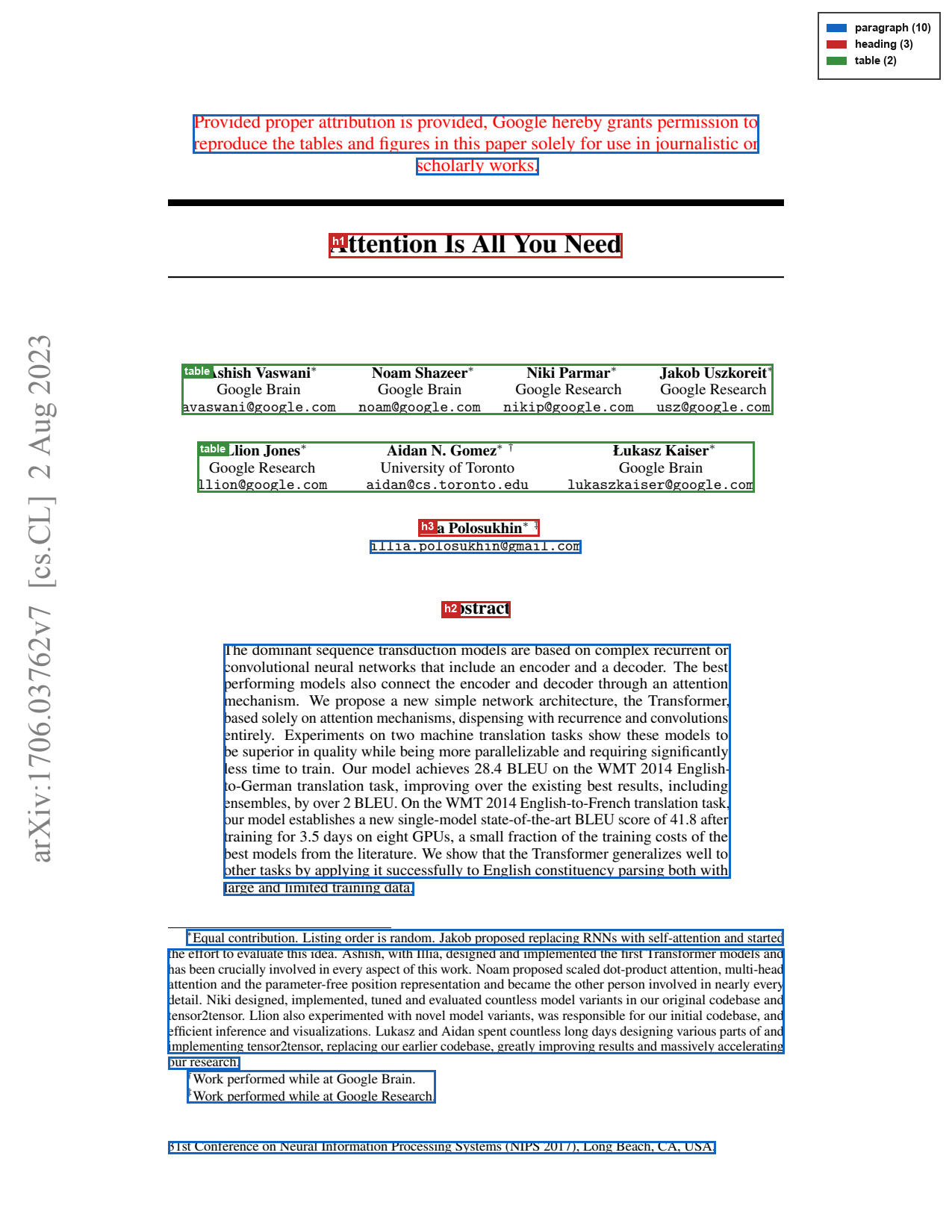
python
[
  {
    "kind": "paragraph",
    "text": "Provided proper..",
    "bbox": {
      "x": 124.313,
      "y": 73.79761,
      "width": 363.60547,
      "height": 24.706726
    }
  },
  {
    "kind": "heading",
    "text": "Attention Is All You Need",
    "level": 1,
    "bbox": {
      "x": 211.488,
      "y": 150.14722,
      "width": 188.4053,
      "height": 15.493835
    }
    ...
  },
Document Complexity
While LiteParse is good, it can never beat more advanced parsing pipelines for complex documents (like LlamaParse). Without some larger, smarter model(s) in the pipeline, there is an upper bound in the types of documents LiteParse can process. So what if LiteParse could tell you this ahead of time?
The is-complex command and API does exactly this: reporting if a page is scanned, if fonts and text come out garbled, text coverage, and also uses our markdown heuristics to detect layout elements like tables and multi-column text.
Using this API, you can get a very fast (~3.5ms/page) decision router that you can use to route to the appropriate pipeline.
bash
# Print the complexity verdict and per-page JSON
lit is-complex document.pdf
json
{
  "page_number": 1,
  "text_coverage": 0.0,
  "full_page_image": true,
  "is_garbled": false,
  "needs_ocr": true,
  "reasons": ["scanned"],
  "layout": {
    "column_count": 2,
    "ruled_table_count": 1,
    "figure_count": 3,
    "is_complex": true,
    "reasons": ["multi-column", "table-likely", "dense-graphics"]
  }
}
There’s a lot to this specific API, our documentation is the best place to learn more: https://developers.llamaindex.ai/liteparse/guides/complexity/
Integrate LiteParse today!
LiteParse is Apache-2.0 and runs as one engine across four ecosystems, including natively in the browser:
bash
# Node library + CLI
npm i @llamaindex/liteparse

# Python library + CLI
pip install liteparse

# Rust library + CLI
cargo install liteparse

# WASM library (browser)
npm i @llamaindex/liteparse-wasm
Or use it with your coding agent directly as a skill:
bash
npx skills add run-llama/llamaparse-agent-skills --skill liteparse