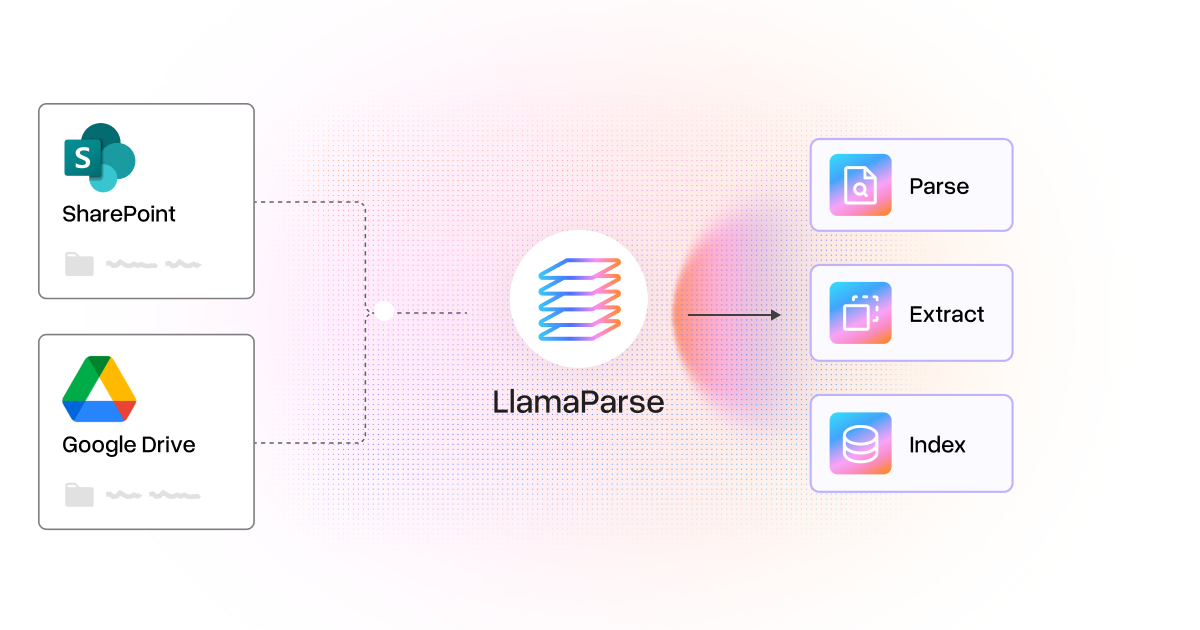
Today, we’re launching data connectors for LlamaParse, starting with SharePoint and Google Drive!
Developers can now connect source folders to LlamaParse instead of uploading documents manually. The synced files can be used across Parse, Extract, and Index to produce structured data for workflows and context agents can search and cite.
Teams keep managing documents in SharePoint and Drive, and LlamaParse syncs new and updated files into the platform for processing.
Connect existing folders
Data connectors are available through Files in LlamaParse. Add a connection, select a source folder, and LlamaParse brings its files into a synced folder in the platform, including documents in subfolders.
One connection can sync multiple folders. If documents are organized by project, customer, or year, select the folders needed for the application.
Use synced documents in agents and workflows
Synced documents can be used across across Parse, Extract, and Index, just like uploaded files.
For example, a research agent can extract revenue, share buybacks, and dividend payments from quarterly reports for financial analysis. An analyst can also ask, “What has management said about its plans for buybacks and dividends?” and get an answer with citations to the reports.
The structured data for the analysis and the source material for the agent come from the same synced folder in LlamaParse.
Keep up with changes at the source
The connection continues after the initial import. LlamaParse automatically syncs connected folders daily, bringing new and updated files into the platform without requiring someone to collect and upload each new version. Use Sync now in Files to pull in changes sooner.
Syncing and document processing are separate steps. Once synced, the files are available for parsing, extraction, or indexing.
When extraction is configured through Index over a synced folder, subsequent index updates process only new or changed files. Unchanged files retain their existing results, so each new batch can be processed without resubmitting the full collection.
Get started
Open Files in LlamaParse, add a SharePoint or Google Drive connection, and select a folder to sync. From there, use the connected documents for parsing, extraction, or indexing. Explore the documentation for configuration options.
We’d love to hear which sources would be useful next and what you’re building with them.