Digital transformation has reached nearly every department in modern organizations. Marketing runs on automation. Sales operates in CRMs. Operations rely on real-time dashboards. And yet, in many finance departments, invoice processing still runs on manual data entry.
Even when invoices arrive as PDFs instead of paper documents, someone is often responsible for opening each file, locating the invoice number, entering vendor details, copying totals, reviewing line items, and typing everything into an ERP or accounting system.
It’s slow, repetitive, and surprisingly expensive.
As invoice volumes grow, this bottleneck becomes more visible. Finance teams struggle to scale. Approval cycles stretch longer than they should. And leadership lacks real-time visibility into liabilities. This is where OCR for invoices fundamentally changes how accounts payable operates.
Modern OCR technology, like LlamaParse, enables businesses to extract structured invoice data automatically, accurately, and in real time—transforming invoice processing from a manual administrative burden into a streamlined, automated workflow.
What is OCR for Invoices and Why is it So Complex?
Invoices are structured financial artifacts designed for accounting systems, not for humans alone. They contain critical data fields that downstream workflows depend on, including:
- Invoice number
- Vendor name and address
- Invoice date
- Purchase order reference
- Payment terms
- Line item details (quantity, description, unit price)
- Subtotals, taxes, and grand totals
Basic OCR can detect text. However, extracting reliable, structured invoice data requires contextual intelligence. An invoice rarely contains a single clearly labeled identifier. Instead, it typically includes multiple numeric fields distributed across the document: an invoice number at the header, a purchase order number in a reference block, a tax ID in the footer, a customer account reference in the billing section, and additional identifiers embedded within line items.
To a human reader, these distinctions are intuitive. We interpret numbers based on surrounding words, layout, and visual hierarchy. To a machine, however, they are merely sequences of digits unless context is applied.
A modern OCR solution must therefore combine text recognition with layout awareness and semantic modeling. It must be understood that a number positioned beside “Invoice No.” represents the primary billing identifier, while a similar numeric pattern next to “PO” refers to a procurement reference. This requires spatial reasoning, language modeling, and structural analysis working together — not simple character detection.
The "Standard Invoice" Problem
There is no such thing as a standard invoice. Every vendor has their own template—different layouts, different label conventions, different positions for the same data fields. One supplier puts payment terms in the header. Another buries them in the footer. A third doesn't include them at all. Multiply that across hundreds of vendors, and you have a format variability problem that no rigid template library can keep up with.
It gets more complicated over time. Vendors rebrand, switch accounting software, or simply update their templates. An invoice that was processed cleanly last quarter may break your extraction pipeline next quarter—not because anything is wrong with the document, but because the layout shifted two inches to the left.
This is the core reason template-based OCR systems struggle in real accounts payable environments. They work well in controlled conditions with known, stable formats. They fall apart when the real world shows up. The right OCR solution handles vendor format variability without requiring manual reconfiguration every time something changes.
The complexity extends beyond identifiers. Visual elements further complicate extraction. Invoices often include logos, QR codes, barcodes, digital stamps, signatures, or watermarks such as “PAID” or “DRAFT.” These overlays can intersect with financial fields. Scanned paper invoices may contain shadows, folds, skewed angles, or compression artifacts that distort layout geometry. Handwritten annotations can appear in margins or across totals.
To reliably extract structured data, a system must interpret layout, hierarchy, spatial relationships, and semantic meaning simultaneously. It must identify where sections begin and end, detect table boundaries, preserve relationships between quantities and prices, and validate totals logically. This is precisely why an OCR solution like LlamaParse is necessary.
LlamaParse does not treat invoices as flat text. It processes them as structured documents. By combining advanced OCR technology with layout parsing, table extraction, and semantic modeling, LlamaParse converts complex, multi-format invoices into clean, validated structured data — ready for downstream automation.
How OCR for Invoices Works (The Technical Process)
To understand why modern invoice OCR can handle messy layouts, complex tables, and inconsistent vendor formats, it helps to look under the hood. In this section, we’ll walk through how to implement OCR for invoices using LlamaExtract to read data and populate a relational database according to existing schema.
1. Document Ingestion
The first step is getting the document into the system. A production-ready OCR solution needs to handle every format invoices actually arrive in—PDFs (both native and scanned), JPGs, PNGs, and multi-page files. Real-world invoices aren't always clean: scanned paper invoices arrive skewed, compressed, or with shadows from a flatbed scanner. The system needs to accept these without failing.
LlamaExtract handles ingestion through both a GUI (for testing up to 20 files at a time) and a Python SDK or API for production deployments. For high-volume environments, the API is the right path—parallel job processing means extraction speed doesn't degrade as volume scales.
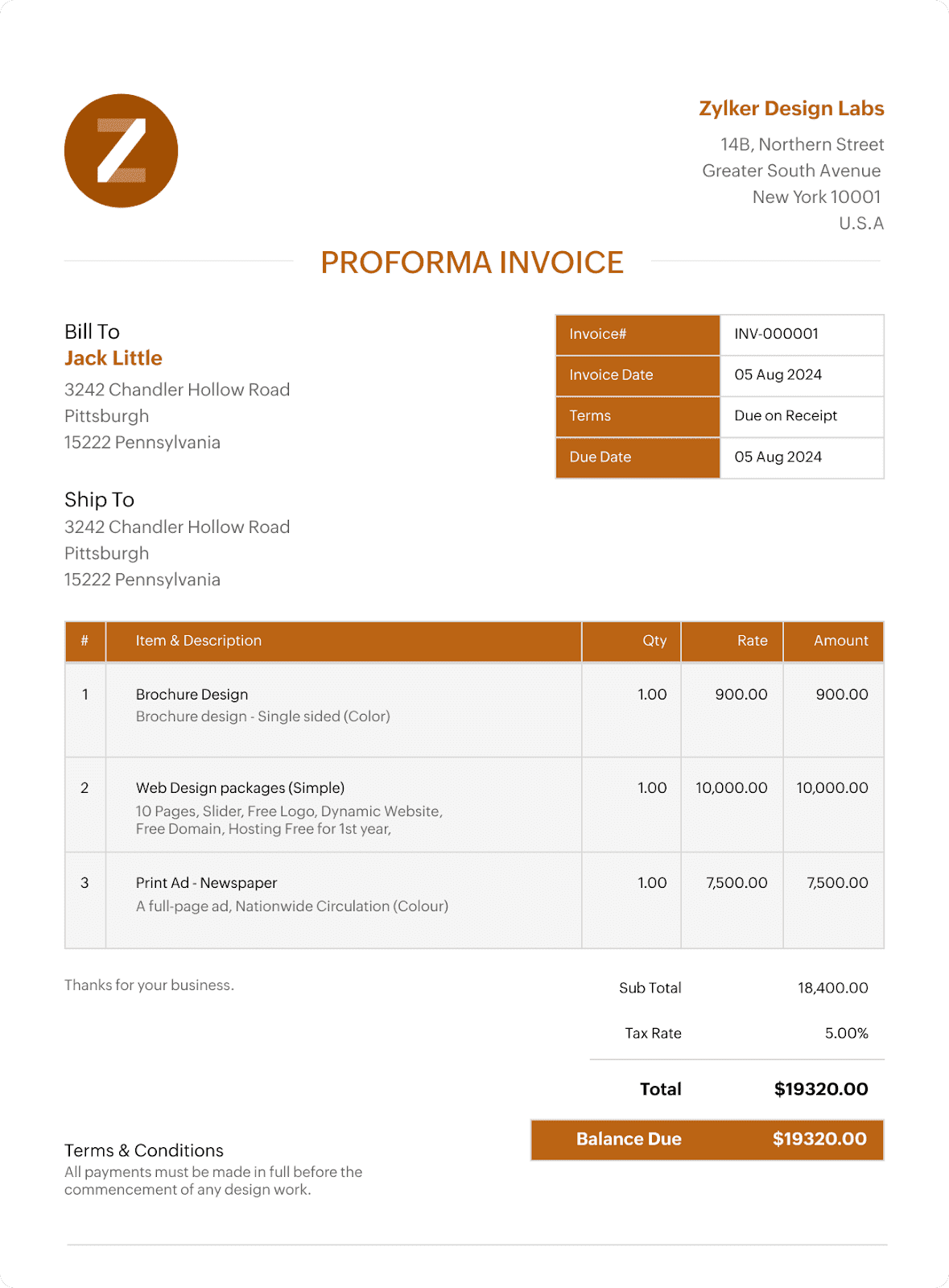
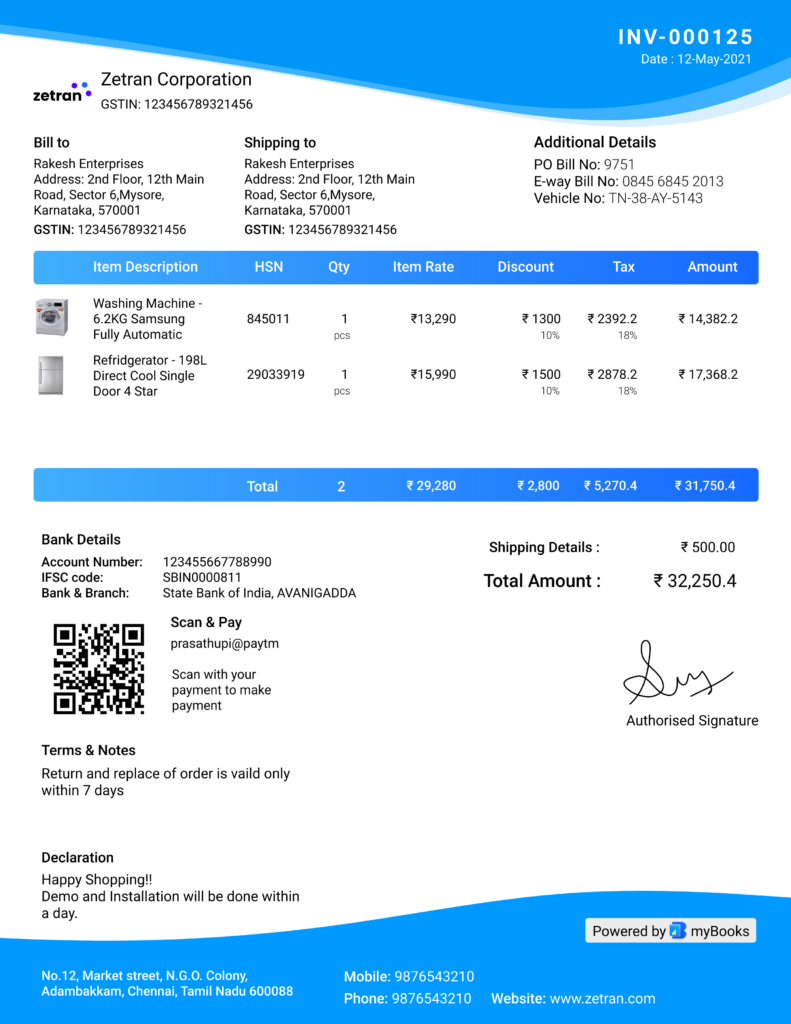
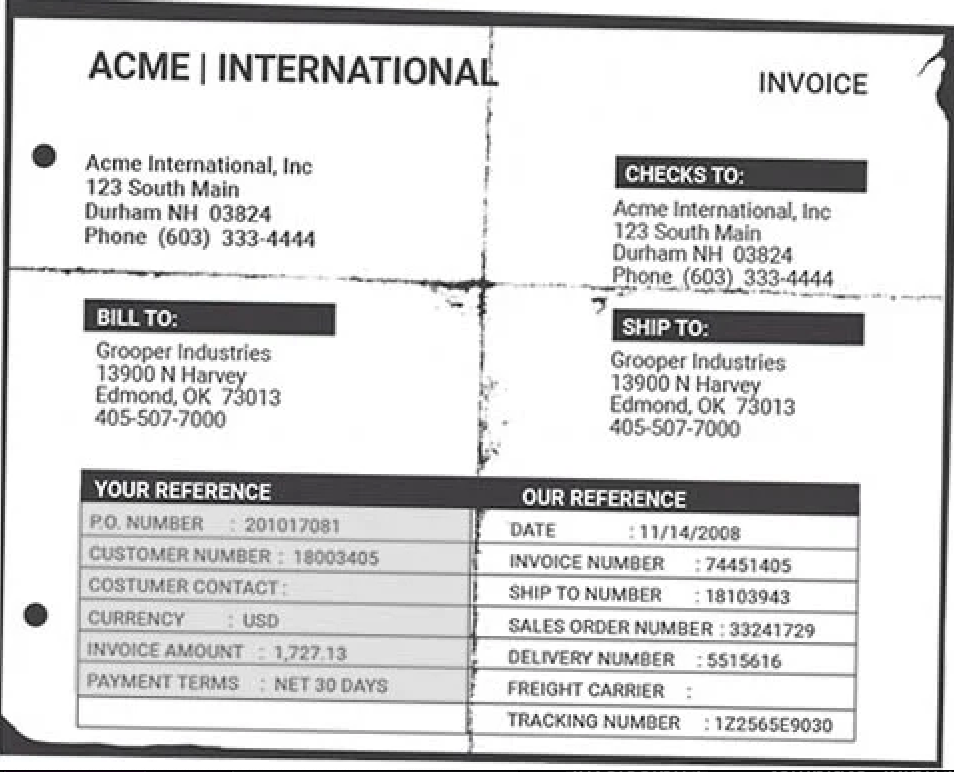
These can be uploaded easily at once and are then ready for the OCR detection.
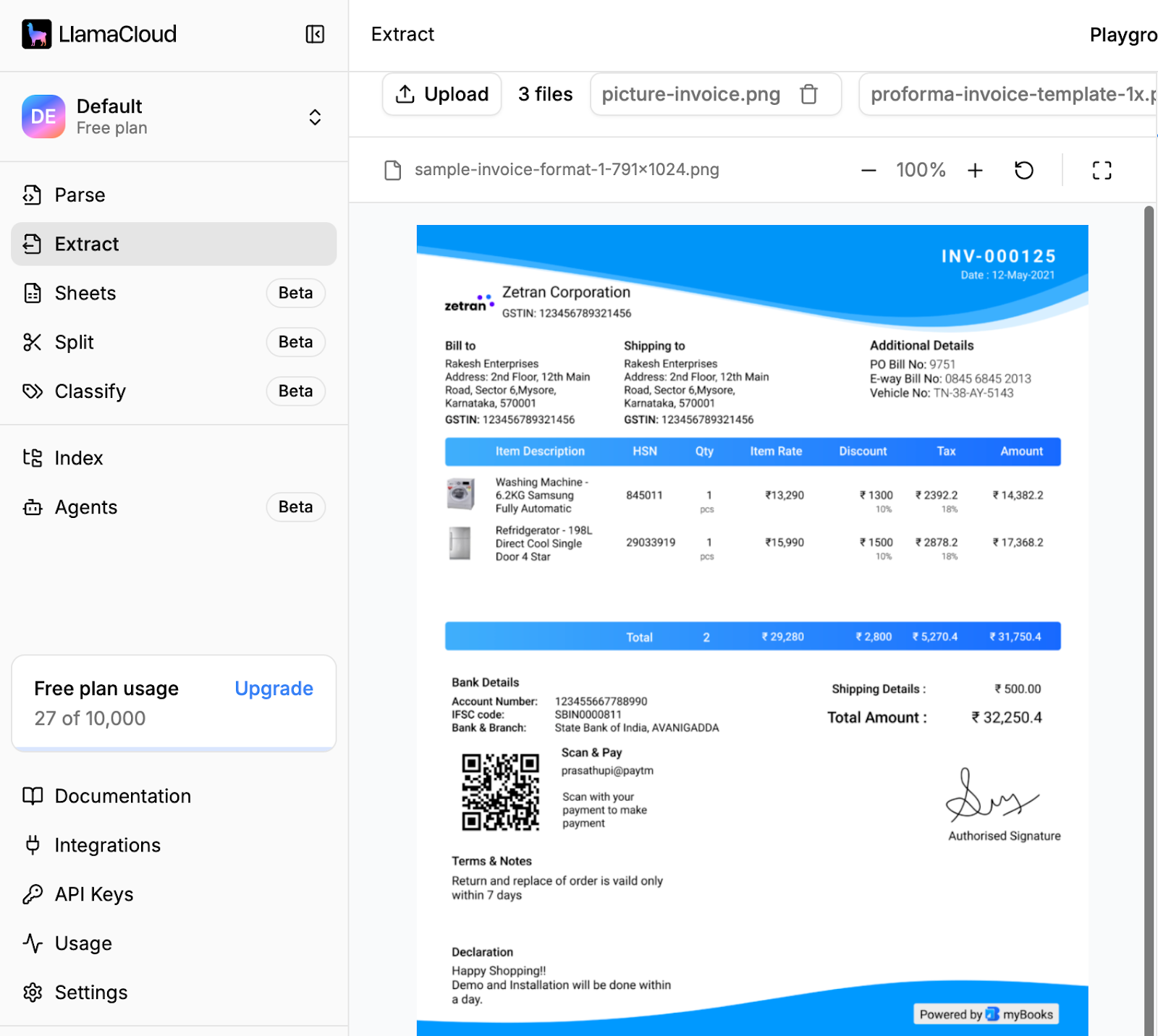
2. Configure the Parsing Schema
Before any data gets extracted, the document needs to be prepared. This is the step most articles skip, but it's where a lot of accuracy is won or lost.
Pre-processing involves correcting skew, normalizing contrast, removing noise, and detecting page orientation. For scanned paper invoices, this stage also handles artifacts like fold lines, handwritten annotations, and overlaid stamps ("PAID," "DRAFT") that can obscure underlying text. Without solid pre-processing, downstream extraction picks up garbage—or misses fields entirely.
LlamaParse handles this automatically using layout-aware computer vision that detects page structure before passing content to the extraction layer. You don't configure it manually; it runs as part of the pipeline.
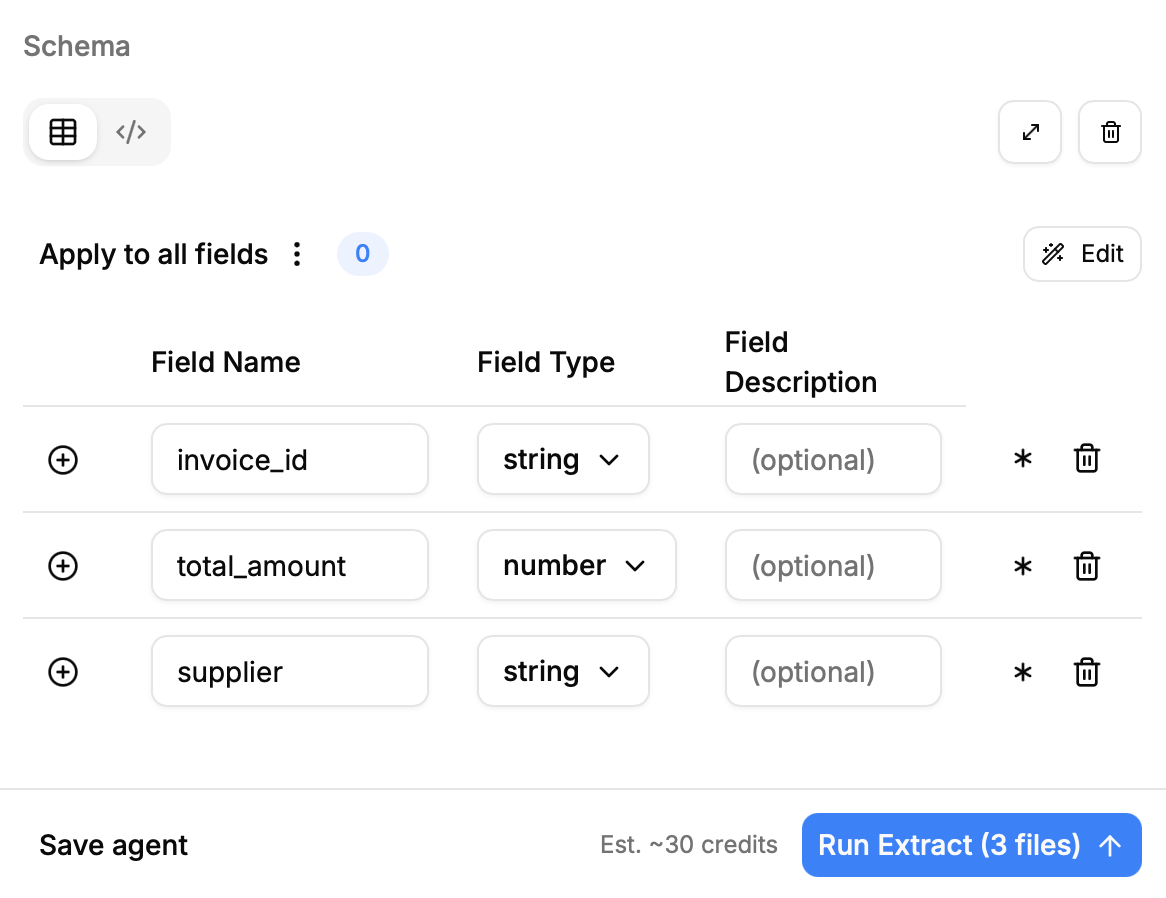
Furthermore, there is the chance to configure the OCR based on the invoices. To save credits, we will start with the “Balanced” mode since our invoices are text-heavy and do not include too many pictures that are relevant.
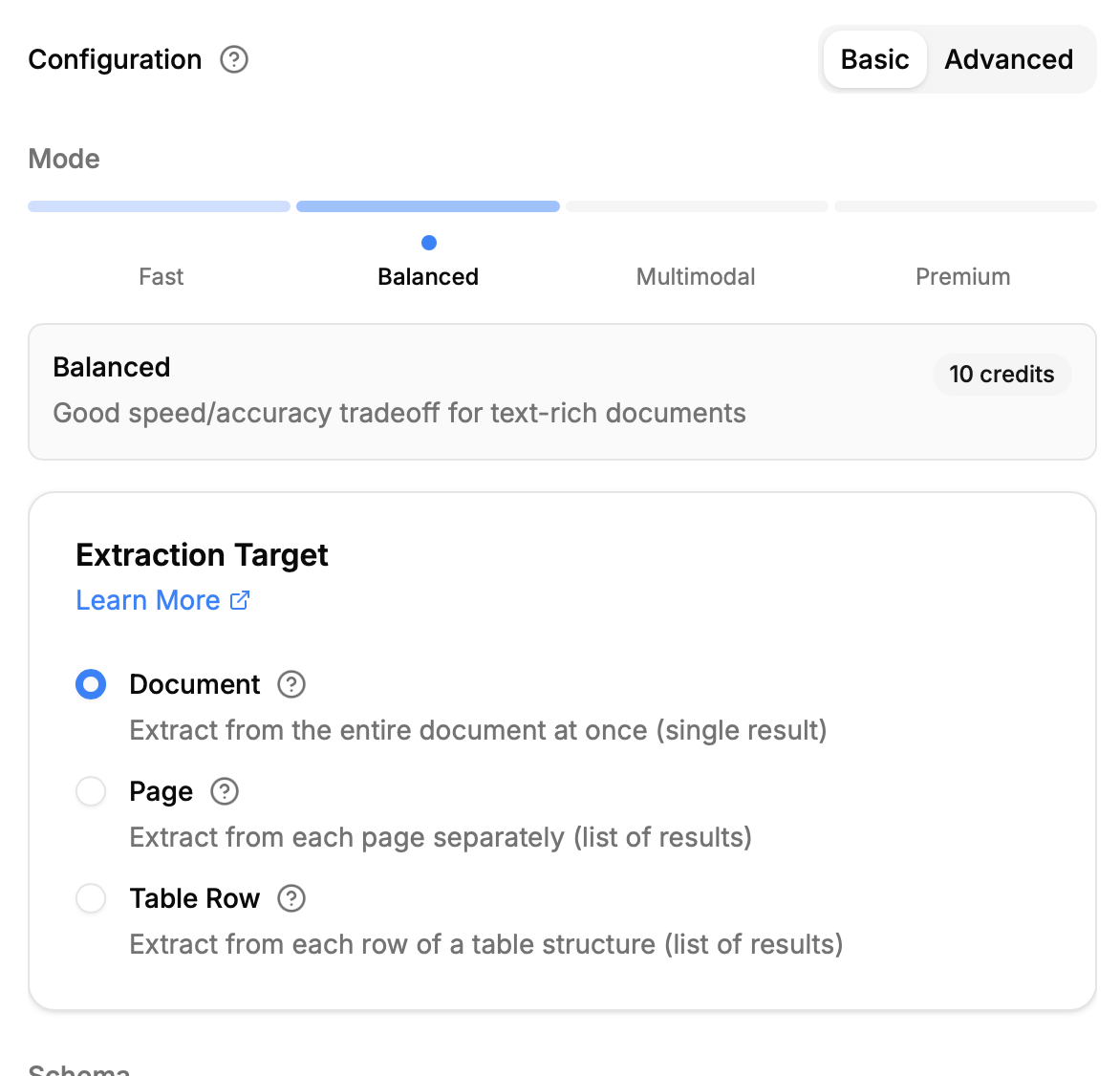
After finalizing our configurations, we can start the extraction and for every document a parallel job is started. This way, the extraction is as fast as possible.
3. Checking the Results
Once the extraction process is complete, we can review the results. LlamaExtract successfully mapped the data to our predefined schema and accurately identified the required fields. Even in cases where the scan quality was less than ideal, the system was able to detect and structure the invoice data reliably.
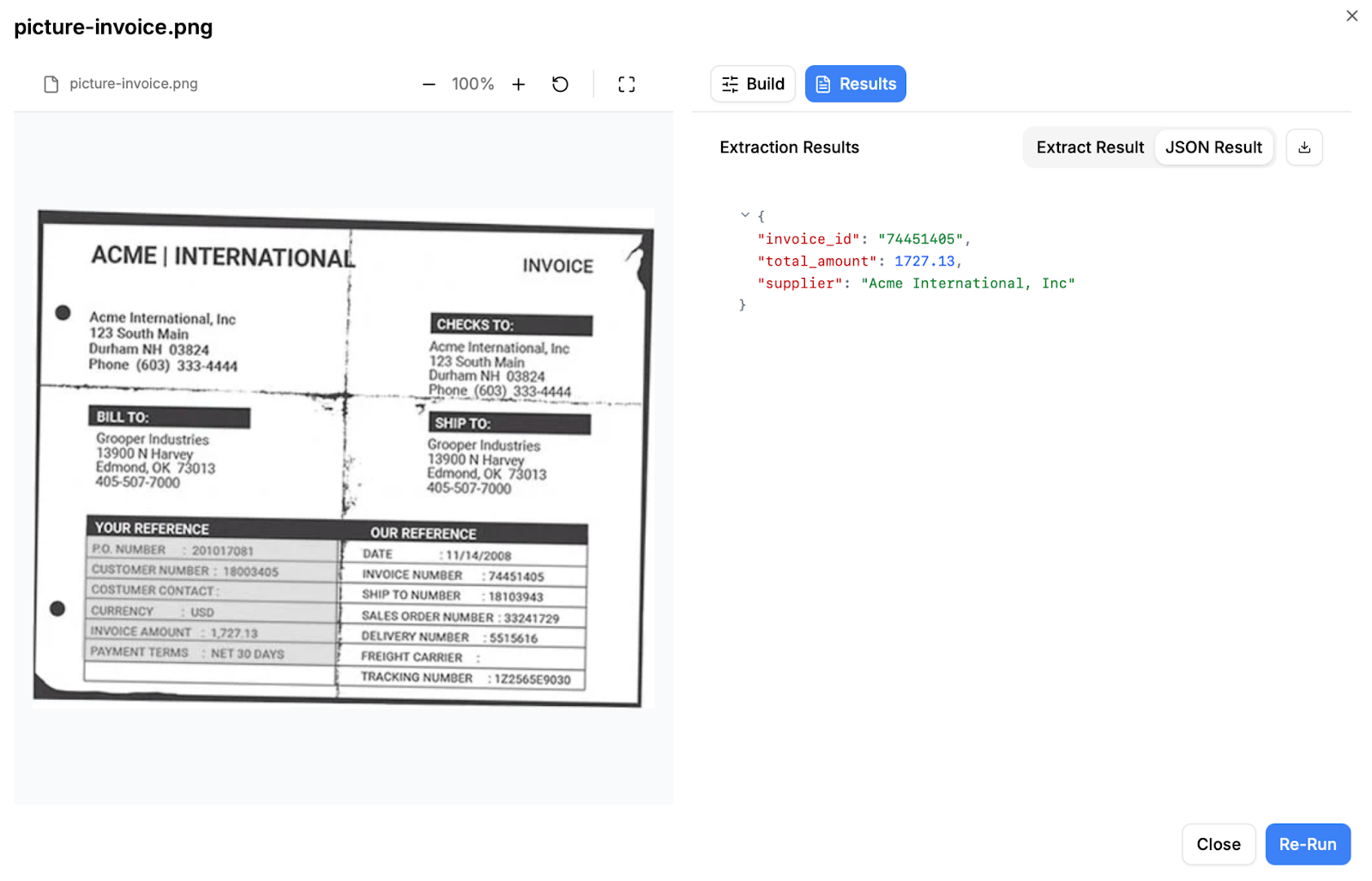
Even for the more crowded and visually dense invoice, the extraction was accurately mapped to our predefined schema. Despite the presence of tightly packed sections, multiple numeric identifiers, and complex line-item tables, LlamaExtract correctly identified the relevant fields and assigned them to the appropriate keys. This demonstrates that the system is not dependent on clean or minimal layouts — it can handle real-world invoices where structure, spacing, and formatting vary significantly, while still delivering structured, reliable output.
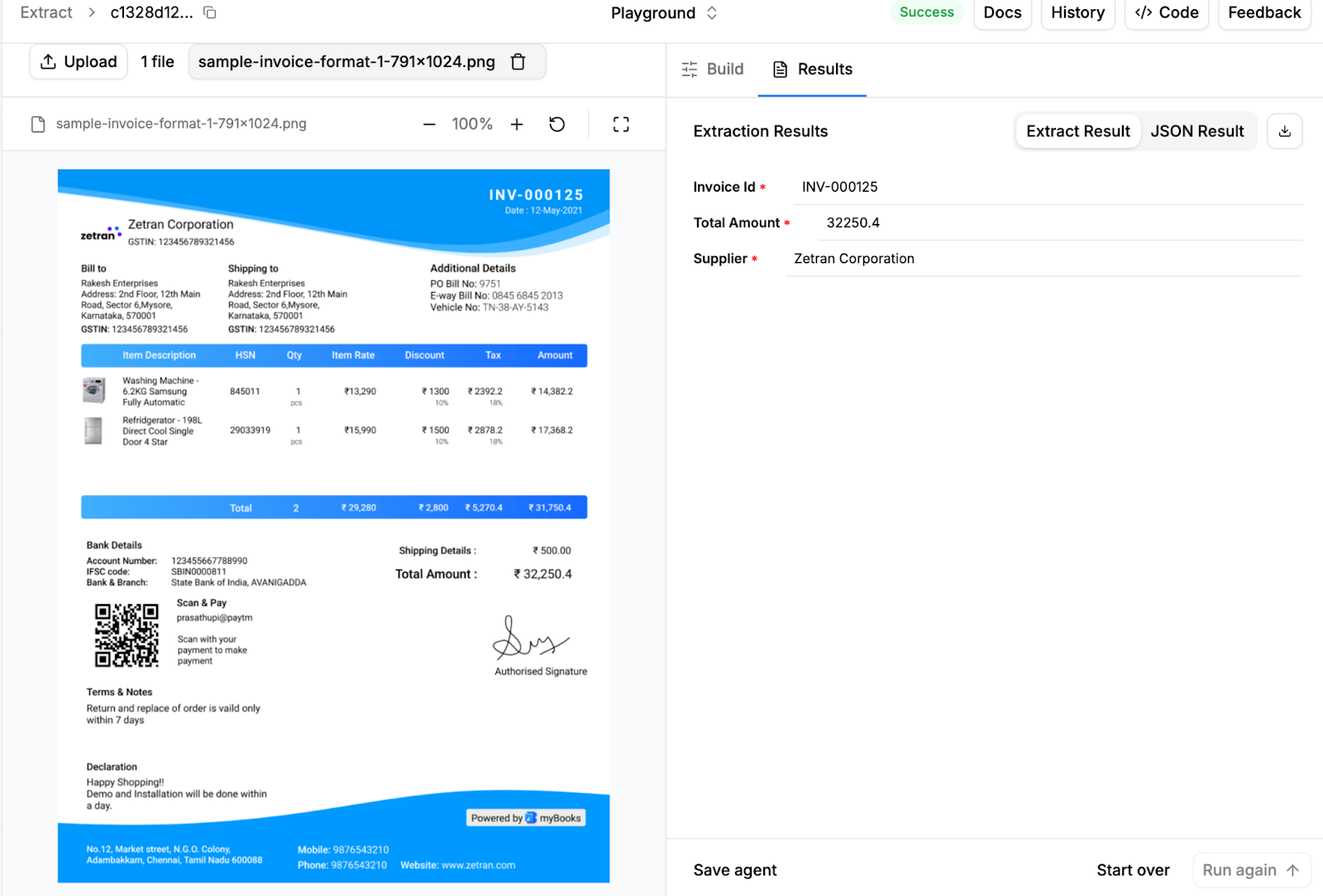
This small example shows how quickly you can move from raw invoice files to structured, usable data with LlamaExtract. By defining a clear schema upfront, configuring the parsing mode to match your document type, and running the extraction in parallel, you create a workflow that is both controlled and scalable.
Even when invoices differ in layout, currency, structure, or scan quality, LlamaExtract reliably maps the extracted values to your predefined keys. Instead of manually reviewing every field or adjusting brittle templates, you get consistent, schema-compliant output that is ready for your database or downstream systems.
In practice, this means less manual effort, faster processing times, and a more predictable invoice automation pipeline—whether you’re testing in the GUI or deploying at scale via the API.
Why Automate? The Impact on the Accounts Payable Workflow
Manual invoice processing is inefficient and strategically limiting. Every invoice that requires manual data entry consumes time that could be allocated to financial analysis, forecasting, or vendor management.
- Reducing Manual Data Entry: In a manual workflow, finance staff act as data typists. With automated invoice processing, their role shifts to validation and exception handling. Instead of entering data line by line, they review extracted invoice data and approve it. This reduces repetitive work and improves job satisfaction.
- Improving Speed and Scalability: Manual processes scale linearly — more invoices require more people. OCR-driven automation scales exponentially. The system can process thousands of invoices in seconds, regardless of volume spikes during peak periods. This ensures the accounts payable workflow remains stable even as the business grows.
- Enhancing Accuracy: Human data entry inevitably introduces errors. A single misplaced digit in an invoice number or total amount can cause duplicate payments, reconciliation issues, or delayed approvals. Automated extraction reduces these risks by standardizing how invoice data is captured and validated.
- Enabling Real-Time Visibility: When invoice data is extracted automatically and integrated immediately into accounting systems, finance teams gain real-time visibility into liabilities.
By eliminating manual data entry, increasing speed, reducing errors, and enabling real-time visibility, OCR-driven automation transforms accounts payable from a reactive administrative task into a scalable, strategic operation.
Key Features to Look for in an OCR Solution and Why LlamaParse Stands Out
Selecting the right solution for invoice processing requires evaluating far more than character recognition accuracy. Invoice automation is a structured data, workflow, and integration problem. The right platform needs to combine extraction accuracy, adaptability to real-world document variability, deep integration capability, and real-time performance. Here's what actually matters.
High Extraction Accuracy with Confidence Scoring
Accuracy is non-negotiable in financial workflows. A single misread field—a transposed digit in an invoice number, a tax value assigned to the wrong line—can cascade into duplicate payments, failed reconciliation, or compliance issues that take days to untangle.
But accuracy alone isn't enough. The system also needs to know when it's uncertain. Confidence scoring at the field level is what separates a genuinely production-ready solution from one that looks good on clean test documents. It enables smart exception handling: high-confidence fields process automatically, low-confidence fields get routed for targeted human review. Without confidence scores, you're either over-automating (and accepting errors) or under-automating (and reviewing everything manually).
LlamaParse provides field-level confidence scores alongside source citations, so reviewers aren't re-reading entire documents—they're verifying a specific flagged value in context.
Adaptive Document Intelligence
Template-based systems are a liability in real finance environments. When a vendor updates their invoice layout, a template-dependent system breaks and requires manual reconfiguration. At scale, maintaining a template library for every supplier is its own operational burden.
The better approach is a system that understands invoice structure semantically rather than positionally. It doesn't need to be told that "Inv #" and "Invoice No." refer to the same field. It doesn't need retraining when a new vendor format appears. LlamaParse handles this through agentic document parsing—layout-aware computer vision combined with semantic modeling that adapts to new formats without rule maintenance.
API Availability and Integration Depth
An invoice processing solution only creates value when it connects to the systems your finance team actually uses. API availability is the baseline requirement, and without it, extracted data doesn't go anywhere useful automatically.
Some solutions, like Mindee, have built their reputation largely on API accessibility, and that's a legitimate strength worth noting. But API access alone isn't the full picture. What matters is the quality of the output the API delivers: clean, validated, structured data that plugs directly into your ERP, accounts payable platform, or RPA workflow without requiring extensive post-processing logic on your end.
LlamaParse is API-first by design. Extracted invoice data can immediately trigger approval workflows, three-way matching, or accounting system updates, all without manual handoffs between steps.
Real-Time Processing
Finance teams can't operate on batch processing cycles anymore. When an invoice arrives, the expectation is that it moves through the system immediately.
Real-time processing means invoices are ingested, parsed, validated, and pushed to downstream systems within seconds of arrival, regardless of volume. This is what enables teams to consistently capture early payment discounts, prevent approval queues from backing up, and maintain truly up-to-date spend visibility instead of relying on 24-hour-old data.
LlamaParse runs extraction jobs in parallel, so processing time doesn't scale linearly with invoice volume. A spike in invoices at month-end doesn't become a bottleneck.
Business Benefits: The ROI of OCR
Investing in OCR for invoice processing delivers measurable financial impact across efficiency, accuracy, and working capital management.
Lower Cost Per Invoice
Processing invoices manually is expensive. When you factor in employee time, corrections, delays, and approval cycles, each invoice can cost between $10 and $20 to handle. With automated invoice processing, that cost drops dramatically, often to less than $1 per invoice at scale.
For companies processing thousands of invoices every month, the savings add up quickly. Over a year, the difference can represent hundreds of thousands of dollars.
Capturing Early Payment Discounts
Speed matters in accounts payable. Many vendors offer discounts for early payment (for example, 2% off if paid within 10 days). When invoices are processed faster through OCR automation, companies can consistently capture these discounts. Even small percentage savings, applied across large invoice volumes, can generate significant annual returns.
Letting Finance Focus on What Matters
Manual data entry keeps skilled finance professionals busy with repetitive tasks. Automation changes that. Instead of typing invoice data, finance teams can focus on higher-value work such as:
- Financial planning
- Cost control and optimization
- Risk assessment
- Vendor relationship management
This shift improves efficiency, and strengthens the strategic role of the finance department. In short, OCR-driven automation reduces costs, unlocks savings opportunities, and allows finance teams to contribute more directly to business growth.
Final Thoughts
The future of invoice processing goes far beyond eliminating manual data entry. As financial operations grow more complex, businesses need systems that not only extract data but also validate and operationalize it.
Modern OCR for invoices enables automatic matching against purchase orders, requested services, and approved budgets. It supports three-way matching, flags discrepancies in real time, and routes invoices based on cost centers or departments.
By transforming diverse invoice formats into structured, validated data, LlamaParse enables organizations to gain efficiency, improve accuracy, and achieve real-time visibility into spend. For companies looking to scale while maintaining control, compliance, and financial clarity, intelligent invoice automation powered by LlamaParse becomes a strategic advantage.
LlamaParse is free to try today and comes with 10,000 free credits upon signup—enough to test extraction on your actual invoice formats before committing to anything.