Accounts Payable teams are under constant pressure to process invoices faster while maintaining financial accuracy and compliance. As organizations scale, invoice volumes increase, vendor formats diversify, and approval workflows grow more complex. What often appears to be a simple data entry function quickly becomes an operational bottleneck.
Manual invoice processing carries hidden costs. Every minute spent entering data from paper invoices or PDF attachments is time diverted from meaningful work. Errors introduced during manual entry can propagate into ERP systems, affecting reporting accuracy, and month-end close timelines.
Optical Character Recognition (OCR) for accounts payable is frequently positioned as the solution to these challenges. However, modern AP automation requires more than text extraction. The true value of OCR lies in transforming unstructured invoice documents into structured, validated financial data that integrates seamlessly with enterprise systems.
Platforms like LlamaParse extend traditional OCR capabilities by combining VLM-based document parsing, machine learning, and structured parsing into a unified workflow. This approach shifts AP automation from simple character recognition to intelligent financial data processing.
What Is OCR in the Context of Accounts Payable?
Optical Character Recognition (OCR) refers to the technology that converts images of text into machine-readable content. In accounts payable processes, OCR is used to extract key invoice fields such as invoice number, vendor name, invoice date, line items, tax amounts, and totals.
Historically, OCR systems relied heavily on pattern matching and template-based parsing. These systems required predefined layouts and manual configuration for each vendor format. While effective in limited environments, they struggled when confronted with new layouts or structural changes.
Modern OCR software, powered by machine learning, has evolved beyond simple character recognition. Today’s systems incorporate layout-aware models and intelligent document understanding techniques, automating the process completely. Instead of reading documents as flat text streams, advanced platforms interpret spatial relationships, table structures, and contextual signals within invoices.
Within LlamaParse, OCR is not treated as an isolated component. Instead, it is integrated into a broader parsing and indexing framework that preserves document structure and prepares financial data for downstream workflows.
Why Accounts Payable Automation Matters
Invoice processing is a multi-stage workflow that includes document receipt, data extraction, validation, matching, approval routing, and ERP integration. Any breakdown in this sequence can delay payment cycles and introduce operational friction.
As invoice volumes increase, manual processes scale linearly with headcount. This creates a cost-per-invoice model that becomes unsustainable over time. In addition, human error in high-volume environments can result in incorrect invoice numbers, mismatched totals, or duplicate entries.
Automation reduces the dependency on manual data entry while improving consistency. However, sustainable AP automation depends on structured data integrity, not raw extraction accuracy alone.
The 5 Major Benefits of OCR Invoice Processing
1. Improved Accuracy
Manual data entry inevitably introduces human error, especially in high-volume environments. Even minor inaccuracies—such as mistyped invoice numbers or incorrect tax amounts—can disrupt reconciliation processes.
By automatically extracting and validating invoice data, OCR systems reduce reliance on manual typing. When integrated with structured parsing and validation logic, platforms like LlamaIndex ensure that subtotals reconcile with line items and totals align with financial rules before data reaches the ERP.
2. Significant Cost Savings
Manual AP workflows scale with staffing requirements. As invoice volume increases, organizations must hire additional personnel to maintain processing timelines.
OCR-driven automation shifts this model. Once implemented, the system processes invoices consistently, regardless of incremental increases in volume. Over time, this reduces operational overhead and reallocates staff toward higher-value financial tasks.
3. Accelerated Processing Cycles
Automated extraction enables invoices to move through workflows within minutes rather than days. Faster processing improves vendor relationships, enables early payment discounts, and supports more predictable cash flow management.
When OCR is integrated into a broader workflow system—as enabled by LlamaIndex—data flows directly from extraction into matching and approval processes without redundant re-entry.
4. Deep Line-Item Data Extraction
Many organizations manually enter only header-level invoice information because capturing line-item detail is time-consuming. This limits analytical visibility into procurement trends and spend categorization.
Advanced OCR systems can extract structured line-item data, preserving table hierarchies and quantities. This enables granular spend analysis, compliance monitoring, and more accurate financial reporting.
5. Enhanced Audit Readiness
Digitized invoices with structured metadata create a transparent and searchable audit trail. Each document is indexed, timestamped, and associated with validation logic, reducing compliance risks.
LlamaIndex’s indexing and retrieval capabilities further strengthen audit readiness by enabling quick access to invoice records and structured financial attributes when needed.
From Scan to Payment: The OCR-Enhanced Workflow
An effective OCR solution must support the full lifecycle of invoice processing.
Step 1: Receipt
Invoices arrive through email, vendor portals, or physical mail. Documents are digitized and ingested into the system. A production-ready workflow must normalize these inputs into a consistent processing format.
This stage includes file-type detection, handling of multi-page PDFs, and image preprocessing for scanned documents. Skew correction, contrast normalization, and orientation detection improve downstream recognition accuracy. Inconsistent file quality is common in real AP environments, so ingestion must be resilient to compression artifacts, shadows, stamps, and handwritten annotations.
Rather than treating ingestion as a simple upload step, mature systems treat it as the first quality control checkpoint in the pipeline.
Step 2: Data Extraction
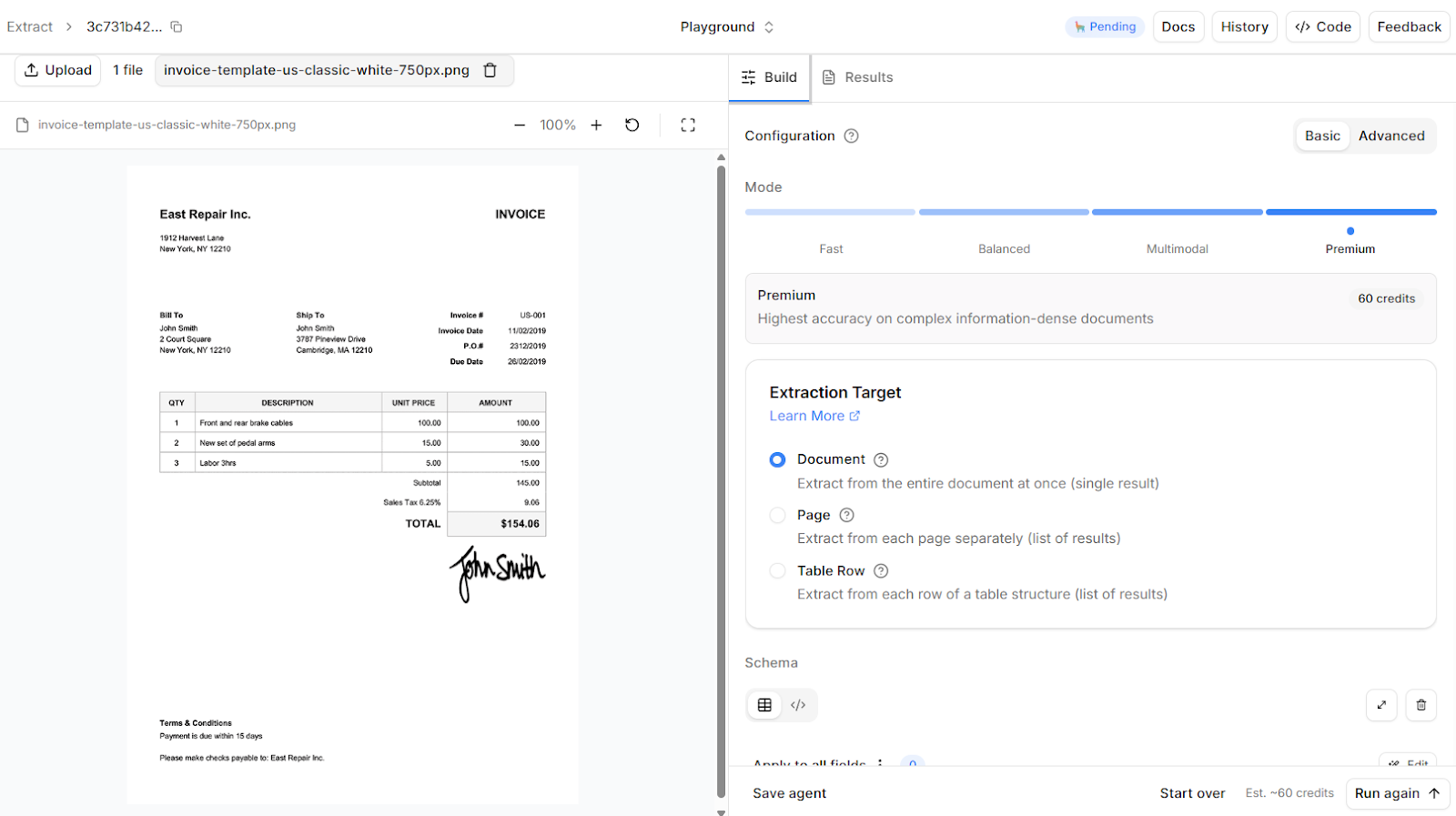
Once ingested, the document moves into the extraction layer. OCR converts visual text into machine-readable content, but reliable invoice processing requires more than character recognition.
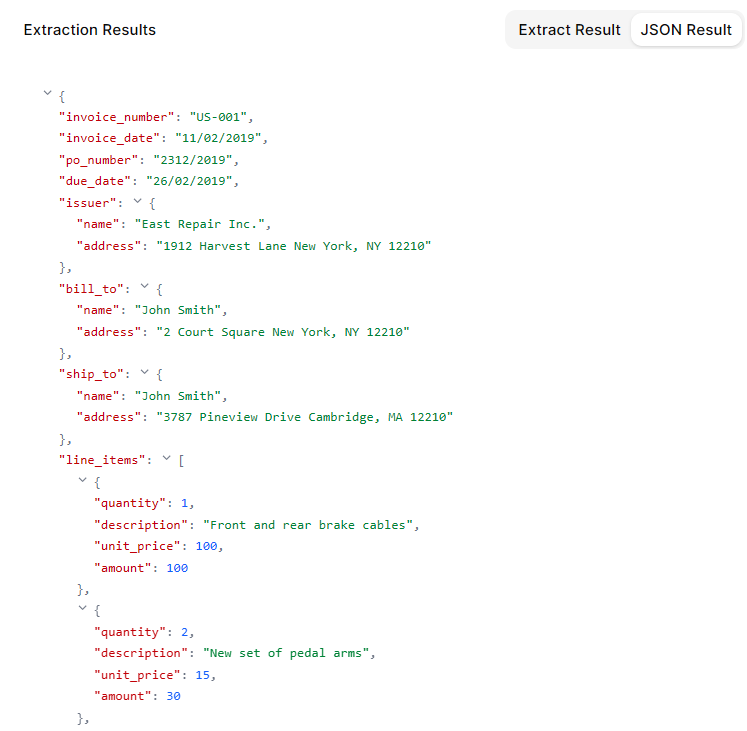
Modern systems interpret layout structure, table boundaries, spatial relationships, and contextual labels. For example, distinguishing between an invoice number, purchase order reference, tax ID, and internal account number requires both positional and semantic reasoning. Line-item extraction must preserve row integrity so quantities, descriptions, unit prices, and totals remain logically connected.
At this stage, the goal is not simply to detect text, but to produce structured, schema-aligned output that downstream systems can process without additional transformation logic.
Step 3: Verification and Matching
Extraction alone does not guarantee financial correctness. Before approval, invoice data must be validated against internal records.
Two-way and three-way matching processes compare invoice data against purchase orders and goods receipt records. Totals are recalculated to verify arithmetic consistency. Vendor identifiers are cross-checked against approved vendor lists. Duplicate invoice detection prevents redundant payments.
Confidence scoring and exception thresholds determine whether an invoice proceeds automatically or routes to manual review. High-confidence, fully matched invoices can flow straight through. Ambiguous or inconsistent entries are flagged with context so reviewers can resolve issues quickly.
Step 4: Invoice Approval
Validated invoices enter rule-based approval workflows. Routing logic may depend on department, cost center, invoice amount, or vendor category.
Automation ensures invoices are directed to the appropriate stakeholders immediately, eliminating delays caused by email chains or manual forwarding. Audit trails capture timestamps, approver actions, and validation history, preserving compliance documentation for future review.
Step 5: ERP Integration
Once approved, structured invoice data is synchronized with the ERP or accounting system. Integration must preserve field-level accuracy and align with the organization’s chart of accounts, tax logic, and vendor master records.
Because the data is already validated and schema-aligned, ERP insertion occurs without manual re-entry. Posting status, payment scheduling, and reconciliation workflows can trigger automatically.
At this stage, the invoice transitions from document to system record, completing the automation cycle.
Within LlamaParse, document ingestion, parsing, indexing, and downstream integration can be orchestrated as a cohesive workflow, reducing fragmentation between OCR and business logic layers.
Current Challenges in OCR for Accounts Payable
Despite advancements, certain challenges persist when it comes to OCR for accounts payable.
Document Quality Variability
Not all invoices arrive as clean, digitally generated PDFs. Many organizations still receive scanned paper documents, mobile-captured images, or compressed email attachments. These files may contain skewed text, shadows, overlapping stamps, handwritten annotations, or degraded print quality.
Recognition errors often originate here. If preprocessing is weak, downstream extraction accuracy suffers regardless of model sophistication. Robust systems apply image normalization, orientation correction, and layout detection before extraction begins. Without this foundation, even advanced models struggle to produce reliable structured output.
Layout and Vendor Variability
There is no standardized invoice format across vendors. Layouts vary in structure, terminology, field positioning, and table organization. A vendor may change accounting software or redesign its invoice template without notice, introducing structural changes that break template-dependent systems.
Template-based OCR pipelines degrade under this variability because they rely on positional assumptions. Machine learning-driven document understanding improves adaptability by interpreting invoices semantically rather than positionally. However, even adaptive systems must be evaluated against edge cases such as multi-column tables, nested line items, or invoices that combine service summaries with detailed attachments.
Exception Management and Financial Risk
No OCR system operates with perfect certainty. Ambiguous fields, inconsistent totals, duplicate invoices, and incomplete purchase order references require controlled intervention.
The challenge is not eliminating exceptions, but managing them efficiently. Without structured confidence scoring and contextual validation, teams either over-review (slowing processing) or under-review (increasing financial risk). Effective systems integrate human-in-the-loop workflows that surface only the invoices that genuinely require judgment.
Accounts payable automation must strike a balance between straight-through processing and financial oversight. Automation reduces manual workload, but governance mechanisms remain essential to maintain auditability and control.
Best Practices for Implementing OCR in AP
Successful OCR implementation in accounts payable requires more than deploying an extraction model. It demands deliberate planning around data validation, integration with financial systems, and exception management to ensure outputs are operationally usable.
- Quantify the baseline before automating: Measure invoice volume, processing time, cost per invoice, and exception rates before implementation. Many inefficiencies only become visible once metrics are tracked explicitly. Clear baselines make automation gains measurable rather than assumed.
- Prioritize structured output over raw extraction accuracy: The goal is not just high character recognition accuracy but schema-aligned, validated financial data. Field-level confidence scores, arithmetic validation, and duplicate detection reduce downstream reconciliation risk. Output should integrate directly with ERP systems without heavy transformation.
- Design for integration from day one: OCR must connect to ERPs, approval systems, and financial databases through APIs and structured data formats. Integration should be planned alongside schema design and workflow routing. Tight system coupling reduces manual data movement and operational friction.
- Plan for exception handling and governance: No system achieves perfect straight-through processing. Define thresholds for manual review, escalation logic, and audit logging before deployment. Human review should focus on ambiguous or high-risk invoices, not routine cases.
- Treat OCR as part of an end-to-end workflow: Extraction alone does not create operational efficiency. Value emerges when parsing, validation, approval routing, and system synchronization operate as a unified pipeline. Automation should improve the full lifecycle — not just the initial data capture step.
Conclusion
The transition from manual invoice processing to intelligent automation marks a significant shift in how accounts payable departments operate. OCR technology provides the foundation for this transformation, but sustainable results depend on structured parsing, validation logic, and seamless system integration.
Organizations that continue relying on manual processes risk falling behind in an era of real-time financial operations. By adopting machine learning-driven OCR solutions integrated within platforms like LlamaIndex, businesses can improve accuracy, reduce operational costs, and build scalable AP workflows.
To learn how LlamaParse can support intelligent document processing and OCR for accounts payable, explore the LlamaParse platform capabilities or request a demonstration tailored to your AP workflow needs.